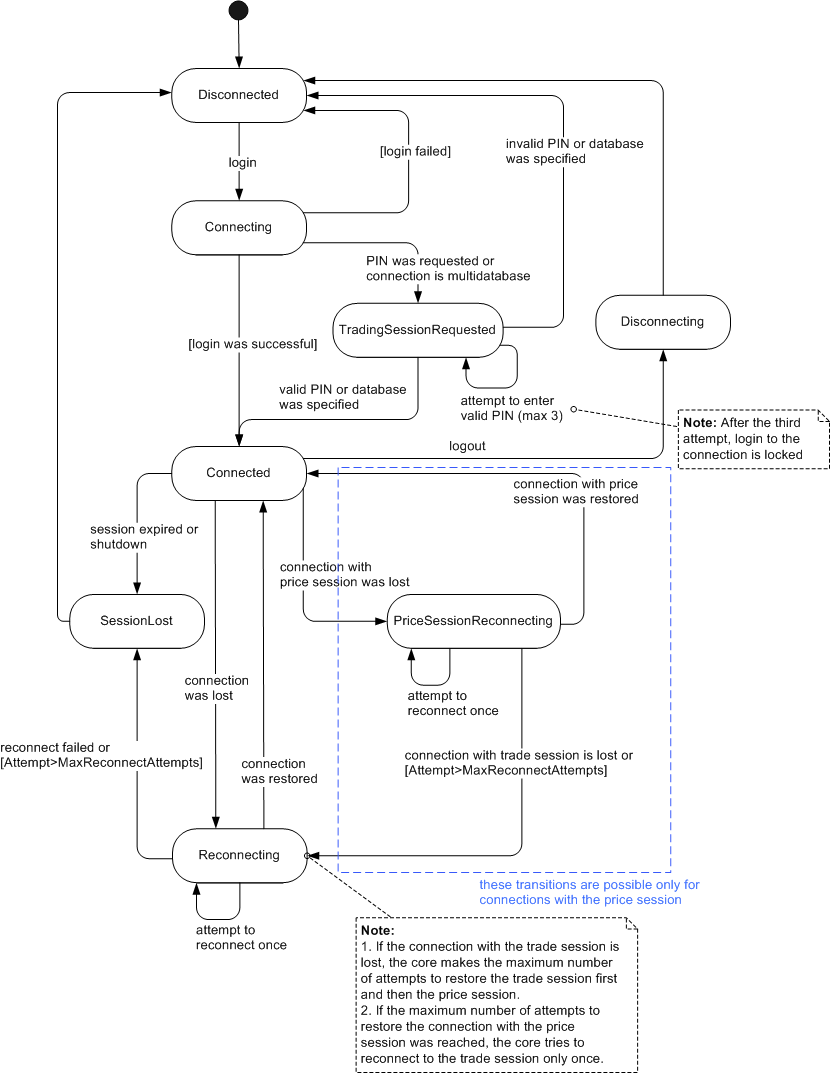
The article describes session statuses.
The description of session statuses is provided below.
Session Status |
Session Status Description |
Disconnected |
The session is disconnected from the server. From this status, the session is transferred to the Connecting status in case the user tries to log in. Note: before release the session and close the application on Linux wait until the status becomes "disconnected". |
Connecting |
The user specified login information and the session is being connected to the server. From this status, the session can be transferred to one of the following statuses: Connected TradingSessionRequested Disconnected |
Connected |
The login was successful, the session is connected successfully. For connections with multiple trading sessions or requiring a PIN code, a valid PIN or database was specified, the session is connected successfully. This is the only status when most of the methods of the session object can be used. From this status, the session can be transferred to one of the following statuses: Disconnecting Reconnecting PriceSessionReconnecting SessionLost |
Reconnecting |
For connections without the price session: The connection was lost. The core is attempting to restore the connection. For connections with the price session: The connection with the price session was lost and either: 1. The connection with the trade session exists but the maximum number of attempts to reconnect to the price session
was reached (currently 20) The core is attempting to restore the connection with the trade session. From this status, the session can be transferred to one of the following statuses: Reconnecting For connections with the price session: Connected Disconnected |