fxcodebase-backup
ATR pips indicator
Source: https://fxcodebase.com/code/viewtopic.php?f=17&t=4971
Forum: 17 · Topic 4971 · 84 post(s)
ATR pips indicator
Alexander.Gettinger · Mon Jul 04, 2011 4:05 am
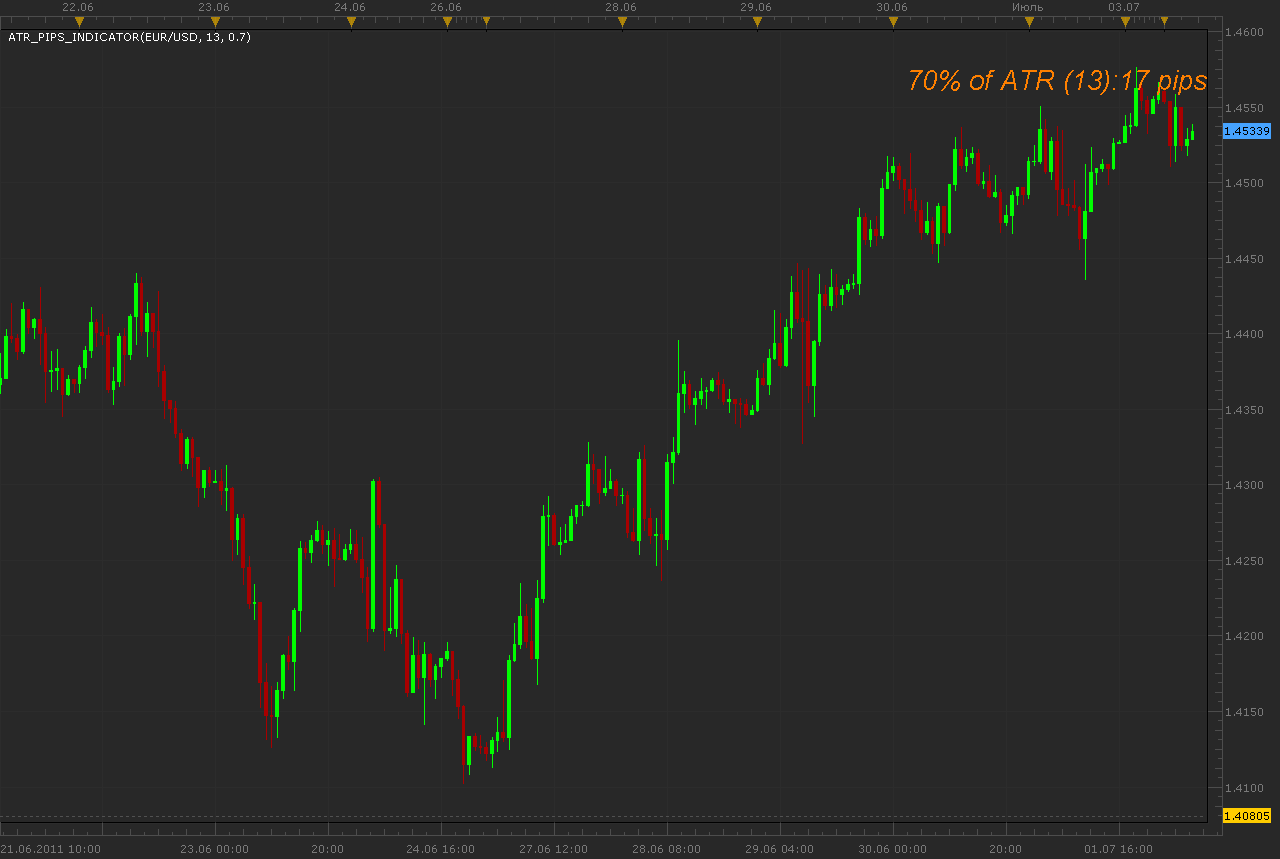
Oscillator is a port of MT4 indicator (http://www.forexfactory.com/showthread.php?p=2216448).
Download:
Will give simple audio alert when ATR meets a determined level (condition)
ATR_pips_Indicator with Alert.lua
Tick ATR_pips_Indicator with Alert.lua
Tick ATR is available here. viewtopic.php?f=17&t=34094&p=94374&hilit=Tick+ATR#p94374
The indicator was revised and updated
Re: ATR pips indicator
porschefan · Tue Aug 09, 2011 1:46 pm
Alexander.Gettinger wrote: Oscillator is a port of MT4 indicator (http://www.forexfactory.com/showthread.php?p=2216448).
ATR_pips_indicator.png
Download:
ATR_pips_Indicator.lua
Hello mr Gettinger You can say what makes this indicator?
Thanks
Re: ATR pips indicator
sunshine · Thu Aug 11, 2011 10:56 pm
The indicator displays the current value of the ATR indicator multiplied by the value set in indicator parameters, in pips. Please read this article about usage of the ATR indicator: Average True Range (ATR)
Re: ATR pips indicator
porschefan · Sun Aug 14, 2011 10:30 am
thank you
Re: ATR pips indicator
JPNWV7 · Thu Sep 22, 2011 2:45 pm
Alexander.Gettinger wrote: Oscillator is a port of MT4 indicator (http://www.forexfactory.com/showthread.php?p=2216448).
ATR_pips_indicator.png
Download:
ATR_pips_Indicator.lua
Just trying to figure out how to read this indicator. On one of my charts it says
70% of ATR(13) : 41 pips
What is the 41 pips? Profit? Stop/Loss?
I’m New to Forex Trading Just trying to learn.
Thanks
Re: ATR pips indicator
sunshine · Mon Sep 26, 2011 7:11 am
JPNWV7 wrote: Just trying to figure out how to read this indicator. On one of my charts it says
70% of ATR(13) : 41 pips
What is the 41 pips? Profit? Stop/Loss?
I’m New to Forex Trading Just trying to learn.
41 pips is 70% from the current ATR value. ATR is the Average True Range indicator which measures volatility. The ATR indicator is included in the standard set of Marketscope indicators.
How this value can be used (a few popular interpretations):
- To determine stop and limit levels. Use the indicator value to determine the distance for your stop and limit levels. Such stops/limits will take into account the current market volatility because they will be based on the ATR indicator. Generally, a two times ATR value is used. That is, you should set the Multiplier parameter of the indicator to 2 and use the received value as the distance for your stop order. Note that when the volatility is high, wider stops should be used in order to avoid execution of stops by a random market movement. When the volatility is low, tighter stops should be used in order to have better protection for trades. So the value of Multiplier should depend on market volatility.
- To determine the best position to buy/sell based on Support/Resistance levels. The ATR indicator can be used as a filter when trading with support/resistance levels. In this case you should:
- Determine the support and resistance levels. For example, the resistance level is at 1.4000.
- Then, watch for price movement. Once the price hits the resistance level, buy at 20% ATR above the line. The idea is to do not buy at the resistance level but above the level to avoid entering on false hitting of the level. For example, when the market hits the resistance level, the current ATR value for EUR/USD is 0.0110 (110 pips). You should enter the market at 20% ATR above the line: 20% of ATR(14) = 110 pips * 0.2 = 22 pips So, buy at 1.4022 level (1.4022 = 1.4000 (resistance level) + 22 pips) Note that for this example you should set the Multiplier parameter of the indicator to 0.2. See also Average True Range
Hope this will help.
Re: ATR pips indicator
JPNWV7 · Mon Sep 26, 2011 5:58 pm
Thanks for the info, yes it helped. Thanks
Re: ATR pips indicator
rose123 · Thu Feb 09, 2012 7:04 pm
i request mtf mcp atr pips indicator as mtf mcp gmmacd incidcator
Re: ATR pips indicator
TheEdge · Fri Feb 10, 2012 11:19 am
Hello,
Can some one tell me how to position this in a different location on the chart, I have a PIP spread indicator in the top right corner and this indicator also in the same location. I would like to have it positioned at the top but to the left of the PIP indicator.
Re: ATR pips indicator
Apprentice · Fri Feb 10, 2012 3:56 pm
MTF MCP ATR u can find here. viewtopic.php?f=17&t=2723&p=24311&hilit=mtf+atr#p24311
Re: ATR pips indicator
TheEdge · Fri Feb 10, 2012 4:12 pm
Hello Apprentice,
Not what I’m looking for Thanks thou, I want to know how to set the position of an indicator so the indicators that are posting to the top right corner are not covering each other up.
In some other platforms the indicators have an X and Y axises so you can move them around the chart. Is this possible with these indicators?
Re: ATR pips indicator
Apprentice · Sun Feb 12, 2012 4:30 am
Although this is not my work. We will prepare an update.
Re: ATR pips indicator
Alexander.Gettinger · Fri Feb 17, 2012 2:50 pm
TheEdge wrote: Hello Apprentice,
Not what I’m looking for Thanks thou, I want to know how to set the position of an indicator so the indicators that are posting to the top right corner are not covering each other up.
In some other platforms the indicators have an X and Y axises so you can move them around the chart. Is this possible with these indicators?
Version of indicator with shift:
Re: ATR pips indicator
JPNWV7 · Fri Mar 09, 2012 6:08 am
Alexander.Gettinger wrote:
TheEdge wrote: Hello Apprentice,
Not what I’m looking for Thanks thou, I want to know how to set the position of an indicator so the indicators that are posting to the top right corner are not covering each other up.
In some other platforms the indicators have an X and Y axises so you can move them around the chart. Is this possible with these indicators?
Version of indicator with shift:
ATR_pips_Indicator.lua
Probably wanting to position it in another corner of the chart?
Re: ATR pips indicator
Alexander.Gettinger · Fri Mar 09, 2012 10:18 am
JPNWV7 wrote: Probably wanting to position it in another corner of the chart?
Yes, use the shift parameters.
Re: ATR pips indicator
TheEdge · Thu Apr 05, 2012 2:55 am
Thanks Exactly what I wanted,
I wonder why the regular shift function doesn’t work on indicators like this or the Spread list indicator?
Re: ATR pips indicator
Apprentice · Fri Apr 06, 2012 4:29 am
Shift, will only work for those indicators, which rely on the chart. Spread List, receives data directly from FXCM servers, works only for the current state, do not supported historical overview.
Re: ATR pips indicator
toxl89 · Thu Apr 12, 2012 3:50 am
Hi Alex Most of your indicators are coded in lua, pls is there a way they can be transformed in a language acceptable on MT4.Please i will like to know. Thanks
Re: ATR pips indicator
Alexander.Gettinger · Thu Apr 12, 2012 4:25 pm
toxl89 wrote: Most of your indicators are coded in lua, pls is there a way they can be transformed in a language acceptable on MT4.Please i will like to know.
As for this indicator, its MQL4 source code you may find in first post of this topic.
Re: ATR pips indicator
toxl89 · Fri Apr 13, 2012 3:10 pm
Thanks for your reply.There is a particular indicator am interested in and would like it in MT4, that is the two MA-Crossover.Please i want to know where I can the MLQ4 code.thanks so much,,
Re: ATR pips indicator
Apprentice · Mon Apr 16, 2012 3:50 am
Contact Alex or our premium development team. Unfortunately, this service is not free.
Re: ATR pips indicator
jefffxcb · Tue Mar 12, 2013 9:34 pm
Is there a download link for the ATR pips lua indicator that displays the values on the upper part of the chart … such as “10% of ATR (14): 8 pips”.
The version I downloaded from an older post (ATR_pips_Indicator.lua) displays it at the bottom as a line indicator.
Re: ATR pips indicator
Apprentice · Wed Mar 13, 2013 8:10 am
Bottom indicator is standard ATR indicator, there is no need to download it. As for the ATR indicator pips, you can find it at the topmost, first post of this topic. viewtopic.php?f=17&t=4971
Re: ATR pips indicator
Jabez3 · Tue Mar 19, 2013 5:38 am
Currently this indicator puts the values in the upper right hand of the chart. Can this information be displayed in the upper left of the chart so it does not get in the way of current price action?
Thank You
Re: ATR pips indicator
Apprentice · Tue Mar 19, 2013 9:38 am
Your request is added to the developmental list.
Re: ATR pips indicator
Alexander.Gettinger · Tue Apr 30, 2013 4:57 pm
Jabez3 wrote: Currently this indicator puts the values in the upper right hand of the chart. Can this information be displayed in the upper left of the chart so it does not get in the way of current price action?
The indicator has been updated.
Re: ATR pips indicator
TheLight · Wed Sep 11, 2013 9:17 pm
I use your indicator every day and was wondering if a calculation could be added and then displayed on the indicator? After the # pips I would like it to also show (the pips as a %). GBPJPY example say 100% of ATR (20): 160 pips and GBPJPY previous bar close was 150.00. So it would display as 100% of ATR (20): 150 pips 1.07% Thank you.
Re: ATR pips indicator
Apprentice · Fri Sep 13, 2013 12:42 am
Your request is added to the development list.
Re: ATR pips indicator
mdwxl3 · Thu Oct 31, 2013 12:06 pm
Howdy,
Great indicator!!! Just wondering if this could be added… could we have an option to not include the current day into the ATR calculation? When I use my ART, I’m just looking at the previous days and not the current day. Since the current day isn’t over and changing per minute, this ever changing ATR does not work with my calculating the previous days.
Thanks, Mark
Re: ATR pips indicator
Apprentice · Sun Nov 09, 2014 8:08 am
Try this Version. I have adjusted rounding a bit.
Please test it with a multiplier of 0.0001 EUR / USD. You will see the values are consistent.
Re: ATR pips indicator
Poupouille · Tue Nov 25, 2014 1:21 pm
Hello, is it possible to create the ATR pips indicator with a selection of the desired time frame ? I would like to install this indicator on an hourly graph but what the atr in pips is to calculate on the value Daily. Tyvm
Re: ATR pips indicator
Apprentice · Wed Nov 26, 2014 3:33 am
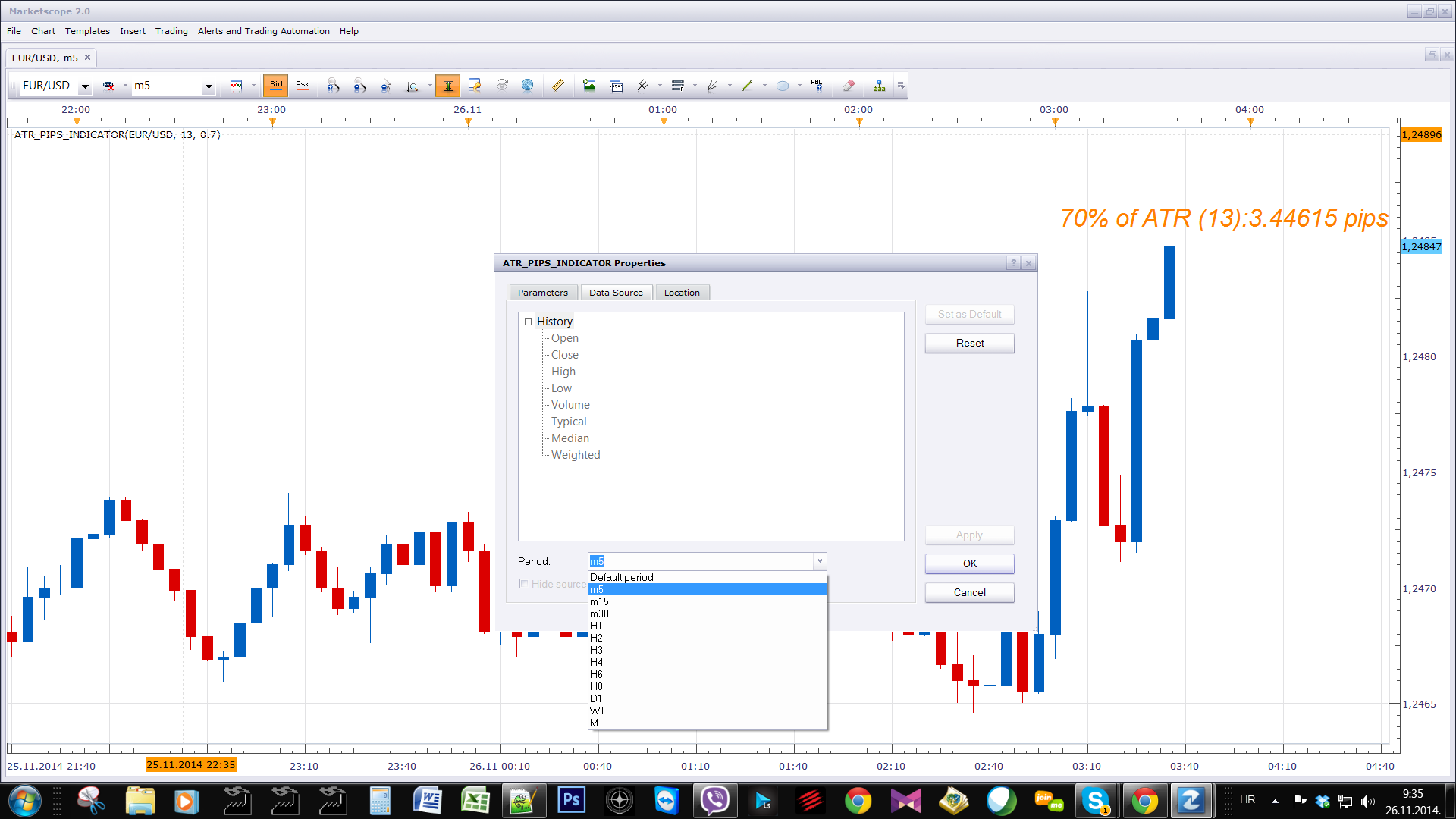
Please use Data Source Period selector drop down menu to select higher time frame source.
Re: ATR pips indicator
[email protected] · Tue Sep 15, 2015 9:05 pm
Hi,
I am unable to figure how where exactly it is that I get the download for this indicator?
Re: ATR pips indicator
Apprentice · Fri Sep 18, 2015 2:31 am
First post in this topic. viewtopic.php?f=17&t=4971
Re: ATR pips indicator
Paul W · Sun Nov 29, 2015 1:28 pm
is it possible to add some flexibility on the Indicator placement ?
Thanks
Re: ATR pips indicator
Apprentice · Tue Dec 01, 2015 6:03 am
As it is, You can choose corner, vertical and horizontal shift.
Re: ATR pips indicator
Paul W · Tue Dec 01, 2015 7:07 am
my apologizes, appears I have an older version
Re: ATR pips indicator
mechanicjon · Sun Feb 21, 2016 11:31 pm
I’ve been having corrupted results when combining this indicator. Combined with any other indicator. Changing TF’s and symbol’s seems to cause it, usually within the first 2 minutes. Environment: Win10, FXCM TS ver.01.14.112415 desktop and Win8.1 same FXCM on laptop Different scenario’s I’ve tried: New marketscope 2.0 insert just the ATR pips indicator switch one chart TF’s and symbols = ok Add in boring and exciting indicator and repeat switching TF’s and symbols = corrupted info (see pic) Also the information when hovering over the chart info appears to take on that of the other indicators. (see pic) Any other indicator combined with it has the same results. Adjusted location, fonts and every other setting with same results. Downloaded new indicators and reimported them overwriting old ones. No change. I’m unsure if it was TS update or the ATR pips indicator that caused it. I started using both at the same time.
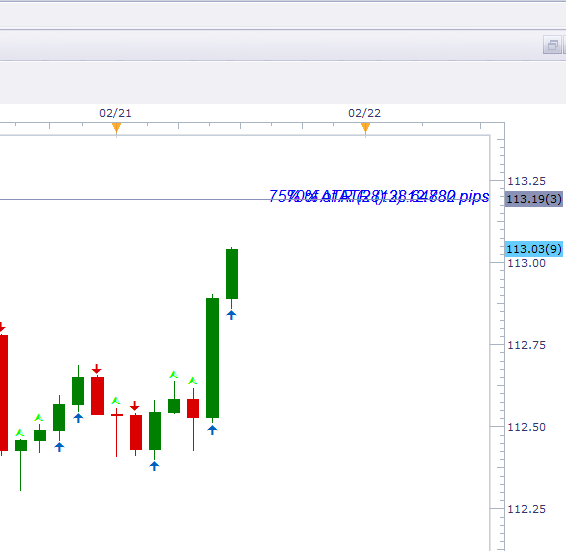
With indicator and boring excited only
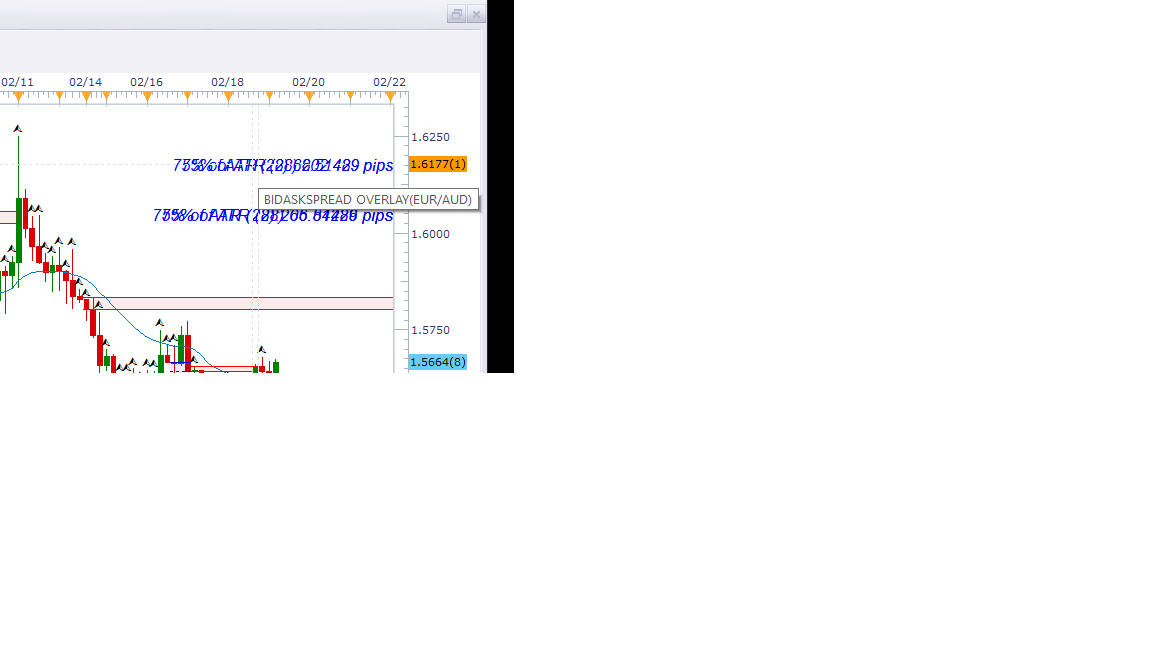
backspread overlay is in the bottom right corner
After this happens all the indicators have to be removed to remove ATR pips. It seems to join the other indicator file.
Also tried same scenario’s on my laptop with the same results. Thx for all you time. Jon
Re: ATR pips indicator
Paul W · Tue Jun 21, 2016 7:12 am
Could you add a simple audio alert - when ATR meets a determined level (condition)
have been using ATR pips indicator in my scalping set-up - works well imo
helps identify possible momentum
thanks
Re: ATR pips indicator
Apprentice · Thu Jun 23, 2016 4:04 am
ATR_pips_Indicator with Alert added.
Re: ATR pips indicator
Paul W · Thu Jun 23, 2016 8:04 am
thanks for the fast turn-around
but unable to locate user parameter/variable for setting ATR trigger level ?
Re: ATR pips indicator
Apprentice · Fri Jun 24, 2016 3:21 am
Try it now. Alert Level added.
Re: ATR pips indicator
Paul W · Fri Jun 24, 2016 10:02 am
closer
works fine when “cross over” condition is met
Crashes (and indicator disappears) when “cross under” condition met
can see this being very handy
Re: ATR pips indicator
Apprentice · Sat Jun 25, 2016 3:32 am
Fixed.
Re: ATR pips indicator
Paul W · Mon Jun 27, 2016 11:35 am
really close
Found a bug – appears “Play Sound” feature is not working
Alert function working properly – user error .. Doh
Try this
Have added a second ATR pips
The first (in Blue, top) has the alert set to 6 pips – (FAST)
- Data source – 1 minute
- Period = 5
The second (black) – no alert – (SLOW)
- Data source – 1 minute
- Period = 15
The (FAST) Alert triggers as ATR increases – which may indicate some momentum is developing I use the second (SLOW) ATR pips (black) as a reference to the longer established ATR
I have incorporated into my Scalping Strategy, and it seems to work pretty well – you will need to adjust the settings to suit the particular Instrument you are trading
Re: ATR pips indicator
Paul W · Thu Aug 18, 2016 12:32 pm
just curious,
is it possible to create an ATR list indicator of the various pairs, including CFDs
for use in a day trading strategy - to help identify possible developing momentum, on a timely basis ?
thanks
Re: ATR pips indicator
Apprentice · Fri Aug 19, 2016 2:36 am
Try this version. viewtopic.php?f=17&t=31923&p=54411#p54411 Also U can find MTF MCP ATR here. viewtopic.php?f=17&t=2723&p=24311&hilit=mtf+atr#p24311
Re: ATR pips indicator
Paul W · Tue Nov 01, 2016 12:06 pm
appears Font selection feature is not working ?
is it possible to permit / enable ATR pips to be displayed on a Tick chart ?
thanks
Re: ATR pips indicator
Apprentice · Fri Nov 04, 2016 4:06 am
appears Font selection feature is not working ?
I can not confirm this. Can you specify the exact indicator version / Web reference.
is it possible to permit / enable ATR pips to be displayed on a Tick chart ?
Usually ATR requires bar source. viewtopic.php?f=17&t=34094&p=94374&hilit=Tick+ATR#p94374 Tick ATR is possible, however the value may vary.
Re: ATR pips indicator
Paul W · Fri Nov 25, 2016 3:12 pm
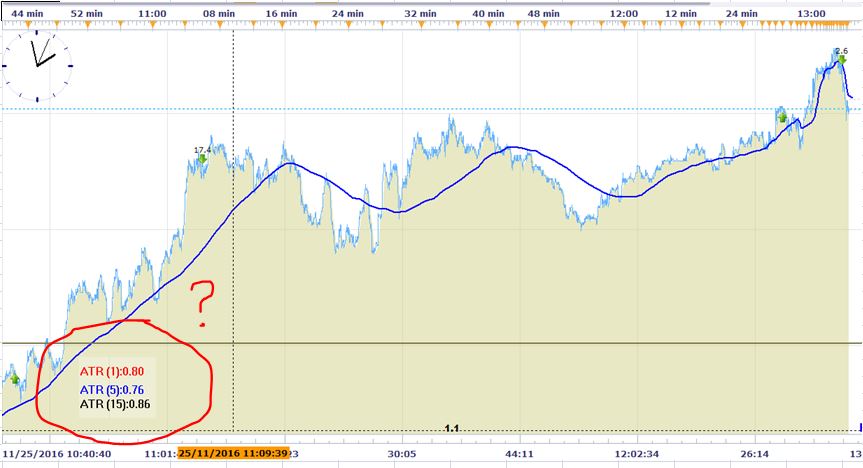
DAX Nov 25, 2016 (ET)
apologies for the delayed response
appears I was using an older version - Font sizing works fine with most recent
was hoping to include ATR pips indicator on a tick chart - am currently using a MTF (customized) version to identify momentum on a 1 minute chart (side by side with Tick-chart) - works pretty good imo
it would be easier/nicer/cleaner if the tick chart could also support ATR pips indicator
ATR (MTF) calculations are set to a 1 minute timeframe - when shorter period ATR exceeds slower/longer, it may indicate gathering momentum
your help would be appreciated
Thanks
Re: ATR pips indicator
Apprentice · Sat Nov 26, 2016 7:07 am
Tick ATR_pips_Indicator.lua added.
Re: ATR pips indicator
Paul W · Sat Nov 26, 2016 11:04 am
apologizes
should have mentioned/asked if the tick-chart support feature could be added to - ATR_pips_Indicator with Alert.lua ?
added Tick ATR_pips_Indicator to tick-chart - really cool
and will definitely help - make entries a little easier to identify - using a scalping strategy
thanks
Re: ATR pips indicator
Paul W · Sat Mar 11, 2017 4:02 pm
could you add the same alert feature to “Tick ATR_pips_Indicator.lua”
as “ATR_PIPS_INDICATOR WITH ALERT”
thanks
Re: ATR pips indicator
Apprentice · Sun Mar 12, 2017 4:19 pm
Tick ATR_pips_Indicator with Alert.lua added.
Re: ATR pips indicator
Paul W · Wed Nov 21, 2018 10:53 am
good indicator
I use to help identify momentum
if you could add a colour change option, for when “Alert Level” condition has been met
which then returns to default when condition has not been met
that would help
thx
Re: ATR pips indicator
Apprentice · Thu Nov 22, 2018 6:26 am
Change label color based on ATR_pips_Indicator with Alert indication?
Re: ATR pips indicator
Paul W · Thu Nov 22, 2018 10:55 am
If possible would like the indicator “Style” colour to change, during Alert level condition being met
and return back to default colour when condotion is not met - below “Alert Level”
thx
Re: ATR pips indicator
Apprentice · Sat Nov 24, 2018 7:01 am
Try an updated version of ATR_pips_Indicator with Alert.
Re: ATR pips indicator
Paul W · Sat Nov 24, 2018 12:48 pm
Thanks
and appreciated,
could you add Style Change feature to - “Tick ATR_pips_Indicator with Alert.lua”
thx
Re: ATR pips indicator
Apprentice · Sun Nov 25, 2018 5:07 am
Added.
Re: ATR pips indicator
minifire18 · Tue Jun 11, 2019 7:09 am
Hey Apprentice, Can yo code ATR_PIPS_INDICATOR WITH ALERT for MT4 thanks minifire
Re: ATR pips indicator
Apprentice · Wed Jun 12, 2019 6:36 am
Your request is added to the development list under Id Number 4716
Re: ATR pips indicator
Apprentice · Thu Jun 13, 2019 7:10 am
MT4/MQ4 version. viewtopic.php?f=38&t=68572
Re: ATR pips indicator
douvanik · Fri Jun 28, 2019 4:43 pm
Hi excellent indicator. Can you modified to indicates precept??? Regards Nick
Re: ATR pips indicator
Apprentice · Sun Jun 30, 2019 5:44 pm
Can you specify exact indicator name and trading station?
Re: ATR pips indicator
douvanik · Mon Jul 01, 2019 9:46 am
ATR pips indicator and FXCM Trading Station / Marketscope.
Re: ATR pips indicator
Apprentice · Mon Jul 01, 2019 12:59 pm
Your request is added to the development list under Id Number 4766
Re: ATR pips indicator
Apprentice · Tue Jul 02, 2019 4:47 am
Can’t figure out what needs to be done. This indicator already shows the percentage. Can you provide more information and provide an indicator name.
Re: ATR pips indicator
douvanik · Fri Jul 05, 2019 8:51 am
Hi the indicator shows Pips volatility, this pips can be showing on percentage, for ex. xauusd 100%ATR(12):5222.75 PIPS, this pips volatility can be showing in percentage.ATR calculation in percentage i think is (Last(high-low)+prev(high-low)/2)/prev.Open. Regards Nick
Re: ATR pips indicator
Apprentice · Mon Jul 08, 2019 6:47 am
Try this version.
Re: ATR pips indicator
douvanik · Thu Nov 21, 2019 7:46 pm
Hi can you add a start and end time to the indicator? .Thanks, regards Nick.
Re: ATR pips indicator
Apprentice · Fri Nov 22, 2019 5:07 am
Can you please clarify. With an example.
Re: ATR pips indicator
douvanik · Fri Nov 22, 2019 12:28 pm
Ok eurusd 24h clock start count pips 03:00 o clock and stop count 23:00.
Re: ATR pips indicator
Apprentice · Sun Nov 24, 2019 8:48 am
We calculate indicator as Current chart / time frame / candle (ATR*Multiplier)/pipSize
It will basically convert ATP currencies to pips. How we will incorporate the start/stop time?
Do you want to calculate the average ATR for selected period?
Re: ATR pips indicator
douvanik · Mon Nov 25, 2019 6:53 pm
YES.Ok. Thanks.
Re: ATR pips indicator
Paul W · Fri Jun 19, 2020 10:15 am
Hello,
noticed an issue with Tick ATR_pips_Indicator with Alert.lua
am unable to get the Alert Feature to work with FX pairs - have been using on CFD’s previously, works ok
could you take a look pls
thx
Re: ATR pips indicator
Apprentice · Sun Jun 21, 2020 4:01 am
Can you please share the parameters used?
Re: ATR pips indicator
Paul W · Sun Jun 21, 2020 1:45 pm
Re: Tick ATR_pips_Indicator with Alert.lua
Apologies,
should have included:
- the Alert “Play Sound” feature does not play
- the Alert change colour feature works ok
tested parameters: USD/CAD - Tick and minute charts Alert Level = 2.0
also, “Show Dialog box Alert” appears not to work as well - but I do not use
Thx
Re: ATR pips indicator
Apprentice · Sun Jun 21, 2020 6:43 pm
Try it now.
Re: ATR pips indicator
Paul W · Mon Jun 22, 2020 12:43 pm
Re: Tick ATR_pips_Indicator with Alert.lua
Colour Display Alert - USD/CAD (FX pairs) ok Play Sound - USD/CAD (FX pairs) ok Show Dialog box Alert - USD/CAD (FX pairs) ok
Level Cross Over Sound - USD/CAD (FX pairs) works - but is inconsistent with Color Display Alert
meaning: When Alert Level triggers and Colour alert triggers (consistent) ok Level Cross Over Sound should also trigger - but does not always (inconsistent) ?
“Play Sound” should trigger only on “Level Cross Over” - and not “Level Cross Under”
THX for taking a look
Re: ATR pips indicator
Apprentice · Tue Jun 23, 2020 3:31 am
Try it now.
Re: ATR pips indicator
Paul W · Thu Jun 25, 2020 1:24 pm
Hello,
Re: “Alert play-sound” feature
have been testing latest version - by Apprentice » Tue Jun 23, 2020 3:31 am and previous - by Apprentice » Sun Jun 21, 2020 6:43 pm (this version I think is a little better/more-consistent)
both work “Alert play-sound” (tick-charts) - however both versions still have issues and are not consistent/synchronized with “Alert change-colour” (works perfectly)
I may be oversimplifying - cannot “Alert play-sound” be added directly to the “Alert change-colour” routine ? (I am not a programmer) - but they should both trigger at the same time
again, I appreciate you taking a look
Thx
note: previous version “by Apprentice » Sun Jun 21, 2020 6:43 pm” is usable
Re: ATR pips indicator
Apprentice · Thu Jun 25, 2020 1:32 pm
Your request is added to the development list. Development reference 1557.
Re: ATR pips indicator
Apprentice · Wed Jul 08, 2020 5:19 am
Try it now.