fxcodebase-backup
FX Multi-Meter
Source: https://fxcodebase.com/code/viewtopic.php?f=17&t=27966
Forum: 17 · Topic 27966 · 22 post(s)
FX Multi-Meter
Apprentice · Tue Dec 25, 2012 3:29 pm
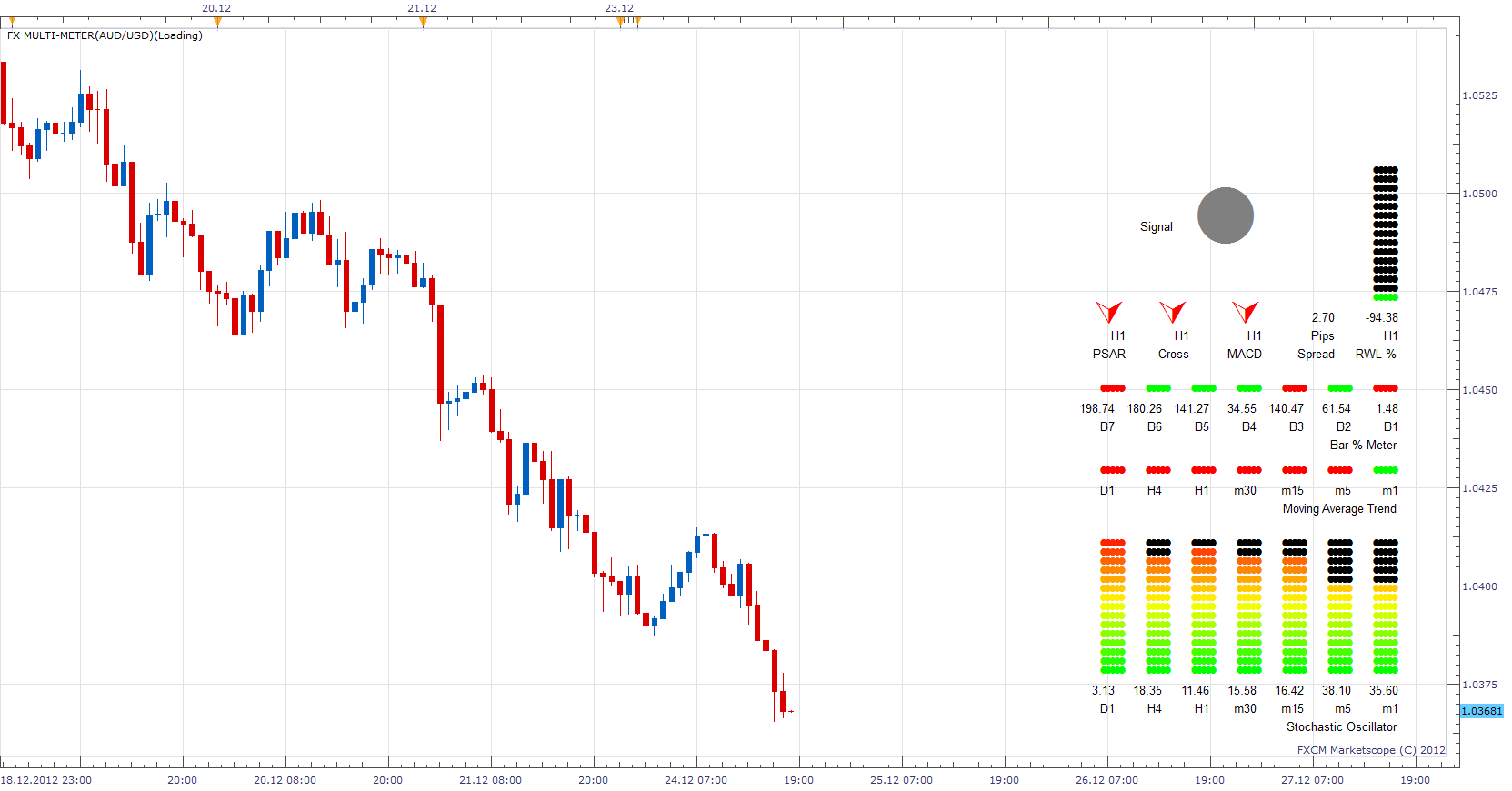
–Main Signal Up ———————— MACD > SIGNAL SHORT_MA > LONG_MA RWL > -50 MA > MA [-1] K > K[-1] Close > Close[-1])
–Main Signal Down ———————— MACD < SIGNAL SHORT_MA < LONG_MA RWL < -50 MA < MA [-1] K < K[-1] Close < Close[-1])
Re: FX Multi-Meter
Coondawg71 · Tue Dec 25, 2012 5:28 pm
Looks Great!!! Nice work.
Thanks!!!
Sjc
Re: FX Multi-Meter
nsaale · Wed Dec 26, 2012 1:56 am
It doesn’t work!
Re: FX Multi-Meter
Apprentice · Wed Dec 26, 2012 4:14 am
Can you give me more details. Altogether? Then you probably do not have a Beta version of TS. Bug are possible. If you find one, please describe them.
Also I have made a few minor improvements. You can download the new version.
Re: FX Multi-Meter
rose123 · Wed Dec 26, 2012 6:39 am
hi,
this is nice work
but it shows error message
sting 222: host command could not regonozed
Re: FX Multi-Meter
Apprentice · Wed Dec 26, 2012 7:17 am
This indicator is written for the current beta version of TS. Beta Version can be found here. http://www.fxcodebase.com/code/viewtopi … 30&t=27222
Re: FX Multi-Meter
nsaale · Sun Jan 06, 2013 5:58 am
There is a problem with positioning, can’t see some of the variables even if you reduce the font.
Re: FX Multi-Meter
Apprentice · Sun Jan 06, 2013 7:19 am
Can you post ScreenShot. Also what screen resolution you are using.
Re: FX Multi-Meter
poriyavt · Wed Jan 09, 2013 4:07 am
sting 222: host command could not regonozed Can you Help me to Solve this Problem Plz
Re: FX Multi-Meter
Apprentice · Wed Jan 09, 2013 4:47 pm
This indicator is written for the current beta version of TS. Beta Version can be found here. viewtopic.php?f=30&t=20383 U have to install it, in order to use this indicator.
Re: FX Multi-Meter
JPNWV7 · Tue Sep 10, 2013 9:24 am
Apprentice wrote: Can you post ScreenShot. Also what screen resolution you are using.
I can’t get the signal area, it’s too big to get all the info.
I get everything upto the
H1 H1 H1 Pips H1 PSar Cross MACD Spread RWL %
My screen resolution settings are set to the default normal of
1024 x 768 (Recommended)
The FX Meter looks to Big, I get all the other info on it except for the signal area
Re: FX Multi-Meter
Apprentice · Wed Sep 11, 2013 3:39 am
Unfortunately, you will need to have 1280x1024. During time of development this was the best solution. New version of TS, will enable us to avoid such problems.
Re: FX Multi-Meter
JPNWV7 · Thu Sep 12, 2013 4:51 pm
[quote][/quote]
when will the new version of T.S. be available?
Thanks
Re: FX Multi-Meter
Apprentice · Fri Sep 13, 2013 12:36 am
Soon, currently available as beta. I need to find time to adapt indicator code to new TS Version.
Re: FX Multi-Meter
2excel · Fri Feb 28, 2014 5:33 am
Gday Aprentice,
Treat yourself tool. Traded a few times and has real promise.
Any chance adding an alert to the signal?
Keep up the good work
Re: FX Multi-Meter
Apprentice · Sun Mar 02, 2014 4:21 am
Your request is added to the development list.
Re: FX Multi-Meter
newton · Tue Mar 04, 2014 5:11 am
i can not see upper half.
Re: FX Multi-Meter
Apprentice · Thu Mar 06, 2014 2:47 am
This version is written with instructions available at this time. It is insensitive to the screen size, optimized for screen resolution of 1680/1050. For now u can try to use a smaller font size, or use a larger monitor. Will try to find time to write new version.
Re: FX Multi-Meter
newton · Thu Mar 06, 2014 5:09 am
ok.
Re: FX Multi-Meter
rose123 · Thu Mar 06, 2014 7:34 am
can you create a mtf mcp multimeter indicator based on main signal only
–Main Signal Up ———————— MACD > SIGNAL SHORT_MA > LONG_MA RWL > -50 MA > MA [-1] K > K[-1] Close > Close[-1])
–Main Signal Down ———————— MACD < SIGNAL SHORT_MA < LONG_MA RWL < -50 MA < MA [-1] K < K[-1] Close < Close[-1])
Re: FX Multi-Meter
Apprentice · Tue Mar 18, 2014 2:09 am
Your request is added to the development list.
Re: FX Multi-Meter
Apprentice · Sat Apr 21, 2018 9:33 am
The indicator was revised and updated.