fxcodebase-backup
Range With Alert
Source: https://fxcodebase.com/code/viewtopic.php?f=17&t=32324
Forum: 17 · Topic 32324 · 27 post(s)
Range With Alert
Apprentice · Fri Feb 22, 2013 12:07 pm
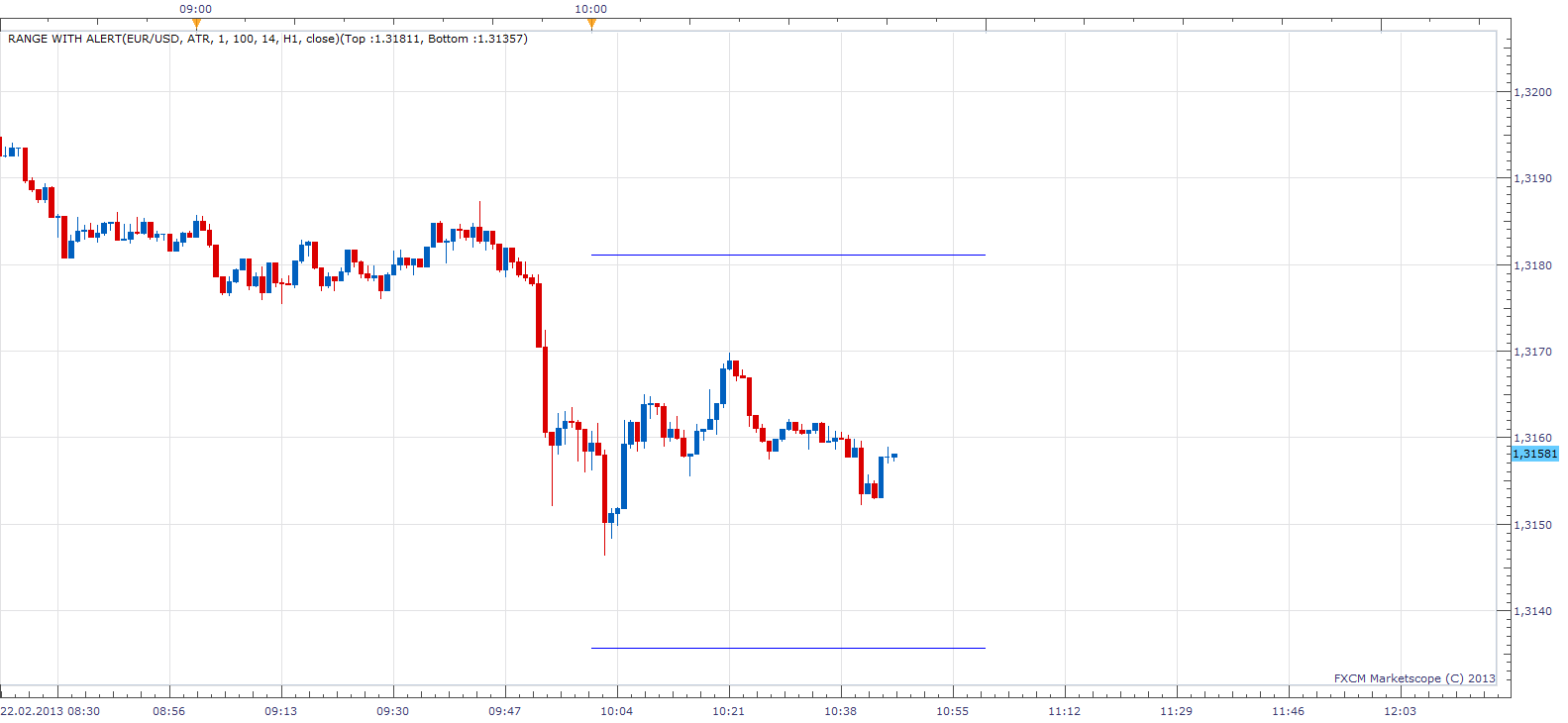
Range will give you range from Certain starting point. It can be Open, High, Low or Close of Current or previous candle. U can use Chart or any Higher time frame. Range would could be defined as +/- X Pips, ATR or Percentage.
This indicator provides Audio / Email Alerts if and when Price cross over/under one of the two defined levels. Dec 29, 2015: Compatibility issue Fix. _Alert helper is not longer needed.
Re: Range With Alert
hautecompany · Fri Feb 22, 2013 12:42 pm
Fricken Awesome!!!!!!!!
I’ll play around with it the next few days and kick any feed back. Nice job
Re: Range With Alert
hautecompany · Tue Feb 26, 2013 4:40 am
1)Its great how you have the bars set up for projecting out each time frame. Its just awesome. I have a 1, 5, 15, 1h, 4h all running the same time. Its totally cool how they stack on top of each other.
2)The Percentage thing isnt working or I dont know how you have it set up. No big deal….probably lost in translation. . What I wanted was the ability to take say the atr for a time frame and then create multiple lines. If you were just using the range projection vs one time frame this would enable you to run support/resistance lines at the ATR(100% already programed), and say the 150%ATR, 200% ATR. So 3 resistance lines and 3 support lines all with different colors or line strength(solid, doted etc) 3)Could we please add shading between the ranges. 4)The alert function isn’t working. It kicks out an error when it should go off. I have alert downloaded. Do I need something else running? 5)I included a picture of how it looks on my screen in my MIAMI Template
6)This is so awesome! Thanks so much!
Re: Range With Alert
Apprentice · Wed Feb 27, 2013 11:05 am
I added ATR Multiplier. As for errors, do u use Dev. Version of TS. Do u Have Activ _Alert.
Re: Range With Alert
hautecompany · Sat Apr 13, 2013 4:37 pm
Could we please add the option to show the historical range?
I think it would look much like HL1M except it would only show horizontal lines. So a 15 min candle chart would show two horizontal lines intersecting the candle, or being above or below it or some combination. Basically each historical projection should not appear like a point in time.
Another line in the parameters that asks to show all historical, or previous( period back), or blank so the user can type in the number of periods like 5.
Thanks.
Re: Range With Alert
Apprentice · Mon Apr 15, 2013 6:04 am
Your request is added to the development list.
Re: Range With Alert
AzaMartin · Wed Nov 30, 2016 10:44 am
Hi,
I really like this indicator, does exactly what I need and looks very nice, thank you very much for creating it. However would it be possible to add LOW/HIGH to “Price Source” so the ATR is calculated from the low AND the high in each direction.
I know Low and High are already present although you can only select one, therefore if price makes a high, then a low, and is now moving higher, you would need to change the “Price Source” to “LOW”. The top ATR Line is the correct distance away from the low, however the bottom ATR Line is calculated also from the low, so it is the ATR + the move lower it has already made. Therefore if price moves back lower you would then need to change “Price Source” to “HIGH” to get the ATR Line calculated from the high, and keep changing the “Price Source” each time the direction changes.
So would it be possible to add LOW/HIGH so the top ATR Line is calculate from the low and the bottom ATR Line is calculated from the high.
Many Thanks Aza
Re: Range With Alert
Apprentice · Thu Dec 01, 2016 4:05 am
Try it now.
Re: Range With Alert
AzaMartin · Thu Dec 01, 2016 7:19 am
Cheers Mate, Perfect.
I sent you a little donation to say thanks.
Aza
Re: Range With Alert
AzaMartin · Wed Jan 18, 2017 10:16 am
I really like the indicator so far, however would it be possible to add a “Historical” option, to be able to show the indicator on all previous sessions, other than just the current day. Therefore we could see how price has reacted to it previously.
Many thanks Aza
Re: Range With Alert
Apprentice · Thu Jan 19, 2017 3:21 pm
Your request is added to the development list, Under Id Number 3721 If someone is interested to do this task, please contact me.
Re: Range With Alert
Alexander.Gettinger · Wed Sep 20, 2017 3:33 pm
AzaMartin wrote: I really like the indicator so far, however would it be possible to add a “Historical” option, to be able to show the indicator on all previous sessions, other than just the current day. Therefore we could see how price has reacted to it previously.
Many thanks Aza
Please, try this version of indicator:
Re: Range With Alert
Trader · Tue Oct 24, 2017 1:28 pm
Hello Apprentice 1] reference the indicator ‘Range With Alert’ in the drop list for the selection of time frame can you please also add the option of ‘Default Period’ 2] or any other method via the indicator should work also for default period Without making any adjustments/changes in the drop list 3] looking forward to your reply Regards Trader
Re: Range With Alert
Apprentice · Wed Oct 25, 2017 8:07 am
Try it now. (First post in topic)
Re: Range With Alert
Trader · Wed Oct 25, 2017 10:58 pm
Hello Apprentice 1] thank you; and Best regards Trader
Re: Range With Alert/ Alert = Live OR End of Turn ?
Trader · Mon Dec 18, 2017 2:06 am
Hello Apprentice 1] reference the indicator ‘Range With Alert’ please advise if the alert parameter is [a] Live /OR/ [b] End of Turn? Regards Trader
Re: Range With Alert
Trader · Mon Dec 18, 2017 10:05 am
Hello Apprentice 1] please ignore the earlier post as have tested this matter on m5 chart and the alert is Live 2] should have done this before hand/ my mistake 3] however the alert dialog boxes are not displaying even though have selected ‘Yes’ for both [a] Show Top Line Alert; and [b] Show Bottom Line Alert 4] please advise how to have the dialog boxes displayed with the sound alert Regards Trader
Re: Range With Alert
Apprentice · Tue Dec 19, 2017 4:22 am
Are you refer to Range With Alert_H.lua or Range With Alert.lua?
Re: Range With Alert
Trader · Tue Dec 19, 2017 7:50 am
Hello Apprentice 1] the later one mentioned in your post = ‘Range With Alert.lua’ 2] and the version that you had kindly amended to show current time frames in default/ not the earlier version 3] as mentioned in the earlier post the alert dialog boxes are not being displayed 4] technically this has nothing to do with the modification to default time frame/ this reference is made only to ensure that if any further coding modifications are required/ please have this done in the newer version and not the old Regards Trader
Re: Range With Alert
Apprentice · Tue Dec 19, 2017 8:47 am
Have you set “Play Sound” to Yes?
Re: Range With Alert
Trader · Tue Dec 19, 2017 11:52 am
Hello Apprentice 1] Play Sound = Yes 2] and the audio alert is working fine 3] however the the dialog boxes do not appear even though have selected ‘Yes’ for both [a] Show Top Line Alert; and [b] Show Bottom Line Alert 4] please advise Regards Trader
Re: Range With Alert
Apprentice · Wed Dec 20, 2017 6:26 am
Try it now. Dialog boxes were NOT added initially.
Re: Range With Alert
Trader · Wed Dec 20, 2017 10:01 am
Hello Apprentice 1] the dialog boxes are now being displayed but sound alert has stopped working 2] Play Sound = Yes 3] ‘Yes’ for both [a] Show Top Line Alert; and [b] Show Bottom Line Alert 3] sound files are defined as required/ but no more sound 4] please advise Regards Trader
Re: Range With Alert
Apprentice · Wed Dec 20, 2017 11:11 am
I was not able to reproduce. Will investigate.
Re: Range With Alert
Apprentice · Wed Dec 20, 2017 12:03 pm
Fixed.
Re: Range With Alert
Trader · Fri Dec 22, 2017 2:09 pm
Hello Apprentice 1] it is now working all right 2] thank you/ happy holidays; and Best regards Trader
Re: Range With Alert
Apprentice · Wed Apr 04, 2018 6:39 am
The Indicator was revised and updated.