fxcodebase-backup
Rounded Number Tool (The Figure)
Source: https://fxcodebase.com/code/viewtopic.php?f=17&t=2356
Forum: 17 · Topic 2356 · 25 post(s)
Rounded Number Tool (The Figure)
Apprentice · Thu Oct 07, 2010 12:15 pm
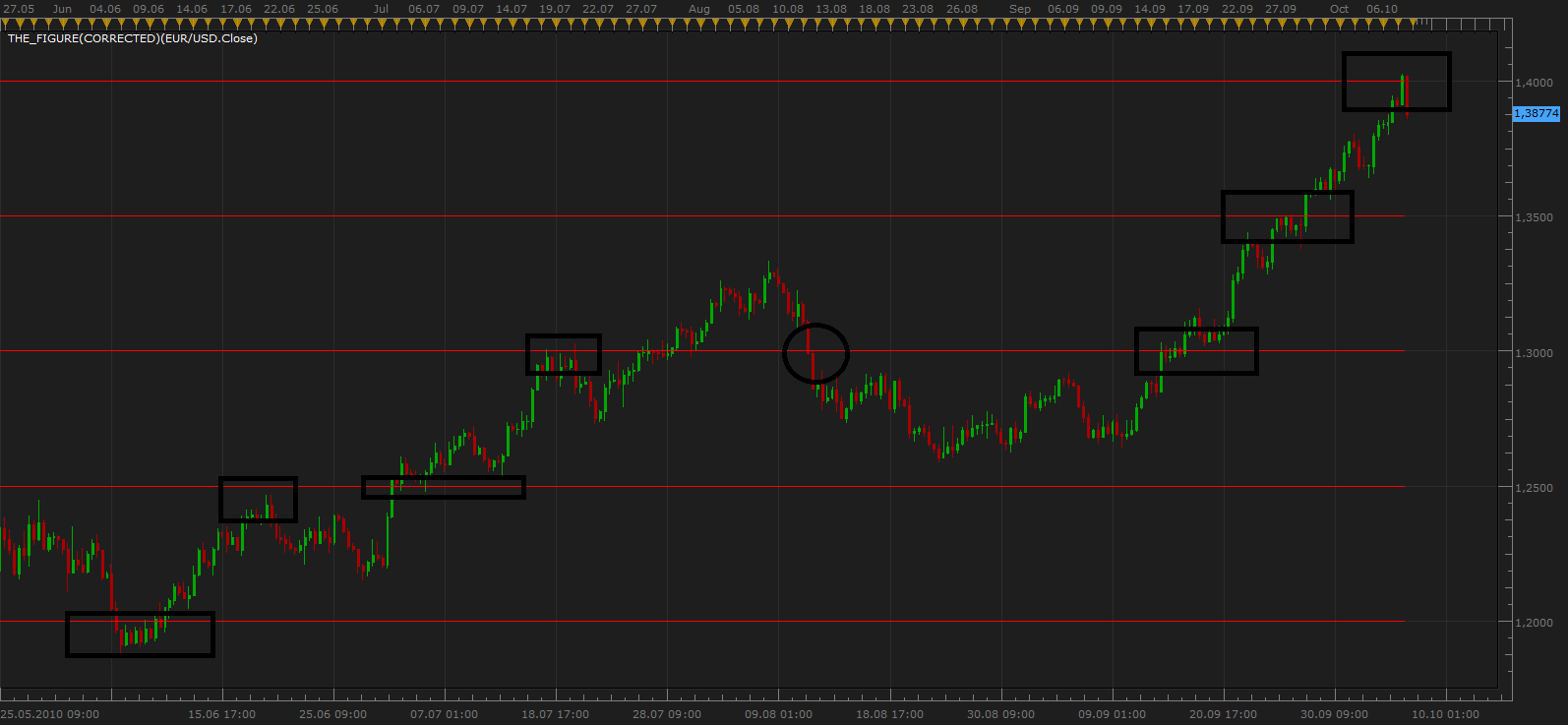
Example of use of round numbers, for support and resistance level definition.
The lines of resistance, support based on mass psychology. Similar reasoning, the behavior of a large number of investors in the market, allows sophisticated investors using them.
People love round numbers.
When placing an order (Entry, Stop, Limit) investors prefer round in front of random numbers. This phenomenon has been proven and tested on the market, smart investors to predict the level of resistance and support.
Another interesting phenomenon is that the strength of some level of support or resistance tends to increase with increase in the level of rounding.
For example, the 1.0 has more power than 1.5, 1.5 has more power than 1.6, 1.6 has more power than 1.61 …
A similar tool by Alex. viewtopic.php?f=17&t=60016&p=91812&hilit=levels#p91812
Re: Rounded Number Tool (The Figure)
Jigit Jigit · Tue Nov 09, 2010 5:33 pm
Yet another interesing tool from Apprentice. Cheers
There seems to be, however, something wrong with it. It slows Marketscope down.
Would it be possible for it to show only the levels relevant for the current price movment range. Perhaps if there were fewer lines to draw it wouldn’t slow things down. For instance, we could manually set the range to be marked with round number lines. Also, can 50-pip lines be added? That would be most helpul.
Ideally, I think, the original grid in Marketscope should be much more customizable. It should be up to the user which lines are are actually shown (horizontal/vertical, 50/100 pips etc.)
Once again, thank you Apprentice for your great work.
Re: Rounded Number Tool (The Figure)
kerkoules · Fri Mar 04, 2011 4:24 am
Ideally, I think, the original grid in Marketscope should be much more customizable. It should be up to the user which lines are are actually shown (horizontal/vertical, 50/100 pips etc.)
I totally agree, platform itself should have more customizing options. Something else I really miss is a trading day separation vertical line.
In regards to this tool, I would be interested to have 50s included in it.
Re: Rounded Number Tool (The Figure)
sunshine · Fri Mar 04, 2011 9:19 am
I’ve uploaded the modified version. Please check whether it is what you need. Regarding customizable grid, I’ve already added this suggestion to our “Wishlist”. Hope this feature will appear in one of the next updates
Re: Rounded Number Tool (The Figure)
Jigi Jigit · Fri Nov 18, 2011 1:23 pm
Can someone, please, make this indicator draw lines every 250 pips?
please please
Re: Rounded Number Tool (The Figure)
Apprentice · Sat Nov 19, 2011 3:59 am
Your request is added to the development queue.
Re: Rounded Number Tool (The Figure)
Apprentice · Sat Nov 19, 2011 3:32 pm
250 pips level added
Re: Rounded Number Tool (The Figure)
Jigit Jigit · Tue Jan 17, 2012 6:24 am
Thank you Apprentice.
On second thoughts, would it be very difficult to change this indicator to allow the user to specify the round figures marked, e.g. 10, 20, 25 etc.
That would be very helpful. Cheers
Re: Rounded Number Tool (The Figure)
trendwatch · Fri Mar 16, 2012 8:55 am
Hello, great tool. But I face a problem:
First 2 versions don’t show up at all. Last version shows only level 1. So 1,300 1,3100 and 1,3200 do show and 1,3025 1,3050 and 1,3075 etc do NOT show up.
Could you please check the indicator?
Thank you
Re: Rounded Number Tool (The Figure)
nazaar · Thu Apr 12, 2012 11:29 pm
i was looking for the process of adjusting the price interval on the right hand axis of the price chart and found this tool. excellent. Is it possible to adjust the interval?
With this tool, could you label the level a little more clear. It looks like it’s in the following order but not labelled:
level 1 10,000 pips level 2 5000 pips level 3 1000pips level 4 500 pips level 5 100 pips level 6 is 50 pips
Also, as is the case with many indicators it would be better if the user had the option to choose the level interval.
thanks.
Re: Rounded Number Tool (The Figure)
Apprentice · Fri Apr 13, 2012 1:38 am
Your suggestions are added to the development list.
Re: Rounded Number Tool (The Figure)
SuperTrader · Wed Jul 11, 2012 6:07 am
Jigit Jigit wrote: Yet another interesing tool from Apprentice. Cheers There seems to be, however, something wrong with it. It slows Marketscope down.
I also find that it slows Marketscope down. I have many open charts (for a number of currency pairs) and I added this indicator to all of them (its 2nd version, with the lines on the 50’s). Then Marketscope became a bit “slower” and a bit “sluggish” …
Re: Rounded Number Tool (The Figure)
Coondawg71 · Fri Jan 25, 2013 4:34 pm
I may be mistaken but I do not have a sixth level on the latest version. Can we check this indicator to make sure it is coded for the 50 pip level.
Thanks,
sjc
Re: Rounded Number Tool (The Figure)
arstechnica · Mon Jan 28, 2013 10:58 am
may we have a strategy based on round numbers:
buy or sell if price touch and reverse a round number
cross option could also be good.
Re: Rounded Number Tool (The Figure)
Apprentice · Mon Jan 28, 2013 1:47 pm
I Believe that you can use some of existing strategies, Like this one. viewtopic.php?f=31&t=20142&p=41784&hilit=line+cross#p41784
Re: Rounded Number Tool (The Figure)
arstechnica · Wed Jan 30, 2013 10:17 am
I would a strategy that trade as any round number is crossed or touch and reverse.
Did Linecross do this? I don’t understand.
Re: Rounded Number Tool (The Figure)
Apprentice · Thu Jan 31, 2013 5:44 am
You have to set the levels manually in Linecross. Could you describe in more detail this strategy.
Something like this. Buy/Sell on CrossOver/CrossUnder Sell/Buy on Reverse Down/ Reverse Up Rounded Number Tool have multiple lines. How i can make this strategy work for you.
Re: Rounded Number Tool (The Figure)
arstechnica · Thu Jan 31, 2013 8:54 am
It should recognize any round number depending on decimals
for example for eurusd one decimal is like 1.3 or 1.4 1.5 etc 2 decimals are like 1.35, 1.40, 1.45, etc.. so it should cross or reverse on round numbers at a specific decimal setting
Re: Rounded Number Tool (The Figure)
rtsayers · Thu May 23, 2013 4:51 pm
I would like a request to extend the lines in the future
Thanks alot!
Re: Rounded Number Tool (The Figure)
Apprentice · Fri May 24, 2013 3:27 am
Your request is added to the development list.
Re: Rounded Number Tool (The Figure)
rtsayers · Fri Jul 12, 2013 2:21 pm
Just wondering if your able to extend the lines anytime soon waited a long time for this!!
Thanks a billion
Re: Rounded Number Tool (The Figure)
arb56ea1 · Thu Aug 15, 2013 7:05 pm
I noticed there are 6 level parameters. I would like to specify numbers ending in 25 50 and 75 in addition to the default of 100. Is this possible?
Thanks for your help.
Andy
Re: Rounded Number Tool (The Figure)
Apprentice · Fri Aug 17, 2018 6:38 am
The indicator was revised and updated.
Re: Rounded Number Tool (The Figure)
allanuplaya1 · Sat Oct 29, 2022 12:12 pm
Hi, new here.
Not really sure how to find the latest version of this indicator, have checked through this thread and see old version as attachments are these the latest updated version of the round number tool?
any help would be great thanks
Re: Rounded Number Tool (The Figure)
Apprentice · Sun Oct 30, 2022 4:10 am
Try the version from the first post in the topic. https://fxcodebase.com/code/viewtopic.php?f=17&t=2356