fxcodebase-backup
SimpleGuy Indicator
Source: https://fxcodebase.com/code/viewtopic.php?f=17&t=65713
Forum: 17 · Topic 65713 · 7 post(s)
SimpleGuy Indicator
Apprentice · Fri Feb 09, 2018 6:41 am
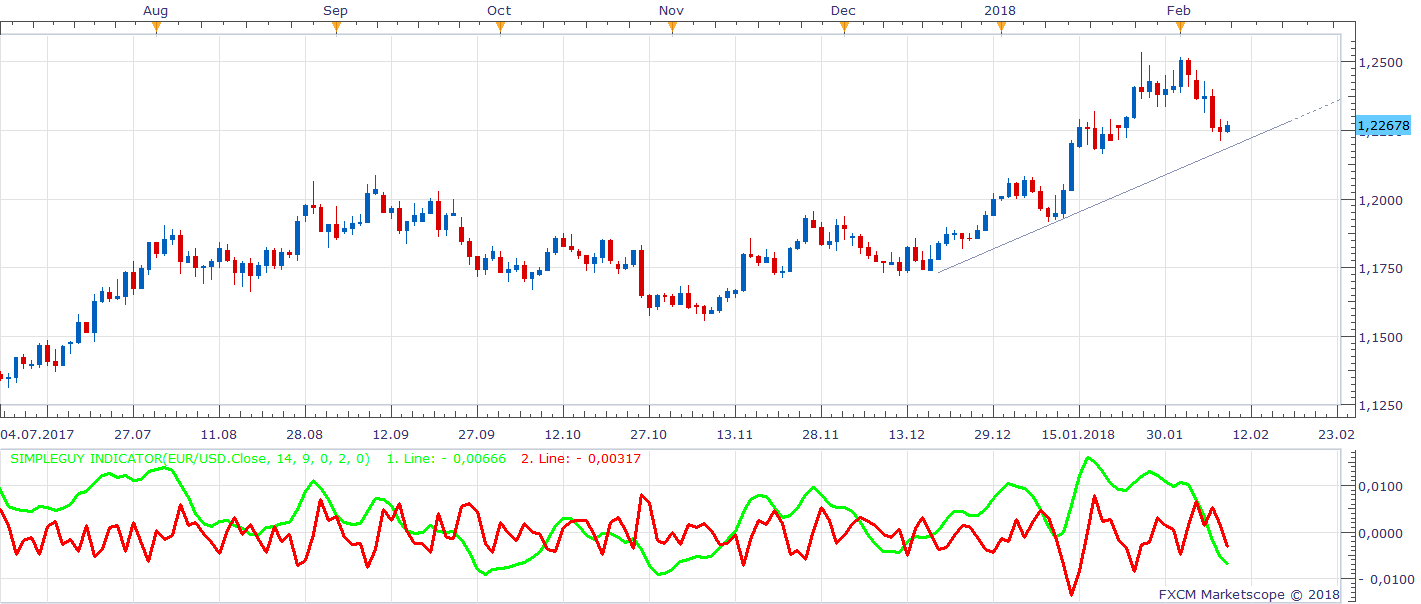
Based on the request. viewtopic.php?f=27&t=65710 1.Line ([non lag moving average] - [ema]) / Close)
- Line [non lag moving average] - [Close]
SSNonLagMA.lua SSNonLagMA.lua viewtopic.php?f=17&t=2231&hilit=non+lag+moving
SimpleGuy Indicator 1. Line.lua
1.Line (Close / [non lag moving average] - [ema])
SimpleGuy Indicator 2. Line.lua
2.Line [Close] - [non lag moving average]
Re: SimpleGuy Indicator
Gentle · Fri Feb 09, 2018 7:59 am
Hi Apprentice,
Thank you for your indi. And thank you SimpleGuy, also.
I noticed I should add this to calculation in order to display correctly on 2-digit charts:
point = source:pipSize();
...
Line1[period]= (NLMA.DATA[period] - EMA.DATA[period]) / source[period]*(point/0.0001);
Re: SimpleGuy Indicator
SimpleGuy · Fri Feb 09, 2018 10:37 am
Hi Apprentice,
thanks alot for ur help.
Can make it separately become 2 indicator?
1.(Close) / ([non lag moving average] - [ema])
2.(Close) - (non lag moving average)
Best Regards
Re: SimpleGuy Indicator
SimpleGuy · Fri Feb 09, 2018 11:21 am
Hi Apprentice,
Can make both line separately become 2 indicator
first indicator is (Close / [non lag moving average] - [ema]).
second indicator is [Close] - [non lag moving average]
Really thanks alot
Re: SimpleGuy Indicator
Apprentice · Fri Feb 09, 2018 11:24 am
SimpleGuy Indicator 1. Line.lua & SimpleGuy Indicator 2. Line.lua added.
Re: SimpleGuy Indicator
SimpleGuy · Fri Feb 09, 2018 11:51 am
Hi Apprentice
1.Can modified the indicator value become 2 digit? like when I put a horizontal line on it, let say 0.00035 level, now is single digit 0.0003 or 0.0004.
2.Can modified the indicator calculation as below?
first indicator = (Close / [non lag moving average] - [ema]) ([non lag moving average] - [ema]) / Close) MODIFIED TO (Close / [non lag moving average] - [ema])
second indicator = [Close] - [non lag moving average] [non lag moving average] - [Close] MODIFIED TO [Close] - [non lag moving average]
THANKS ALOT
Re: SimpleGuy Indicator
Apprentice · Sun Feb 11, 2018 5:36 am
Try it now.