fxcodebase-backup
Total Power Indicator
Source: https://fxcodebase.com/code/viewtopic.php?f=17&t=6307
Forum: 17 · Topic 6307 · 20 post(s)
Total Power Indicator
Apprentice · Mon Sep 05, 2011 11:55 am
Adaptable Total Power Indicator.lua
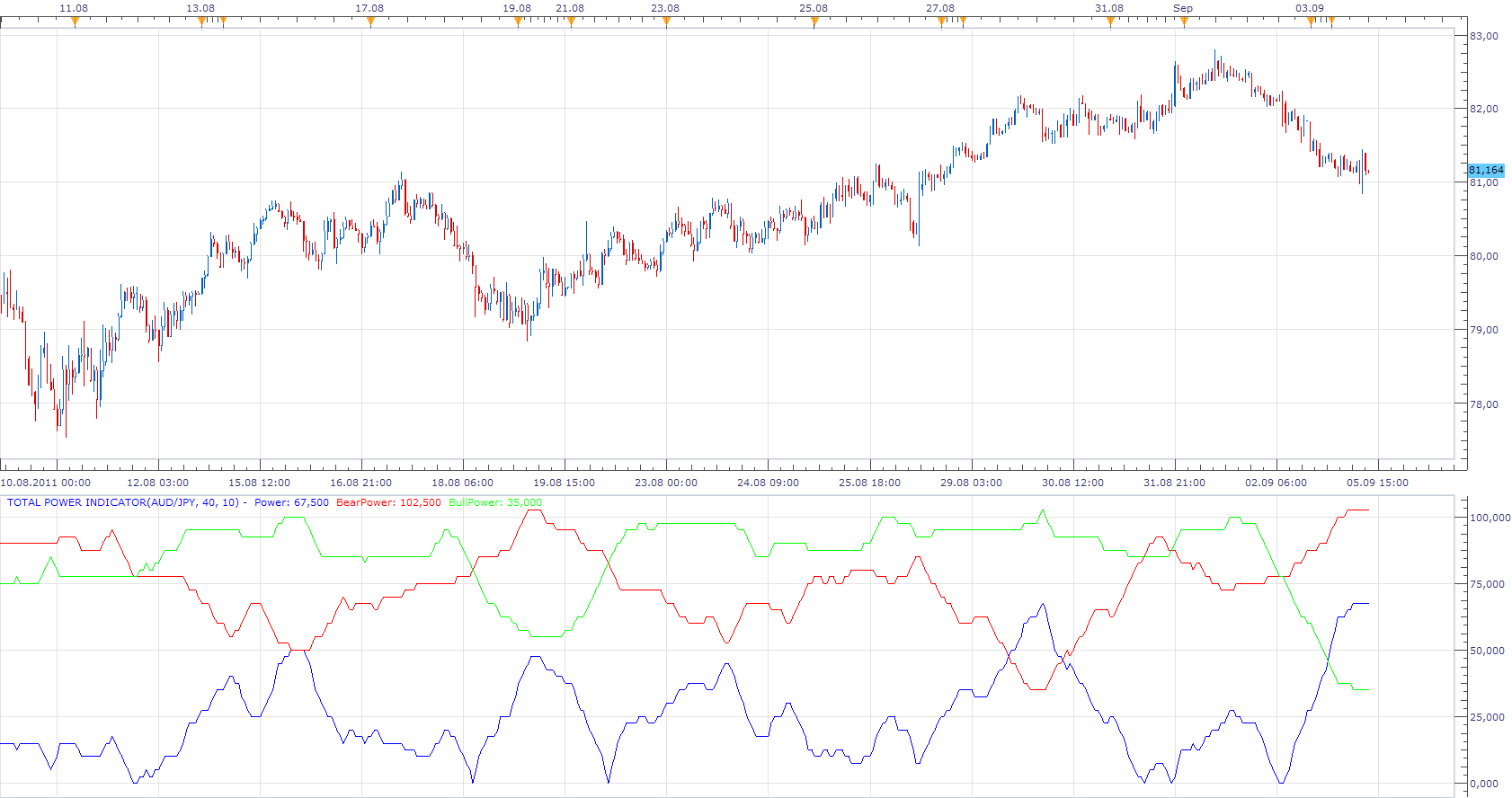
Total Power Indicator or Improving Elder Ray Indicator
Power = Abs (BearCount - BullCount)100 / Lookback Period; BearPower = BearCount100/ Lookback Period; BullPower = BullCount*100/Lookback Period ;
The components of this indicator we get, if we count the Elder Ray Indicator components Within the Lookback Period.
But only if Elder Ray Bull is greater than 0, and Elder Ray Bear is less than 0
The indicator was revised and updated
Re: Total Power Indicator
emjay-short · Tue Sep 06, 2011 7:49 pm
Thanks a bunch @Apprentice. Again!
For everyone else, the request and a brief description of this Trend Following System can be found here ( viewtopic.php?f=27&t=5090 ) . And a detailed description to the TPI can be found here in this pdf http://www.wupload.com/file/145521100/TPI–CTM–June11-excerpt.pdf.
Happy Analyzing. -emjay.
Re: Total Power Indicator
Coondawg71 · Mon Apr 23, 2012 8:38 am
Can we please get a strategy for this very useful indicator.
Please allow the user to change parameter settings for the values of Lookback and Power, plus the usual offerings of user settings for Trading Parameters.
Thanks!
sjc
Re: Total Power Indicator
Coondawg71 · Mon Apr 23, 2012 10:42 am
Can we please request a MTF Multi-currency pair Total Power Index indicator constructed the same way you made the MTF MCP Trend Stop list.
Thanks!
sjc
Re: Total Power Indicator
Apprentice · Mon Apr 23, 2012 12:33 pm

MTF_MCP_Total Power Indicator_List.lua
As for strategy, can you define entry, exit conditions.
Re: Total Power Indicator
Coondawg71 · Tue Apr 24, 2012 8:02 am
First, Thanks for the List!
Second, sorry for this large post, but as they say, a picture says a thousand words, so…
As per the Strategy, I would like to illustrate 3 different scenarios and hence 3 different Algorithims/parameters. I consider them Conservative, Moderate and Aggressive.
Conservative: open trades only when Bull or Bear signal is JOINED at the same maximum value of 110 and closes position when the POWER signal decreases to less than 110, similar to the Schaff Trend.
Moderate:open trades when the Bull/Bear signal AND the POWER signal have both crossed up through the opposite Bear/Bull signal, and perhaps after both the Bull/Bear signal and Power signal have crossed ABOVE 50, similar to a CCI.
Aggressive: open trades when Bull/Bear signal crosses opposite signal. Probably most like what the Total Power Indicator was intended to be used.
To further utilize the Strategy, and this would make it more complex, give the trader the option within the trading parameters to combine different Algo’s for entry/exit. Example: Entry Algo: Aggressive and Exit Algo: Moderate
Re: Total Power Indicator
Coondawg71 · Tue Apr 24, 2012 8:03 am
Total Power Indicator:Moderate Strategy
Re: Total Power Indicator
Coondawg71 · Tue Apr 24, 2012 3:36 pm
Total Power Indicator: Conservative Strategy
Re: Total Power Indicator
Apprentice · Wed Apr 25, 2012 7:45 am
Try this one viewtopic.php?f=31&t=16962
Re: Total Power Indicator
Alexander.Gettinger · Tue May 08, 2012 5:21 pm
MQL4 version of indicator: viewtopic.php?f=38&t=17980
Re: Total Power Indicator
Patrick Sweet · Tue Sep 24, 2013 5:00 am
Great work! And I appologise for the long post.
Question: what is the EMA used in the LUA for these calcs for? It makes the Bull/Bear/Power dependent on each other rather than independent of each other.
I would like to adjust Power Period line without causing subsequent changes in values for the Bull/Bear Power lines.
Apparently the EMA impacts a) when Bull/Bear Power lines actually cross based on some averaging (which may be ok) and b) it is influenced by changing the Power Period. This causes the following issue.
When I change Power Period, both the TIME at which, and the VALUE at which the Bull/Bear crosses, is impacted which means all BULL/BEAR Power values are impacted when I change the Power Period?
I understood these calcs/values to be independent. That is, the Power Period setting would have no impact on the values of BULL/BEAR Power lines.
Shouldn’t the Bull/Bear/Power calcs be independent of each other?
Check my example (please) and see if I am mistaken. Try this: Note where a BULL/BEAR cross occurs (both the time and the indicator value and price) using standard TPI settings.
Then make a significant change to the Power Period (double it) and change nothing else.
In my version, both the time and the indicator value (and this the actual instrument price) of the Bull/Bear power cross changes simply when I change the Power Period.
I appologise in advance, if this is expected. But the formulas for the respective lines given above are independent of each other.
Lookback is lookback. 100 is 100. Bear/Bull Counts are Bear/Bull counts. Power Period is Power Period.
I would like to adjust Power Period line without causing subsequent changes in values for the Bull/Bear Power lines. I think this makes more sense. Or am I mistaken?
Humbly,
Patrick
Re: Total Power Indicator
Apprentice · Tue Sep 24, 2013 10:58 am
Bulls/Bears are initial data for the calculation of Power. and this can not be avoided. Changes in the two components are passed to Power. Unrelated, I can make a version that use various moving averages. With different periods for bulls and bears.
Re: Total Power Indicator
Patrick Sweet · Tue Sep 24, 2013 1:13 pm
Ok. Thanks.
I understand how Power is built on Bulls/Bears.
Power = Abs (BearCount - BullCount)*100 / Lookback Period;
How does a change in Power period impact Bulls/Bears counts (in this formula)?
BearPower = BearCount100/ Lookback Period; BullPower = BullCount100/Lookback Period ;
The Lua code draws on an EA in a way that I do not understand (which does not make it ‘wrong’, I just do not understand it and I have no alternative, and no complaints).
I just do not see how changing the Power Period would change Bulls/Bears counts or values, which is why I raise the question…as it would be good to be able to modify the Power Period in an isolated fashion…I believe.
Thanks for listening and your guidance! Patrick
Re: Total Power Indicator
Apprentice · Wed Sep 25, 2013 4:32 am
- Power Period or EMA Period is used in the calculation od EMA and indirectly Bulls and Bears
Bulls[period] = source.high[period] - EMA.DATA[period];
Bears[period] = source.low[period] - EMA.DATA[period];
- Change in EMA, will change the Bulls / Bear Levels, and indirectly BullCount and BearsCount
if Bulls[i] > 0 then
            BullCount=BullCount+1;
            end

            if Bears[i] < 0 then
            BearCount=BearCount+1;
            end
Re: Total Power Indicator
Patrick Sweet · Fri Sep 27, 2013 3:56 am
Thanks. I understand. I naively thought that Bear/Bull power was the result of simple counting and not comparison to an average and that Power peroid was a separate varialb simply comparing bull/bear. That you take the time to clarify some ‘dumb’ questions is GREATLY appreciated. Patrick
Re: Total Power Indicator
Apprentice · Fri Sep 27, 2013 4:37 am
Anytime.
Re: Total Power Indicator
Apprentice · Thu Jun 22, 2017 6:28 am
The indicator was revised and updated.
Re: Total Power Indicator
amvt85 · Mon Feb 04, 2019 11:03 am
Apprentice wrote:
Total Power Indicator.png
Total Power Indicator.lua
Adaptable Total Power Indicator.lua
Total Power Indicator or Improving Elder Ray Indicator
Power = Abs (BearCount - BullCount)100 / Lookback Period; BearPower = BearCount100/ Lookback Period; BullPower = BullCount*100/Lookback Period ;
The components of this indicator we get, if we count the Elder Ray Indicator components Within the Lookback Period.
But only if Elder Ray Bull is greater than 0, and Elder Ray Bear is less than 0
The indicator was revised and updated
Hello,
Is it possible to add two adjustable levels to “Adaptable Total Power Indicator”?
Thanks!
Re: Total Power Indicator
Apprentice · Tue Feb 05, 2019 10:51 am
Added.
Re: Total Power Indicator
amvt85 · Tue Feb 05, 2019 4:49 pm
Apprentice wrote: Added.
All thanks mate!