fxcodebase-backup
Trend Line Helper
Source: https://fxcodebase.com/code/viewtopic.php?f=17&t=62304
Forum: 17 · Topic 62304 · 16 post(s)
Trend Line Helper
Apprentice · Tue Jun 09, 2015 4:51 am
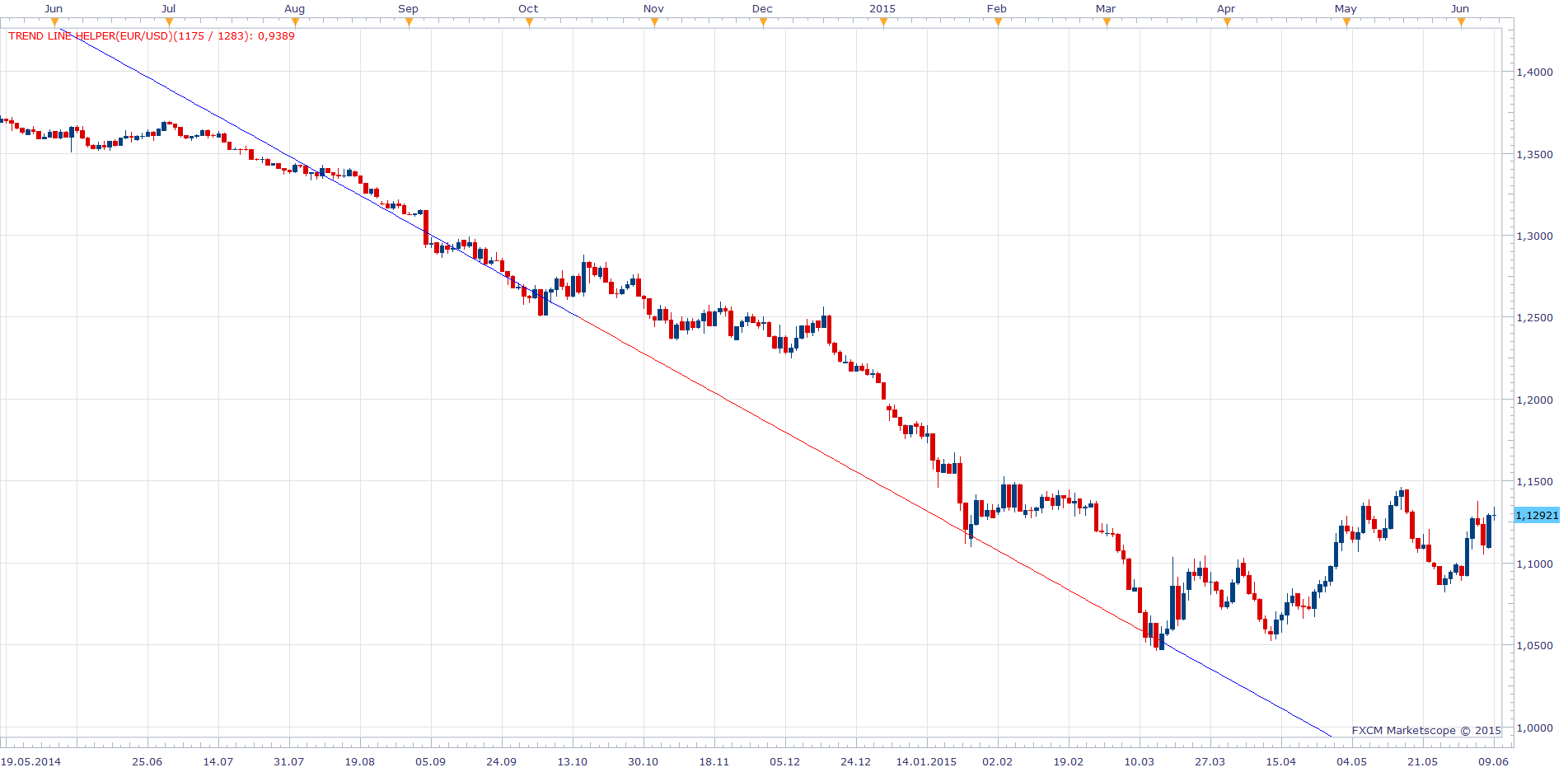
Based on request. viewtopic.php?f=27&t=62268
While you can argue this indicator does not have any practical value. This indicator is designed to be used from within strategys.
Line is determined by two points. Date And Level is set via indicator parameter sections.
The indicator was revised and updated
Re: Trend Line Helper
zoltanh · Wed Jun 10, 2015 2:11 pm
Thanks a lot, Apprentice!! this is exactly what i need.. i can start putting this into strategies
Re: Trend Line Helper
zoltanh · Tue Jun 16, 2015 3:15 pm
Hi Apprentice,
I seem struggling with this, I created the first strategy, which is a simple cross over/under of the line. When I want to run the strategy TS always says that the indicator cannot be found although it is imported. I think somehow the strategy cannot pull the indicator data. Could you help me having a look at this? thanks!
Re: Trend Line Helper
Apprentice · Wed Jun 17, 2015 2:21 am
Try this lines.
assert(core.indicators:findIndicator("TREND LINE HELPER") ~= nil, "Please, download and install Trend Line Helper.LUA indicator");
TLH = core.indicators:create("TREND LINE HELPER", Level1, Date1, Level2, Date2, Extend );
You must use uppercase when defined indicator calls.
Re: Trend Line Helper
zoltanh · Fri Jun 19, 2015 7:26 am
Hi Apprentice, Big thank you again for your help!!!
Re: Trend Line Helper
Cactus · Sat Jul 30, 2016 1:27 pm
I like this very much. The only trendline that can be used in a strategy indeed. Now, can the point level and point date be automatically definded by the past zig zag turning points? With zig zag settings set by user also?
When zig zag turns from red (downtrend) to green (uptrend), make that point 1 When zig zag turns from green (uptrend) to red (downtrend), make that point 2 This would make an “uptrend” line, color = green
When zig zag turns from green (uptrend) to red (downtrend), make that point 1 When zig zag turns from red (downtrend) to green (uptrend), make that point 2 This would make a “downtrend” line, color = red
And to have multiple lines like this not just two, on all past zig zag points? But all independently named (up1, dn1, up2, dn2 etc)
I have something that made in Excel to detect zig zag swings from past historical data exported from marketscope “table” view with zigzag indicator applied, please see screenshot for formulas if they might be useful to help. Now the only thing is to take the date from that period too and the parameters can be populated. This indicator would gain much power this way.
Re: Trend Line Helper
Cactus · Sat Jul 30, 2016 1:36 pm
Actually apart from what I explained it might be better if it plotted those lines from low to low and high to high. Like normal trendlines should be drawn… So there is no “up” or “down” trend. Just lines plotted on high to high zigzags and low to low zigzags CHEERS
Re: Trend Line Helper
Apprentice · Tue Aug 02, 2016 6:56 am
Your request is added to the development list, Under Id Number 3582 If someone is interested to do this or any task other from list please contact me.
Re: Trend Line Helper
Cactus · Sat Nov 05, 2016 7:59 pm
I managed to achieve what I described in above posts using a macro to input the points and date data from Excel into multiple instances of Trend Line Helper on the chart.
The problem is, the lines will not show until sufficient candlesticks are shown on the screen. Can this be fixed to still show the lines even if date is out of range for current view?
For example, when having the chart set to 1 minute timeframe, one cannot scroll past back to year 2010 for example. So if I add a trendline that should show up today, but the points are defined back in 2010, the indicator will stay blank until it “sees” that data on chart, only then it will draw a line with “extend” set to yes… So my question is, can it still work without me having to zoom out all the chart? Sometimes it’s impossible, such as with “1 minute” data… It’s only possible to zoom out so far with 1m view in backtester chart. Thanks
Re: Trend Line Helper
Apprentice · Mon Nov 07, 2016 6:13 am
Can you share excel / code.
Re: Trend Line Helper
Cactus · Thu Nov 17, 2016 4:00 pm
Apprentice wrote: Can you share excel / code.
Oh, it is just a simple macro created using “Microsoft Mouse and Keyboard Centre” using just keystrokes to automate inputting the data and the indicator on the chart. It works like this if anyone is using the same app
<?xml version="1.0" encoding="UTF-8"?><Macro>
   <KeyBoardEvent Down="true">29</KeyBoardEvent>
   <DelayEvent>110</DelayEvent>
   <KeyBoardEvent Down="true">46</KeyBoardEvent>
   <DelayEvent>110</DelayEvent>
   <KeyBoardEvent Down="false">46</KeyBoardEvent>
   <DelayEvent>110</DelayEvent>
   <KeyBoardEvent Down="false">29</KeyBoardEvent>
   <DelayEvent>110</DelayEvent>
   <KeyBoardEvent Down="true">56</KeyBoardEvent>
   <DelayEvent>110</DelayEvent>
   <KeyBoardEvent Down="true">15</KeyBoardEvent>
   <DelayEvent>110</DelayEvent>
   <KeyBoardEvent Down="false">15</KeyBoardEvent>
   <DelayEvent>110</DelayEvent>
   <KeyBoardEvent Down="false">56</KeyBoardEvent>
   <DelayEvent>110</DelayEvent>
   <KeyBoardEvent Down="true">23</KeyBoardEvent>
   <DelayEvent>110</DelayEvent>
   <KeyBoardEvent Down="false">23</KeyBoardEvent>
   <DelayEvent>110</DelayEvent>
   <KeyBoardEvent Down="true">28</KeyBoardEvent>
   <DelayEvent>110</DelayEvent>
   <KeyBoardEvent Down="false">28</KeyBoardEvent>
   <DelayEvent>110</DelayEvent>
   <KeyBoardEvent Down="true">15</KeyBoardEvent>
   <DelayEvent>110</DelayEvent>
   <KeyBoardEvent Down="false">15</KeyBoardEvent>
   <DelayEvent>110</DelayEvent>
   <KeyBoardEvent Down="true">29</KeyBoardEvent>
   <DelayEvent>110</DelayEvent>
   <KeyBoardEvent Down="true">47</KeyBoardEvent>
   <DelayEvent>110</DelayEvent>
   <KeyBoardEvent Down="false">47</KeyBoardEvent>
   <DelayEvent>110</DelayEvent>
   <KeyBoardEvent Down="false">29</KeyBoardEvent>
   <DelayEvent>110</DelayEvent>
   <KeyBoardEvent Down="true">28</KeyBoardEvent>
   <DelayEvent>110</DelayEvent>
   <KeyBoardEvent Down="false">28</KeyBoardEvent>
   <DelayEvent>110</DelayEvent>
   <KeyBoardEvent Down="true">57424</KeyBoardEvent>
   <DelayEvent>110</DelayEvent>
   <KeyBoardEvent Down="false">57424</KeyBoardEvent>
   <DelayEvent>110</DelayEvent>
   <KeyBoardEvent Down="true">56</KeyBoardEvent>
   <DelayEvent>110</DelayEvent>
   <KeyBoardEvent Down="true">15</KeyBoardEvent>
   <DelayEvent>110</DelayEvent>
   <KeyBoardEvent Down="false">15</KeyBoardEvent>
   <DelayEvent>110</DelayEvent>
   <KeyBoardEvent Down="false">56</KeyBoardEvent>
   <DelayEvent>110</DelayEvent>
   <KeyBoardEvent Down="true">57415</KeyBoardEvent>
   <DelayEvent>110</DelayEvent>
   <KeyBoardEvent Down="false">57415</KeyBoardEvent>
   <DelayEvent>110</DelayEvent>
   <KeyBoardEvent Down="true">29</KeyBoardEvent>
   <DelayEvent>110</DelayEvent>
   <KeyBoardEvent Down="true">46</KeyBoardEvent>
   <DelayEvent>110</DelayEvent>
   <KeyBoardEvent Down="false">46</KeyBoardEvent>
   <DelayEvent>110</DelayEvent>
   <KeyBoardEvent Down="false">29</KeyBoardEvent>
   <DelayEvent>110</DelayEvent>
   <KeyBoardEvent Down="true">56</KeyBoardEvent>
   <DelayEvent>110</DelayEvent>
   <KeyBoardEvent Down="true">15</KeyBoardEvent>
   <DelayEvent>110</DelayEvent>
   <KeyBoardEvent Down="false">15</KeyBoardEvent>
   <DelayEvent>110</DelayEvent>
   <KeyBoardEvent Down="false">56</KeyBoardEvent>
   <DelayEvent>110</DelayEvent>
   <KeyBoardEvent Down="true">29</KeyBoardEvent>
   <DelayEvent>110</DelayEvent>
   <KeyBoardEvent Down="true">47</KeyBoardEvent>
   <DelayEvent>110</DelayEvent>
   <KeyBoardEvent Down="false">47</KeyBoardEvent>
   <DelayEvent>110</DelayEvent>
   <KeyBoardEvent Down="false">29</KeyBoardEvent>
   <DelayEvent>110</DelayEvent>
   <KeyBoardEvent Down="true">28</KeyBoardEvent>
   <DelayEvent>110</DelayEvent>
   <KeyBoardEvent Down="false">28</KeyBoardEvent>
   <DelayEvent>110</DelayEvent>
   <KeyBoardEvent Down="true">57424</KeyBoardEvent>
   <DelayEvent>110</DelayEvent>
   <KeyBoardEvent Down="false">57424</KeyBoardEvent>
   <DelayEvent>110</DelayEvent>
   <KeyBoardEvent Down="true">57424</KeyBoardEvent>
   <DelayEvent>110</DelayEvent>
   <KeyBoardEvent Down="false">57424</KeyBoardEvent>
   <DelayEvent>110</DelayEvent>
   <KeyBoardEvent Down="true">56</KeyBoardEvent>
   <DelayEvent>110</DelayEvent>
   <KeyBoardEvent Down="true">15</KeyBoardEvent>
   <DelayEvent>110</DelayEvent>
   <KeyBoardEvent Down="false">15</KeyBoardEvent>
   <DelayEvent>110</DelayEvent>
   <KeyBoardEvent Down="false">56</KeyBoardEvent>
   <DelayEvent>110</DelayEvent>
   <KeyBoardEvent Down="true">57416</KeyBoardEvent>
   <DelayEvent>110</DelayEvent>
   <KeyBoardEvent Down="false">57416</KeyBoardEvent>
   <DelayEvent>110</DelayEvent>
   <KeyBoardEvent Down="true">57423</KeyBoardEvent>
   <DelayEvent>110</DelayEvent>
   <KeyBoardEvent Down="false">57423</KeyBoardEvent>
   <DelayEvent>110</DelayEvent>
   <KeyBoardEvent Down="true">57421</KeyBoardEvent>
   <DelayEvent>110</DelayEvent>
   <KeyBoardEvent Down="false">57421</KeyBoardEvent>
   <DelayEvent>110</DelayEvent>
   <KeyBoardEvent Down="true">57419</KeyBoardEvent>
   <DelayEvent>110</DelayEvent>
   <KeyBoardEvent Down="false">57419</KeyBoardEvent>
   <DelayEvent>110</DelayEvent>
   <KeyBoardEvent Down="true">29</KeyBoardEvent>
   <DelayEvent>110</DelayEvent>
   <KeyBoardEvent Down="true">46</KeyBoardEvent>
   <DelayEvent>110</DelayEvent>
   <KeyBoardEvent Down="false">46</KeyBoardEvent>
   <DelayEvent>110</DelayEvent>
   <KeyBoardEvent Down="false">29</KeyBoardEvent>
   <DelayEvent>110</DelayEvent>
   <KeyBoardEvent Down="true">56</KeyBoardEvent>
   <DelayEvent>110</DelayEvent>
   <KeyBoardEvent Down="true">15</KeyBoardEvent>
   <DelayEvent>110</DelayEvent>
   <KeyBoardEvent Down="false">15</KeyBoardEvent>
   <DelayEvent>110</DelayEvent>
   <KeyBoardEvent Down="false">56</KeyBoardEvent>
   <DelayEvent>110</DelayEvent>
   <KeyBoardEvent Down="true">29</KeyBoardEvent>
   <DelayEvent>110</DelayEvent>
   <KeyBoardEvent Down="true">47</KeyBoardEvent>
   <DelayEvent>110</DelayEvent>
   <KeyBoardEvent Down="false">47</KeyBoardEvent>
   <DelayEvent>110</DelayEvent>
   <KeyBoardEvent Down="false">29</KeyBoardEvent>
   <DelayEvent>110</DelayEvent>
   <KeyBoardEvent Down="true">28</KeyBoardEvent>
   <DelayEvent>110</DelayEvent>
   <KeyBoardEvent Down="false">28</KeyBoardEvent>
   <DelayEvent>110</DelayEvent>
   <KeyBoardEvent Down="true">57424</KeyBoardEvent>
   <DelayEvent>110</DelayEvent>
   <KeyBoardEvent Down="false">57424</KeyBoardEvent>
   <DelayEvent>110</DelayEvent>
   <KeyBoardEvent Down="true">56</KeyBoardEvent>
   <DelayEvent>110</DelayEvent>
   <KeyBoardEvent Down="true">15</KeyBoardEvent>
   <DelayEvent>110</DelayEvent>
   <KeyBoardEvent Down="false">15</KeyBoardEvent>
   <DelayEvent>110</DelayEvent>
   <KeyBoardEvent Down="false">56</KeyBoardEvent>
   <DelayEvent>110</DelayEvent>
   <KeyBoardEvent Down="true">57415</KeyBoardEvent>
   <DelayEvent>110</DelayEvent>
   <KeyBoardEvent Down="false">57415</KeyBoardEvent>
   <DelayEvent>110</DelayEvent>
   <KeyBoardEvent Down="true">29</KeyBoardEvent>
   <DelayEvent>110</DelayEvent>
   <KeyBoardEvent Down="true">46</KeyBoardEvent>
   <DelayEvent>110</DelayEvent>
   <KeyBoardEvent Down="false">46</KeyBoardEvent>
   <DelayEvent>110</DelayEvent>
   <KeyBoardEvent Down="false">29</KeyBoardEvent>
   <DelayEvent>110</DelayEvent>
   <KeyBoardEvent Down="true">56</KeyBoardEvent>
   <DelayEvent>110</DelayEvent>
   <KeyBoardEvent Down="true">15</KeyBoardEvent>
   <DelayEvent>110</DelayEvent>
   <KeyBoardEvent Down="false">15</KeyBoardEvent>
   <DelayEvent>110</DelayEvent>
   <KeyBoardEvent Down="false">56</KeyBoardEvent>
   <DelayEvent>110</DelayEvent>
   <KeyBoardEvent Down="true">29</KeyBoardEvent>
   <DelayEvent>110</DelayEvent>
   <KeyBoardEvent Down="true">47</KeyBoardEvent>
   <DelayEvent>110</DelayEvent>
   <KeyBoardEvent Down="false">47</KeyBoardEvent>
   <DelayEvent>110</DelayEvent>
   <KeyBoardEvent Down="false">29</KeyBoardEvent>
   <DelayEvent>110</DelayEvent>
   <KeyBoardEvent Down="true">28</KeyBoardEvent>
   <DelayEvent>110</DelayEvent>
   <KeyBoardEvent Down="false">28</KeyBoardEvent>
   <DelayEvent>110</DelayEvent>
   <KeyBoardEvent Down="true">15</KeyBoardEvent>
   <DelayEvent>110</DelayEvent>
   <KeyBoardEvent Down="false">15</KeyBoardEvent>
   <DelayEvent>110</DelayEvent>
   <KeyBoardEvent Down="true">15</KeyBoardEvent>
   <DelayEvent>110</DelayEvent>
   <KeyBoardEvent Down="false">15</KeyBoardEvent>
   <DelayEvent>110</DelayEvent>
   <KeyBoardEvent Down="true">15</KeyBoardEvent>
   <DelayEvent>110</DelayEvent>
   <KeyBoardEvent Down="false">15</KeyBoardEvent>
   <DelayEvent>110</DelayEvent>
   <KeyBoardEvent Down="true">15</KeyBoardEvent>
   <DelayEvent>110</DelayEvent>
   <KeyBoardEvent Down="false">15</KeyBoardEvent>
   <DelayEvent>110</DelayEvent>
   <KeyBoardEvent Down="true">28</KeyBoardEvent>
   <DelayEvent>110</DelayEvent>
   <KeyBoardEvent Down="false">28</KeyBoardEvent>
   <DelayEvent>110</DelayEvent>
   <KeyBoardEvent Down="true">56</KeyBoardEvent>
   <DelayEvent>110</DelayEvent>
   <KeyBoardEvent Down="true">15</KeyBoardEvent>
   <DelayEvent>110</DelayEvent>
   <KeyBoardEvent Down="false">15</KeyBoardEvent>
   <DelayEvent>110</DelayEvent>
   <KeyBoardEvent Down="false">56</KeyBoardEvent>
   <DelayEvent>110</DelayEvent>
   <KeyBoardEvent Down="true">57416</KeyBoardEvent>
   <DelayEvent>110</DelayEvent>
   <KeyBoardEvent Down="false">57416</KeyBoardEvent>
   <DelayEvent>110</DelayEvent>
   <KeyBoardEvent Down="true">57423</KeyBoardEvent>
   <DelayEvent>110</DelayEvent>
   <KeyBoardEvent Down="false">57423</KeyBoardEvent>
   <DelayEvent>110</DelayEvent>
   <KeyBoardEvent Down="true">57421</KeyBoardEvent>
   <DelayEvent>110</DelayEvent>
   <KeyBoardEvent Down="false">57421</KeyBoardEvent>
   <DelayEvent>110</DelayEvent>
   <KeyBoardEvent Down="true">57419</KeyBoardEvent>
   <DelayEvent>110</DelayEvent>
   <KeyBoardEvent Down="false">57419</KeyBoardEvent>
</Macro>
First, have a spreadsheet with O,H,L,C data window opened Then a marketscope chart window opened This macro will copy the last row, alt+tab , insert indicator (most recent), add the time, then alt+tab, copy date, alt+tab to insert date… etc.
However this is still slow with a lot of lines to add, and doesn’t address the issue I described (in case data isn’t visible on chart because it’s older than what’s availalbe to see, for example, the first point is in year 2012).
I think the normal “line” objects that can be added to the chart by pressing L don’t have this issue as this indicator. But it is impossible to “paste” data into the “position” tab into their parameters, only type it or choose from calendar dates. So my macro wouldn’t work. I just want a way to draw the lines on two points I need (date/time). I have requested for this in this topic. viewtopic.php?f=27&t=64066
Re: Trend Line Helper
Cactus · Thu Apr 06, 2017 9:19 pm
Can this issue of lines not being drawn if historical candles with the points are not seen be fixed? Also, I don’t know if all lines draw correctly? The trend line helper line does not look the same as normal line object (different slope)
Re: Trend Line Helper
Cactus · Thu Apr 06, 2017 10:49 pm
Also can you create a sample strategy template with this indicator so I can learn from it since I cannot add this indicator into FX Wizard for some reason. Let the user decide parameters (level1, level2, date1, date2, extend = true) and when price cross below line, buy and if it goes above, sell
Re: Trend Line Helper
Apprentice · Mon Apr 10, 2017 7:06 am
Your request is added to the development list, Under Id Number 3778 If someone is interested to do this task, please contact me.
Re: Trend Line Helper
Apprentice · Wed Apr 19, 2017 1:25 pm
Try this version.
Re: Trend Line Helper
Cactus · Wed Apr 19, 2017 7:07 pm
Lovely thank you, now I can paste the numbers instead of putting them in by clicking on calendar