fxcodebase-backup
ZigZag Channel
Source: https://fxcodebase.com/code/viewtopic.php?f=17&t=60727
Forum: 17 · Topic 60727 · 109 post(s)
ZigZag Channel
Apprentice · Mon May 26, 2014 5:16 am
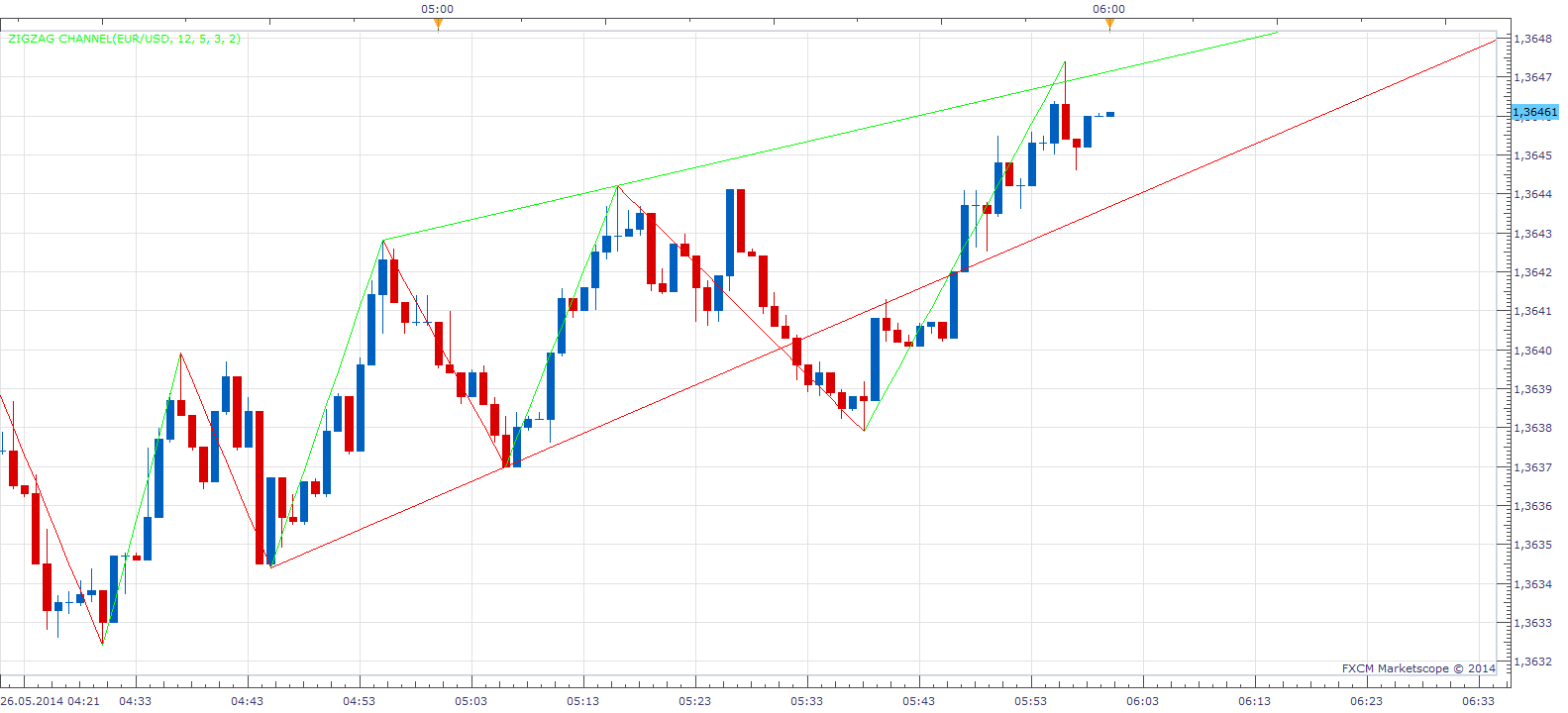
ZigZag Channel with Output.lua
Tick ZigZag Channel with Output.lua
Re: ZigZag Channel
Cactus · Tue Feb 21, 2017 8:43 pm
Great find. Can you please check why lines disappear sometimes when moving the chart around with many instances of the same indicator applied? When zooming in/out or scrolling back, the lines simply disappear, until I go into indicator settings and click apply/ok again.
Re: ZigZag Channel
Apprentice · Wed Feb 22, 2017 3:32 am
Objects are drawn via Draw() function. I believe this is the reason.
Re: ZigZag Channel
Cactus · Wed Feb 22, 2017 4:50 pm
Apprentice wrote: Objects are drawn via Draw() function. I believe this is the reason.
I see. In this case, what is the solution? Is it possible to make this behavior go away? Can you re-write this indicator using same principle as “trend line helper” or something? Can this draw() function be fixed? This would make for a very good channel indicator if lines would not disappear
Re: ZigZag Channel
Apprentice · Fri Feb 24, 2017 5:56 am
We can rewrite, use ouput core.drawLine and two output streams, or core.host:execute (“drawLine”…
Re: ZigZag Channel
Cactus · Fri Feb 24, 2017 3:37 pm
Apprentice wrote: We can rewrite, use ouput core.drawLine and two output streams, or core.host:execute (“drawLine”…
That’s great, can you please provide this indicator with two output streams for the lines as you mention?
Re: ZigZag Channel
Apprentice · Sat Feb 25, 2017 4:17 pm
ZigZag Channel with Output added.
Re: ZigZag Channel
Cactus · Sat Feb 25, 2017 7:48 pm
This is perfect, thank you Apprentice, very good indicator I have a problem after adding it to a strategy, the following in the backtester:
C:/Program Files (x86)/Candleworks/FXTS2/Strategies/Custom/my_strat.lua:239: C:/Program Files (x86)/Candleworks/FXTS2/Indicators/Custom/ZigZag Channel with Output.lua (409, -1) : E19 - The first parameter must be a number
Strategy line code
Code: Select all
ZIGZAG_CHANNEL_WITH_OUTPUT:update(core.UpdateLast);
However this does not happen in Simulation Mode so I guess it shoudn’t be a problem live either
I am guessing it is to do with no candle history being available in backtester to draw the zigzag
Thank you
Re: ZigZag Channel
Apprentice · Sun Feb 26, 2017 4:58 am
I can not help you without access to underlying strategy.
Re: ZigZag Channel
Cactus · Sun Feb 26, 2017 8:23 am
Ok! Here’s a sample strategy to demonstrate this problem I created using FX Wizard:
I have added a screenshot of the settings Running it on EUR/USD on the past week (13.02.2017 - 17.02.2017), I get the following error:
Code: Select all
C:/Program Files (x86)/Candleworks/FXTS2/Strategies/Custom/zig_output_channel_strat.lua:230: C:/Program Files (x86)/Candleworks/FXTS2/Indicators/Custom/ZigZag Channel with Output.lua (409, -1) : E19 - The first parameter must be a number
But when I do the same in “simualtion mode” (where there is more candle data available, not just the chosen range), the backtesting runs fine, but is very slow, and the equity looks like this: (with settings take_profit 0.1 and max_positions 100)
However, sometimes, with different settings, I get a similar error, just talking about “third parameter”
Also, can you please say what stream is “out” corresponding to? I understand “Top” and “Bottom”. But on chart there’s also “Up” and in FX Wizard there’s “out”. Is this causing the error? Or is it because I am checking every tick for updates? How can I fix this strategy to work in backtester?
Also, I mostly rely on FX Wizard to create my strategies, would you be so kind to inspect the code and advice on any changes I should perform every time, since it’s the same template every time, I want to know if there’s a better way of writing strategies, since the project has not been updated in a while. By “better” I mean without unecessary code, more efficient, optimal, etc. For example, I like to use (ask + bid / 2) price = median. In this strategy I use this indicator and BB. I have two BB (1 ask and 1 bid) and perform the median calculation to get one reading. I also have “mid_tick” which is the median price, I am sure I could replace the BB source with mid_tick instead of calculating it twice, one for ask and one for bid and dividing by two… And stuff like that.
All suggestions and comments are welcome please.
This strategy uses 3 timeframes: tick, m1, m15
Thanks
Re: ZigZag Channel
Cactus · Mon Feb 27, 2017 12:54 pm
Should I create a new thread to seek help getting this strategy fixed to work in backtester with this indicator or is leaving the post here just fine
Re: ZigZag Channel
Cactus · Mon Feb 27, 2017 3:02 pm
Ok I see the “out” / “up” stream is for color, width and style.
Re: ZigZag Channel
Apprentice · Tue Feb 28, 2017 4:02 am
I do not use FX Wizard, If you write strategy rules, I can write strategy for you.
Re: ZigZag Channel
Cactus · Thu Mar 16, 2017 8:12 pm
Can you also provide a version of ZigZag with Output, with tick as source, so it can be used on tick charts and indicators
Re: ZigZag Channel
Apprentice · Fri Mar 17, 2017 4:49 am
Tick ZigZag Channel with Output.lua added.
Re: ZigZag Channel
Cactus · Fri Apr 14, 2017 11:30 am
Symbol   Strategy/Indicator   Message   Time
EUR/GBP   ZIGZAG CHANNEL WITH OUTPUT(midprice, 45, 1, 1, 44)   An error occurred during the calculation of the indicator 'ZIGZAG CHANNEL WITH OUTPUT(midprice, 45, 1, 1, 44)'. The error details: C:/Program Files (x86)/Candleworks/FXTS2/Indicators/Custom/ZigZag Channel with Output.lua:409:  The first parameter must be a number.   14/04/2017 20:33:31
Do you know how to fix this error? I think this happens when there’s not enough candles loaded on the chart
Re: ZigZag Channel
Apprentice · Sat Apr 15, 2017 1:39 pm
Try it now.
Re: ZigZag Channel
Cactus · Sat Apr 15, 2017 4:56 pm
Apprentice wrote: Try it now.
Perfect, the error does not happen anymore, at least on the charts, yet to try it in a strategy, and ZigZag channel with output updates itself as more data is beeing seen on the chart (when I scroll back), thank you, this will help me a lot.
Re: ZigZag Channel
cash4u · Mon Apr 17, 2017 7:21 pm
hi apprendice,
can you add show/hide option for zig zag in this indicator
Re: ZigZag Channel
Apprentice · Tue Apr 18, 2017 12:09 pm
I can add it. If you re-download, you can already set a line style option to “no line”.
Re: ZigZag Channel
Cactus · Sat May 27, 2017 5:55 am
Can you add a version of the “ZigZag Channel with Output” with a see historical option. The same as it is in “AUTOLEV3” indicator (The Lookback) paramter. So that we can draw many zigzag channels without applying the same indicator many times which slows down marketscope when there’s a lot. Currently one zigzag indicator instance = 2 trendlines, but can you add a parameter to see historical also where it is possible to have many trendlines with just one indicator instance applied on chart? Thank you
Re: ZigZag Channel
Apprentice · Sat May 27, 2017 7:23 am
Your request is added to the development list, Under Id Number 3801 If someone is interested to do this task, please contact me.
Re: ZigZag Channel
Alexander.Gettinger · Fri Sep 22, 2017 1:02 pm
Cactus wrote: Can you add a version of the “ZigZag Channel with Output” with a see historical option. The same as it is in “AUTOLEV3” indicator (The Lookback) paramter. So that we can draw many zigzag channels without applying the same indicator many times which slows down marketscope when there’s a lot. Currently one zigzag indicator instance = 2 trendlines, but can you add a parameter to see historical also where it is possible to have many trendlines with just one indicator instance applied on chart? Thank you
Please, try this version of indicator:
ZigZag Channel with Output_Mult.lua
Re: ZigZag Channel
Cactus · Fri Oct 20, 2017 7:19 pm
That is great!
Apprentice wrote: We can rewrite, use ouput core.drawLine and two output streams, or core.host:execute (“drawLine”…
Ok. So can the same be done using core.host:execute (“drawLine” So “ZigZag Channel with Output_Mult.lua” version but with no output streams, just lines, for less lag?
I know it may sound like I am asking the reverse of previous request but both of these can be useful, streams version for strategies, and the one I am requesting now as visual help
I know it may be a case of just replacing core.drawLine so I will give it a go and if I can implement it I will post it here
So far trying something like this
Code: Select all
core.host:execute("drawLine", Top[index], tx2, ty2, source:date(source:size()-1), Y1, Color, Style, Width); but no luck
Also if you got the time, can a Tick ZigZag Channel with Output.lua with same multiple lookback see historical option get done, like I explained here:
Cactus wrote: a parameter to see historical also where it is possible to have many trendlines with just one indicator instance applied on chart?
Thanks in advance
Re: ZigZag Channel
Apprentice · Mon Oct 23, 2017 4:41 am
core.host:execute (“drawLine” product is line as on screen graphic presentation. NOT as indicator output, which can be referenced.
Re: ZigZag Channel
Apprentice · Mon May 07, 2018 12:43 pm
The Indicator was revised and updated.
Re: ZigZag Channel
Paul W · Tue Jan 14, 2020 2:48 pm
TICK ZIGZAG CHANNEL WITH OUTPUT
found an issue/bug affecting “Zig Zag Line Style” - specifically “Down swing” (Line) performance
currently both “Up swing” (Line) and “Down swing” (Line) default/focus is on “Bid”
- “Up swing” (Line) works well
- “Down swing” (Line) does not perform as well
can you default/focus “Down swing” (Line) onto “Ask ?
————- If possible, an Alert Feature https://youtu.be/hJaT-Zrd9Nk
“Up swing” (Line)/”Down swing” (Line) cross - (user-defined) equal or greater than “touch” eg: +0.0, +0.1, .. +1.0 etc
after each “Line Style” Up/Down repaint - counter resets to “0”
after user defined “N” crosses - triggers Alert
additional Alerts with each additional “touch” - until next repaint, and counter resets
Alert Symbol (Wingdings 116 pls) and Sound - no email or dialogue-box Feature needed
Have been using “Up swing” Line cross on a scalping strategy - works well
Thanks
Re: ZigZag Channel
Apprentice · Wed Jan 15, 2020 1:55 pm
Your request is added to the development list. Development reference 548.
Re: ZigZag Channel
Apprentice · Thu Jan 16, 2020 4:56 am
Tick_ZigZag_Channel_with_Output.lua
Try this version.
Re: ZigZag Channel
Paul W · Thu Jan 16, 2020 10:02 am
Tick_ZigZag_Channel_with_Output.lua
loaded, but an output display error occurred
Re: ZigZag Channel
Apprentice · Thu Jan 16, 2020 11:34 am
Can you provide error text?
Re: ZigZag Channel
Paul W · Thu Jan 16, 2020 3:46 pm
Tick_ZigZag_Channel_with_Output.lua
Loading indicator onto TSII Platform did not generate an error -ok
an error was generated (no detailed text description) - when loading indicator onto a Tick-Chart errors occurred on both Bid and Ask
loaded onto a 1-minute chart - no error was generated both Bid and Ask line features appear to function correctly
a quick video illustration https://youtu.be/96Qnt_Hn1Fo
Re: ZigZag Channel
Apprentice · Sat Jan 18, 2020 5:35 am
Your request is added to the development list. Development reference 555.
Re: ZigZag Channel
Apprentice · Mon Jan 20, 2020 10:06 am
Tick_ZigZag_Channel_with_Output.lua
Try this version.
Re: ZigZag Channel
Paul W · Wed Jan 22, 2020 10:53 am
am testing latest version
still some bugs on how Bid / Ask lines are being displayed - and alert feature has issues
am currently testing running old and new versions side by side - there is really good potential for this to be an entry indicator (scalping strategy)
I need to better document - will post as soon as possible
just wanted to give you a heads-up on my progress - and this reply doesn’t need to be posted
thanks
Re: ZigZag Channel
Paul W · Tue Jan 28, 2020 10:50 pm
Can you pls have a look at the original “Tick ZigZag Channel with Output.lua” indicator - appears there is “Down Line” calculation issue
“Down Line” calculation - does not paint the same (reciprocally) as “UpLine” calculation (an important functionality)
If there is a fix, it would be very much appreciated
Note ———-
the same “Down Line” calculation issue also appears to occur with “Tick_ZigZag_Channel_with_Output.lua”
-
“Up Line” alert function does work (some bugs thou)
-
“Down Line” alert function does not work at all - price never appears to cross “Down Line” (different calculation ?)
getting “Tick ZigZag Channel with Output.lua” to work is a more important fix
many Thx
Re: ZigZag Channel
susan61 · Wed Jan 29, 2020 9:51 am
Hey Apprentice Can you make some adjustments to ZigZag Channel with Output_Mult.lua
Add a long-term zigzag channel if channel. Long term-trend needs to create a lower high in a downtrend and long-term uptrend would create a higher low. Current price on that timeframe would need to close against zigzag channel the high/low of zigzag channel where trend started. Horizontal line to be added from the candle long-term trend started. if new long term trend zigzag channel was create in same direction to stop lines on chart have option to show last or show all. To have colour and line option for current & long-term and historical zigzag channel, for long- term zigzag channel and historical zigzag channel and current zigzag channel long term would stay until new same direction long term then old long term would become historical. Add Horizontal line to alert on touch and closed against. Add pip swing count and high/low and mid of current swing.This would be for 5min and above not tick Link below Thankyou in advance Susan
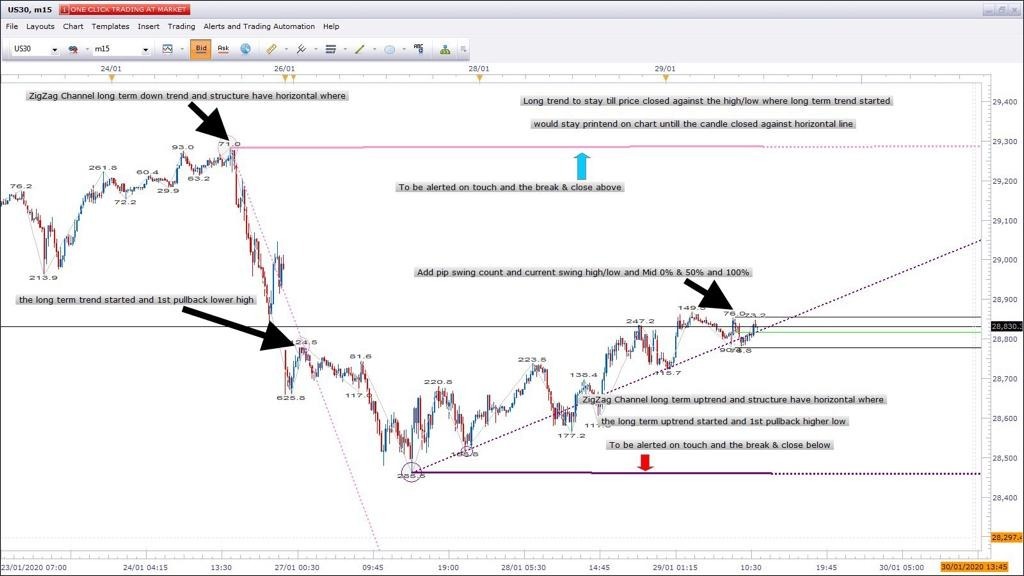
Re: ZigZag Channel
Apprentice · Wed Jan 29, 2020 5:21 pm
Your request is added to the development list. Development reference 608.
Re: ZigZag Channel
Apprentice · Thu Jan 30, 2020 5:11 pm
Tick ZigZag Channel with Output.lua
Tyr this version.
Re: ZigZag Channel
Apprentice · Tue Feb 04, 2020 6:10 am
susan61 I have a hard time understanding your request. Can you provide a bit more structured, a more detailed description? Maybe provide some sort of drawing.
Re: ZigZag Channel
susan61 · Tue Feb 04, 2020 9:42 am
Apprentice wrote: susan61 I have a hard time understanding your request. Can you provide a bit more structured, a more detailed description? Maybe provide some sort of drawing.
Hi Apprentice, The long term down trend = A swing to the downside with a zigzag pullback data to be taken from the high at point 1 and the 1st zigzag pull back point 2, And add horizontals from the point high point. The long term up trend = A swing to the upside with a zigzag pullback data to be taken from the low at point 1 and the 1st zigzag pull back point 2, And add horizontals from the point high point.
Current price on that timeframe would need to close against zigzag channel the high/low horizontal of zigzag channel where trend started. Horizontal line to be added from the candle long-term trend started. if new long term trend zigzag channel was create in same direction to stop lines on chart have option to show last or show all. To have colour and line option for current & long-term and historical zigzag channel, for long- term zigzag channel and historical zigzag channel and current zigzag channel long term would stay until new same direction long term then old long term would become historical. Add Horizontal line to alert on touch and closed against. Add pip swing count and high/low and mid of current swing.
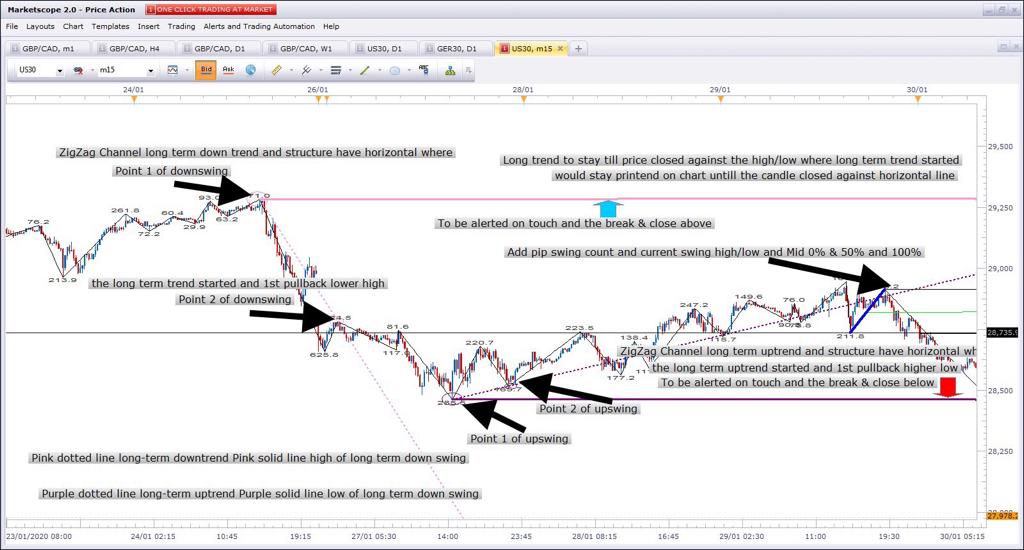
Hope this helps you understand with more details to the screen shot thanks in advance Susan
Re: ZigZag Channel
Apprentice · Tue Feb 04, 2020 1:19 pm
Your request is added to the development list. Development reference 637.
Re: ZigZag Channel
Apprentice · Wed Feb 05, 2020 10:12 am
I didn’t manage to figure out what “Add pip swing count and high/low and mid of current swing.” means.
ZigZag Channel with Output_Mult.lua
Re: ZigZag Channel
susan61 · Wed Feb 05, 2020 11:52 am
Hi Apprentice, Just had a look and its printing high & low of different swing. What I want is when price makes a higher low for long from point 1 then has a zigzag printed pullback creating point 2 to draw a trend line from point 1 to point 2 and draw a horizontal till end only draw if this happens. When price makes a lower high for short from point 1 then has a zigzag printed pullback creating point 2 to draw a trend line from point 1 to point 2 and draw a horizontal till end only draw if this happens. as condition repeat would keep drawing trend line from point 1 to point 2 and the horizontal line from point 1 until price closed below the low of point 1 1st low of higher low, and closed above the high of point 1 1st high of higher low also the need the current zigzag channel from the last 2 swings please, the current high low and mid of the current printed swing and pips count id amount of pips in that printed swing can be found ZigZag with Fibonacci.lua hope this clarifies my request Susan
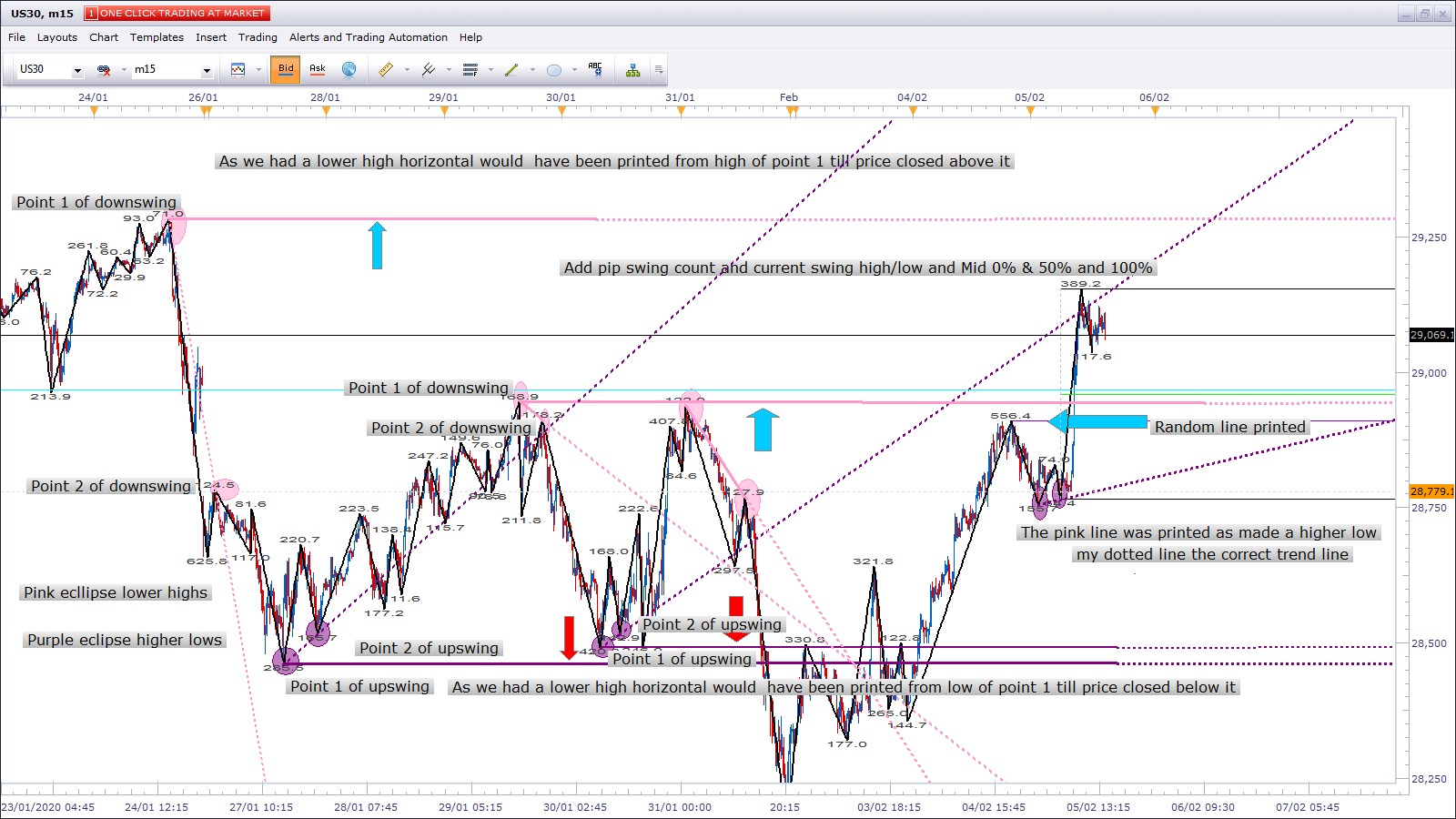
Re: ZigZag Channel
Paul W · Thu Feb 06, 2020 12:57 pm
Re: TICK ZIGZAG CHANNEL WITH OUTPUT
Could you please check the “Down Line” calculation - is it the same as the “Up Line” calculation (reciprocally) ?
They appear not to be - see attachment
-“Up Line” - works great, and is part of a successful Long-scalp Strategy -“Down Line” - should be reciprocal to “Up Line” performance - it is not (could you pls look at the calculation)
Originally I thought it was a “Bid” / “Ask” issue - I now believe this is incorrect (Re: TICK_ZIGZAG_CHANNEL_WITH_OUTPUT) …. my apologies
What is important (to me) is to have TICK ZIGZAG CHANNEL WITH OUTPUT “Up Line” and “Down Line” performance to be identical (reciprocally) - if this is possible ?
Re: TICK_ZIGZAG_CHANNEL_WITH_OUTPUT ……. (can wait, has more issues to fix)
Loading issues Bid/Ask calculation issues Alert function not working correctly
Many Thx
Re: ZigZag Channel
Apprentice · Fri Feb 07, 2020 6:17 am
Your request is added to the development list. Development reference 691.
Re: ZigZag Channel
Apprentice · Fri Feb 07, 2020 7:01 am
ZigZag Channel with Output_Mult.lua
Tick ZigZag Channel with Output.lua
Re: ZigZag Channel
susan61 · Fri Feb 07, 2020 8:47 am
[quote=”Apprentice”]
ZigZag Channel with Output_Mult.lua
Hi Apprentice, Thanks, you got the idea what I want still need adjustments. Need to have long-term trend lines look for data from the 1st pullback and every time there was a pullback, Thinks we to insist x =amount of pullback in % required otherwise chart would clutter up with irrelevant lines. To have option to show all or last x = amount of long-term trend to show. The horizontal lines from the long –term trends to be from point 1 every time a long-term trend created with x= amount of % pullback. I put the lookback to 1000 and still only printed the last 2, No historical either can you also add colour and line option for long term & historical trend up & down ,If you can also put back the original indicator that shows the last 2 swings as my request was to be added to the ZZ Channel. The current swing created for high /low and mid, what I should have explained the previous swing completed for the high/low and mid and the amount of pips from the high/low or low/ high. And there’s a number on the top don’t know what that is thanks for your work on this topic Susan
Re: ZigZag Channel
Paul W · Fri Feb 07, 2020 1:03 pm
Re: Tick ZigZag Channel with Output.lua - Feb 07, 2020 7:01 am - update
thank you
acts differently than original version - and Price now crosses “Down Line” (no bugs/issues so far)
settings need to be tuned (to selected instrument)
this could be a very good indicator - to a composite Strategy
Thx
Re: ZigZag Channel
Paul W · Fri Feb 07, 2020 2:18 pm
Re: Tick ZigZag Channel with Output.lua - Feb 07, 2020 7:01 am - update
found one glitch that needs to be error trapped
occasionally indicator will repaint backwards - to a previously painted line - both “Up Line” and “Down Line”(s)
could you error trap - allowing only forward progress of Line(s)
Thx
Re: ZigZag Channel
Apprentice · Mon Feb 10, 2020 6:39 am
ZigZag Channel with Output_Mult.lua
Try this version.
Re: ZigZag Channel
susan61 · Mon Feb 10, 2020 10:16 am
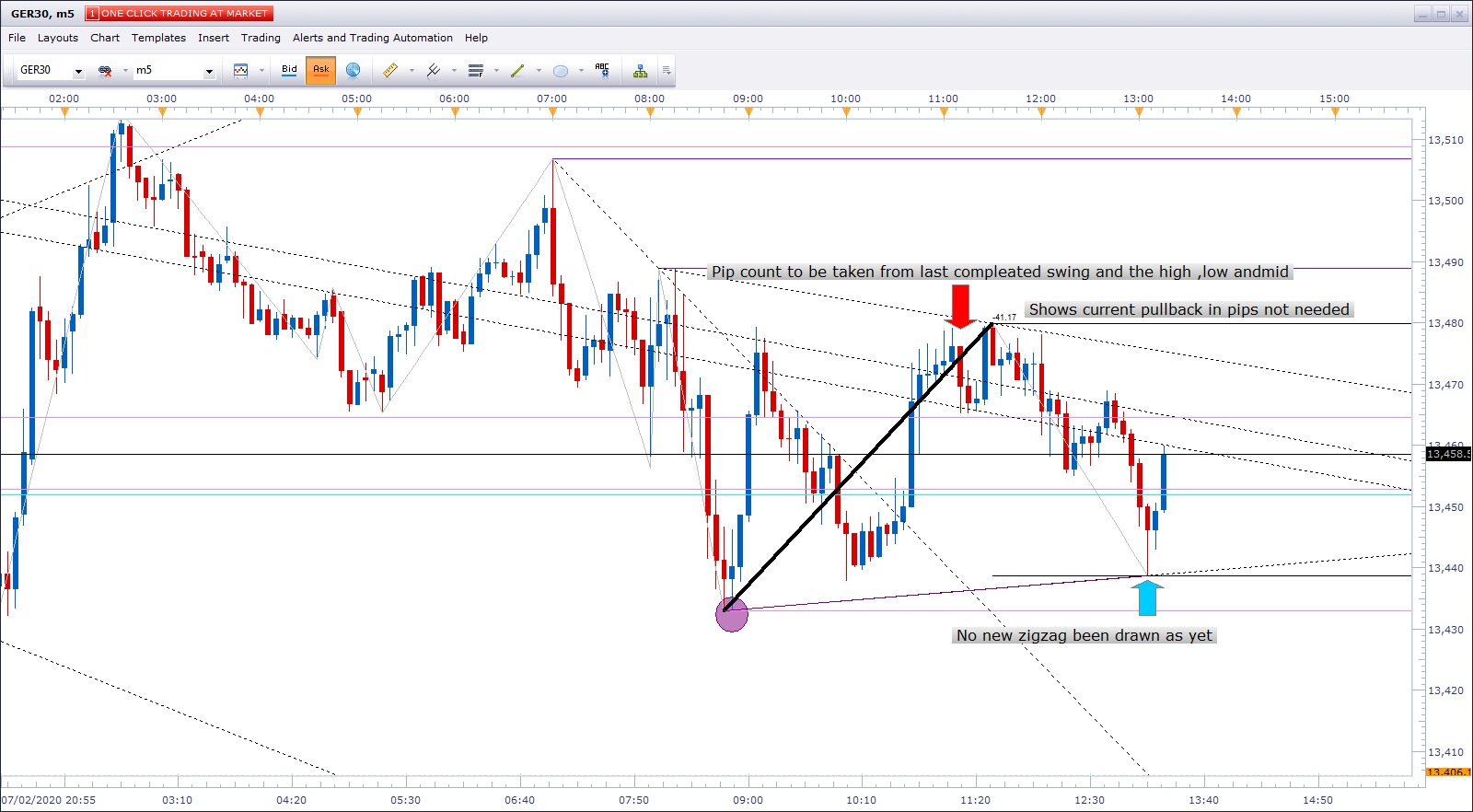
Hi Apprentice, This looks great with the added pullback %… Can you just make a few more adjustments 1. For the down swing on long term, historical and current data to be taken from ask price 2. For the down swing line and colour option for long term separate for historical separate for current trend. 3.For the up swings on long term trend, historical and current data to be taken from bid price 4. For the up swing line and colour option for long term separate for historical separate for current trend. 5. The pip count to be on the last completed swing and draw a line high ,low and mid points 6. And lastly noticed that a trend line is drawn b4 the zigzag has been drawn on current trend can this be set to once new zigzag created a higher low as per screen shot Thanks again for all hard work gone into this to getting right for me Susan
Re: ZigZag Channel
Apprentice · Tue Feb 11, 2020 5:59 am
Your request is added to the development list. Development reference 708.
Re: ZigZag Channel
Apprentice · Tue Feb 11, 2020 6:58 am
I can’t repeat that.
Re: ZigZag Channel
Paul W · Tue Feb 11, 2020 12:20 pm
Re: Tick ZigZag Channel with Output.lua - Feb 07, 2020 7:01 am - update
apologies, I should have attached an example
On Tick-Chart (US30) - back-to-previous-repaints are frequent - https://www.youtube.com/watch?v=fXusifC … e=youtu.be
appears that if “price” retraces (on a tick chart) sufficiently (making the previous calculation “more valid”(?), Then the “Up/Down Line(s)” will backstep and repaint the previous line-paint
btw the indicator is awesome - when used in a scalp-strategy for entry-points
I appreciate your efforts
Thanks
Re: ZigZag Channel
Apprentice · Wed Feb 12, 2020 1:35 pm
ZigZag Channel with Output_Mult.lua
Try this version.
Re: ZigZag Channel
susan61 · Wed Feb 12, 2020 3:14 pm
Hi Apprentice, Thanks so much for doing a great job Noticed that the data points are taken from are the wrong way round,also need to add the current swing as in the original version of indicator, and sometimes the indicator crashes 1. Upswingdata to be taken from a bid price source and a Downswingdata to be taken from a ask price currently other way round please can you change round 2. Thinks the current trend line is created when it has retracted more then % pullback but no ZigZag been created if you can add current swing as in the original version of the indicator (with no pullback required on current swing) this should eliminate this problem and we get the requested current swing in as well 3. The indicator shows (Error) in the legend when you adjust chart to get more chart data Thanks Susan
Re: ZigZag Channel
Apprentice · Fri Feb 14, 2020 8:54 am
ZigZag Channel with Output_Mult.lua
Try this version.
Re: ZigZag Channel
susan61 · Fri Feb 14, 2020 10:09 am
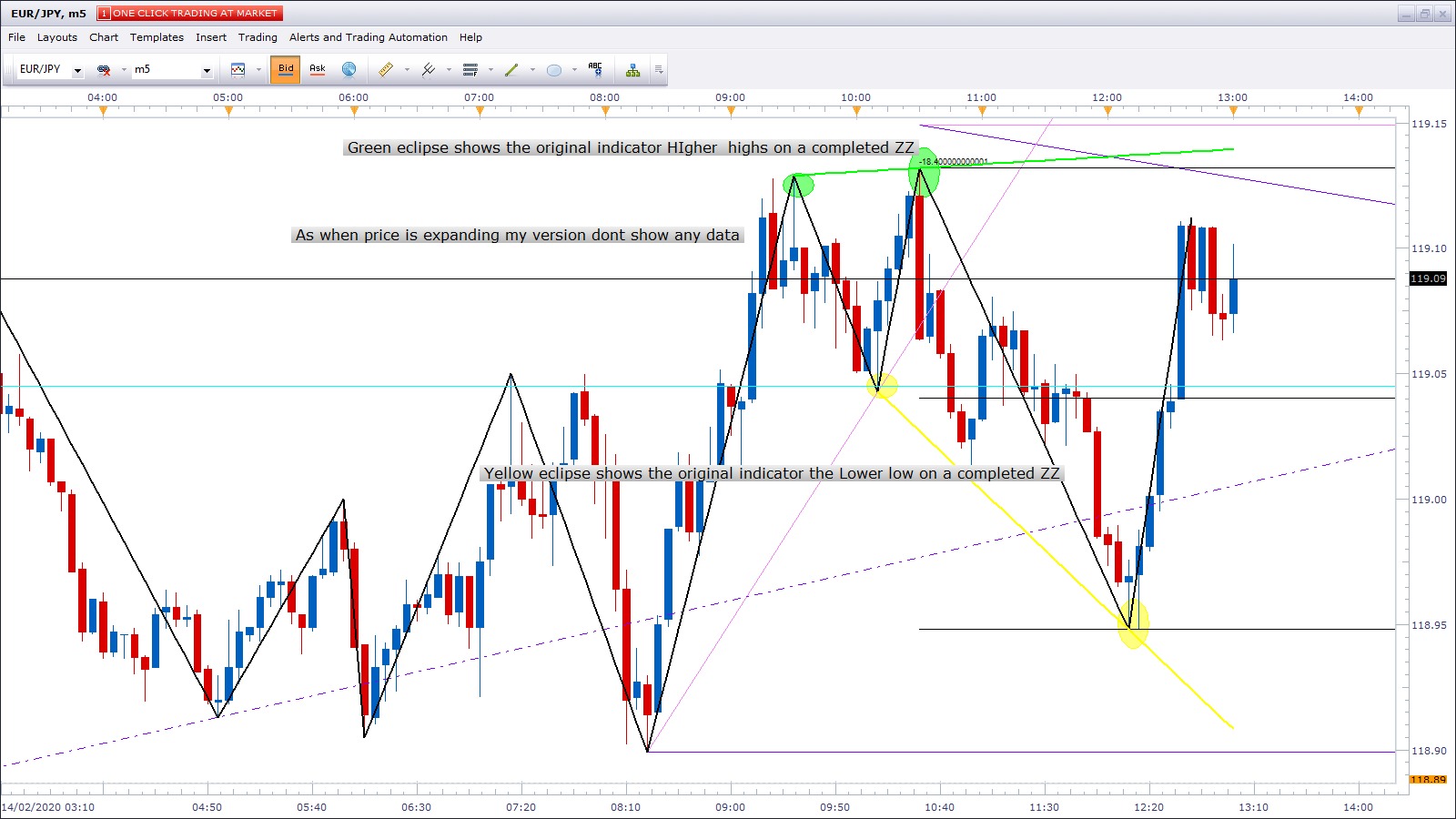
Hey Apprentice, You have done a perfect job with the bid and ask data point and pip count and the high /low and mid thank you. Can you still add the original version of the indicator as my version don’t any data for the last 2 swings if price is expanding would need to disable the % pullback or straight add the original version to run alongside with the long term historical and % pullback and would you be able to add multiple time frame option (x3) would just colour option .
Thank you so much for taking time to do all the adjustments i think this will be the last adjustments Susan
Re: ZigZag Channel
Apprentice · Sun Feb 16, 2020 5:59 am
Your request is added to the development list. Development reference 727.
Re: ZigZag Channel
Apprentice · Mon Feb 17, 2020 7:22 am
Try this version.
ZigZag Channel with Output_Mult.lua
NOTE: it’s better to use 3 indicators instead of coding 3 timeframes into the same indicator.
Re: ZigZag Channel
susan61 · Mon Feb 17, 2020 9:18 am
NOTE: it’s better to use 3 indicators instead of coding 3 timeframes into the same indicator.[/quote]
Hi Apprentice, Have tried putting x3 indicators using different time frames on but seems to slow the platform down when switching to different currency pairs. And the able/disable of the pullback didn’t make a difference, still didn’t print the last 2 high points or last 2 low point zigzag channel as per previous screen shot. Can you add the original version and its calculations for this part of the indicator note no pull back required on this part of the indicator only pullback % only required on the long term trend and historical trends Thanks Susan
Re: ZigZag Channel
Apprentice · Tue Feb 18, 2020 8:52 am
Your request is added to the development list. Development reference 736.
Re: ZigZag Channel
yolerap · Tue Feb 18, 2020 12:14 pm
Hi,
Is it possible to create a strategy with the last version of the indicator ( Zig Zag Channel With Output ) please ?
Look the picture ;
Sell when the price touch the upper line of the swing line Buy when the price touch the lower line of the swing line Close position at the middle of the upper and lower swing line
Thank you,
Re: ZigZag Channel
Apprentice · Wed Feb 19, 2020 2:11 pm
Your request is added to the development list. Development reference 749.
Re: ZigZag Channel
Apprentice · Wed Feb 19, 2020 2:21 pm
When you set “Use poolback” to false the old version of the code is used. Coding 3 timeframes into one indicator will not be any faster. It’s likely that it’ll be even slower. And I don’t understand 2high/low part
Re: ZigZag Channel
susan61 · Thu Feb 20, 2020 4:30 am
Hi Apprentice, When disable the pullback it disables on the long term and historical long term as well, is there a way can only disable the last 2 swings printed on the zigzag channel have a separate line and colour option. And would you be able to add x 3 % extensions above and below the last competed zigzag swing where we have the high low and mid-point and lastly can you make the label for the pip count of the completed zigzag swing larger and to the decimal point eg; currently sometimes shows 18.4440 to show 18.4 Thanks so much Susan
Re: ZigZag Channel
Apprentice · Fri Feb 21, 2020 6:09 am
ZigZag Channel with Output_Mult.lua
Re: ZigZag Channel
Apprentice · Fri Feb 21, 2020 6:16 am
Task 749
ZigZag Channel with Output_Mult With Arrows.lua
ZigZag Channel with Output_Mult Strategy.lua
Re: ZigZag Channel
susan61 · Fri Feb 21, 2020 10:01 am
Apprentice wrote:
ZigZag Channel with Output_Mult.lua
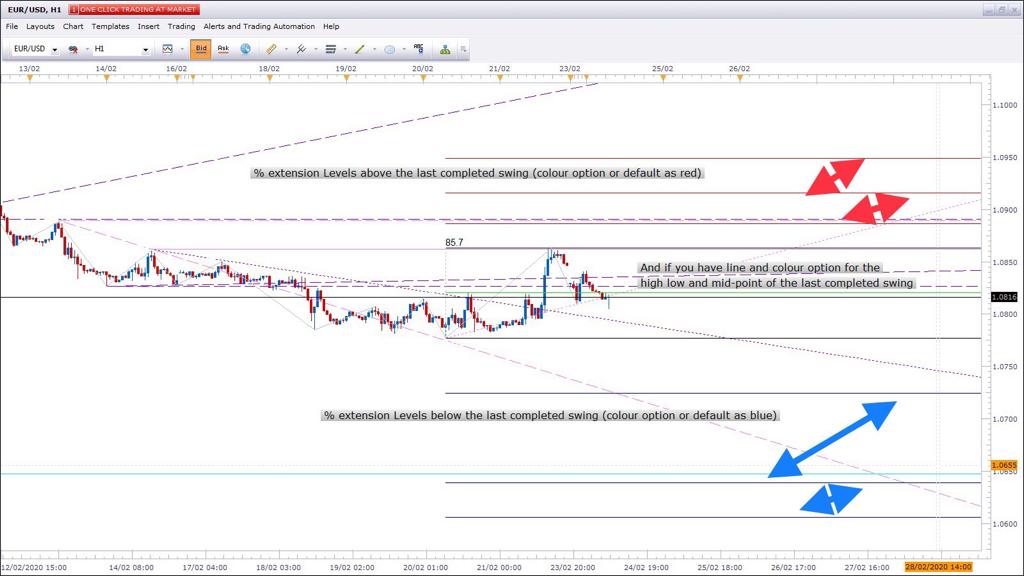
Hi Apprentice, Pip swing count great work, if you can add x3 percentage extensions levels above the high (colour option or default to red), and below the low (colour option or default to blue) from the last zigzag completed swing where we have the high low and mid-point, where the pip count is taken from. Still cannot manage to get the last to swing when I overlay the original version. Thanks Susan
Re: ZigZag Channel
Apprentice · Sun Feb 23, 2020 4:10 am
Your request is added to the development list. Development reference 764.
Re: ZigZag Channel
Apprentice · Mon Feb 24, 2020 4:02 am
I don’t understand the logic required. The screenshot will help.
Re: ZigZag Channel
susan61 · Mon Feb 24, 2020 4:53 am
Hi Apprentice, As per screen shot % extension levels above the last completed swing (colour option or default as red) and % extension levels below the last completed swing (colour option or default as blue).And have line and colour option for the high low and mid-point of the last completed swing all data taken from the last completed swing
Hope this helps Susan
Re: ZigZag Channel
Apprentice · Tue Feb 25, 2020 6:22 am
ZigZag Channel with Output_Mult.lua
Try this version.
Re: ZigZag Channel
susan61 · Tue Feb 25, 2020 9:11 am
Hi Apprentice, Great work on the line & colour option. With the % extension we need x3 % extensions levels for above the high of the last completed swing eg; 1.272% and 1.50% 1.618% and x3 % extensions levels for below the low of last completed swing -1.272% and -1.50% and -1.618%. As in previous screenshot as when tested this version it put both % extensions at bottom of swing and I used the + & - on the % extensions. If you make these adjustments Thanks Susan
Re: ZigZag Channel
Paul W · Tue Mar 03, 2020 11:40 am
Here is a simple strategy for Tick Chart Entries
to be used with - download/file.php?id=27469
currently tuned for CFD’s - US30 works well, and to be used with other indicators (for confirmation)
Note: there is a bug - Indicator will back-repaint to a previously displayed position - appears to depend on how price advances
here is a short video example of the bug https://www.youtube.com/watch?v=fXusifC … e=youtu.be
to duplicate bug - pls use US30 and settings displayed on attached example (tick-chart) during an active period - NY session
if you could take a look, and if possible fix - would make the indicator even better
thanks
Re: ZigZag Channel
susan61 · Tue Mar 03, 2020 1:37 pm
[quote=”susan61”]Hi Apprentice, Great work on the line & colour option. With the % extension we need x3 % extensions levels for above the high of the last completed swing eg; 1.272% and 1.50% 1.618% and x3 % extensions levels for below the low of last completed swing -1.272% and -1.50% and -1.618%. As in previous screenshot as when tested this version it put both % extensions at bottom of swing and I used the + & - on the % extensions. If you make these adjustments
never got a development referrence number if you can add the % extension levels and below thanks Susan
Re: ZigZag Channel
Apprentice · Wed Mar 04, 2020 5:35 am
Your request is added to the development list. Development reference 816.
Re: ZigZag Channel
Apprentice · Wed Mar 04, 2020 9:12 am
ZigZag Channel with Output_Mult.lua
Something like this?
Re: ZigZag Channel
Paul W · Wed Mar 04, 2020 11:55 am
My apologies - my mistake
I attached the incorrect download Link / Version
should be Tick version - download/file.php?id=27414
again, I appreciate your efforts
Thx
Re: ZigZag Channel
susan61 · Wed Mar 04, 2020 12:17 pm
Hi Apprentice, the percentage extensions are there in the parameters setting but not for above and below (only one set) on the last completed zigzag. When you apply in parameters, nothing is drawn on the chart Hope u can fix this Susan
Re: ZigZag Channel
Apprentice · Thu Mar 05, 2020 6:07 am
Your request is added to the development list. Development reference 823.
Re: ZigZag Channel
Apprentice · Thu Mar 05, 2020 6:42 am
ZigZag Channel with Output_Mult.lua
Try this version.
Re: ZigZag Channel
susan61 · Thu Mar 05, 2020 12:47 pm
Hi Apprentice , The extension levels are there. When I put my levels in they have no relevance to the percentage entered needs to calculated from the last completed swing for example if we entered 150% as a level, the 100% would be in the last completed zigzag and the extension level to be drawn outside the last completed zigzag of 50% of last swing and when calculating the other end of the last completed zigzag might need to use the – so the level to input -1.50% Thanks in advance Susan
Re: ZigZag Channel
Apprentice · Fri Mar 06, 2020 6:25 am
Your request is added to the development list. Development reference 832.
Re: ZigZag Channel
Apprentice · Mon Mar 09, 2020 6:57 am
ZigZag Channel with Output_Mult.lua
Try this version.
Re: ZigZag Channel
susan61 · Mon Mar 09, 2020 10:03 am
Hi Apprentice Perfect looks good thanks so much Susan
Re: ZigZag Channel
Paul W · Thu Apr 09, 2020 1:27 pm
Hello,
have been using ZigZag Channel (line option) to look for possible entries - works well with other confirming indicators
however, there is an undesired feature/bug - the “Line” option of the indicator - occasionally it will repaint to a previously painted position (back-repainting) - eg: https://youtu.be/pTq6bwpDZX0
to duplicate: I have attached the settings used - try the indicator with these setting on the US30 during an active period - NY open 09:30 ET
appreciate you having a look
Thx
Re: ZigZag Channel
Apprentice · Fri Apr 10, 2020 6:30 am
Your request is added to the development list. Development reference 1041.
Re: ZigZag Channel
Apprentice · Wed Apr 15, 2020 1:00 pm
Actually, it’s a feature of this indicator. It should do that because the latest leg no longer satisfy for the line to be drawn at that spot. And it jumps at the latest spot where all conditions are satisfied.
Re: ZigZag Channel
Paul W · Tue Apr 21, 2020 3:09 pm
re: “Line Style” feature
unfortunately “And it jumps at the latest spot where all conditions are satisfied” is an undesired feature on tick-charts - jumps frequently during active Mrkts
is it possible (at least on Tick-charts) to defeat this feature ? or to add a check-box that defeats this feature (on Tick-charts) ?
where the “Line” will not jump (backwards), and holds in place until the next (forward) valid set of conditions are met ?
If you could take a look - that would be great
Thanks
Re: ZigZag Channel
arfs9090 · Fri Oct 02, 2020 5:51 am
The attachment ZigZag Channel with Output.lua is no longer available
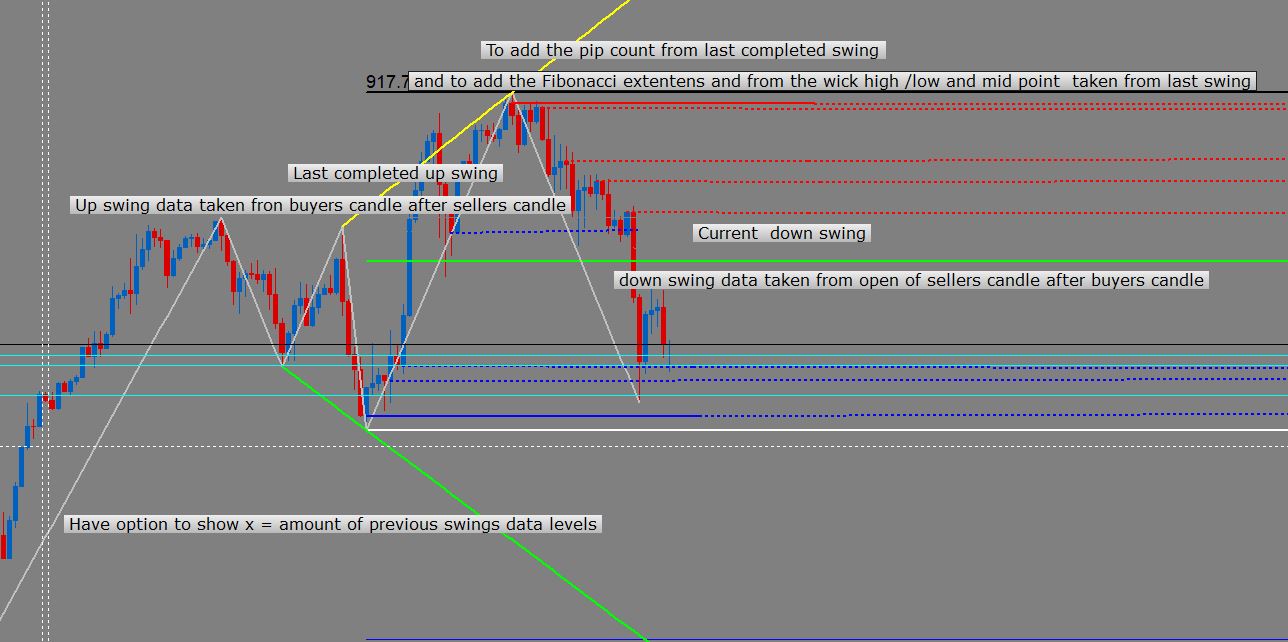
Hey Apprentice & Team, ZigZag Channel with output.lua (Not the tick version) Can you add some horizontal candle keylevel to this indicator ZigZag Channel with output.lua (Not the tick version) Would have top/bottom of swings from the open of the reversal candle and also would mark out were price had a pullback. Show last completed and current swing in the making, Also if can have an option to show x=amount of historical swings to get data from for levels. Need line and colour option for buyers /sellers and structure high/low and different for pullback keylevel. And add levels from the last completed swing wick high/low and mid point with pip count and add x3 extention above & below last levels as per the Zigzag channel with output_mult indicator on the forum.
Downswing (pullback) Data info defined for biased downward move creating a buyers candle then sellers candle after to continuing with downward movement. Down Swing data would take from open of sellers candle
Upswing (pullback) Data info defined for biased upward move creating a sellers candle then buyers candle after to continuing with upward movement Up Swing data would take from open of buyers candle
The line to start on the candle
Thanks in advance Arfs
Re: ZigZag Channel
Apprentice · Sat Oct 03, 2020 6:48 am
Your request is added to the development list. Development reference 2136.
Re: ZigZag Channel
arfs9090 · Thu Oct 15, 2020 5:03 am
Hi Apprentice, Hope you’re all safe and well, Is there any update on this task? thanks in advance arfs
Re: ZigZag Channel
arfs9090 · Tue Oct 27, 2020 3:56 am
Hi Apprentice, Was given a Development reference 2136 and not seen anything posted on the forum can the task be done arfs
Re: ZigZag Channel
minifire18 · Thu Nov 26, 2020 11:20 pm
Apprentice wrote:
ZigZag Channel with Output_Mult.lua
Hi Apprentice From the Zigzag channel with Output_Mult.lua posted 29.3.20 with fib extensions and mid structure levels can you change, instead of using the high /low to use the open of the 1st sellers candle for down swing and the open of the 1st buyers candle in upswing
thanks Minifire
Re: ZigZag Channel
Apprentice · Fri Nov 27, 2020 7:07 am
Your request is added to the development list. Development reference 2364.
Re: ZigZag Channel
Apprentice · Sun Nov 29, 2020 3:53 am
I don’t understand what high/low should we replace.
Can you clarify, “open of the 1st sellers candle for down swing and the open of the 1st buyers candle in upswing” provide a chart example?
Re: ZigZag Channel
minifire18 · Mon Nov 30, 2020 1:59 am
Apprentice wrote: I don’t understand what high/low should we replace.
Can you clarify, “open of the 1st sellers candle for down swing and the open of the 1st buyers candle in upswing” provide a chart example?
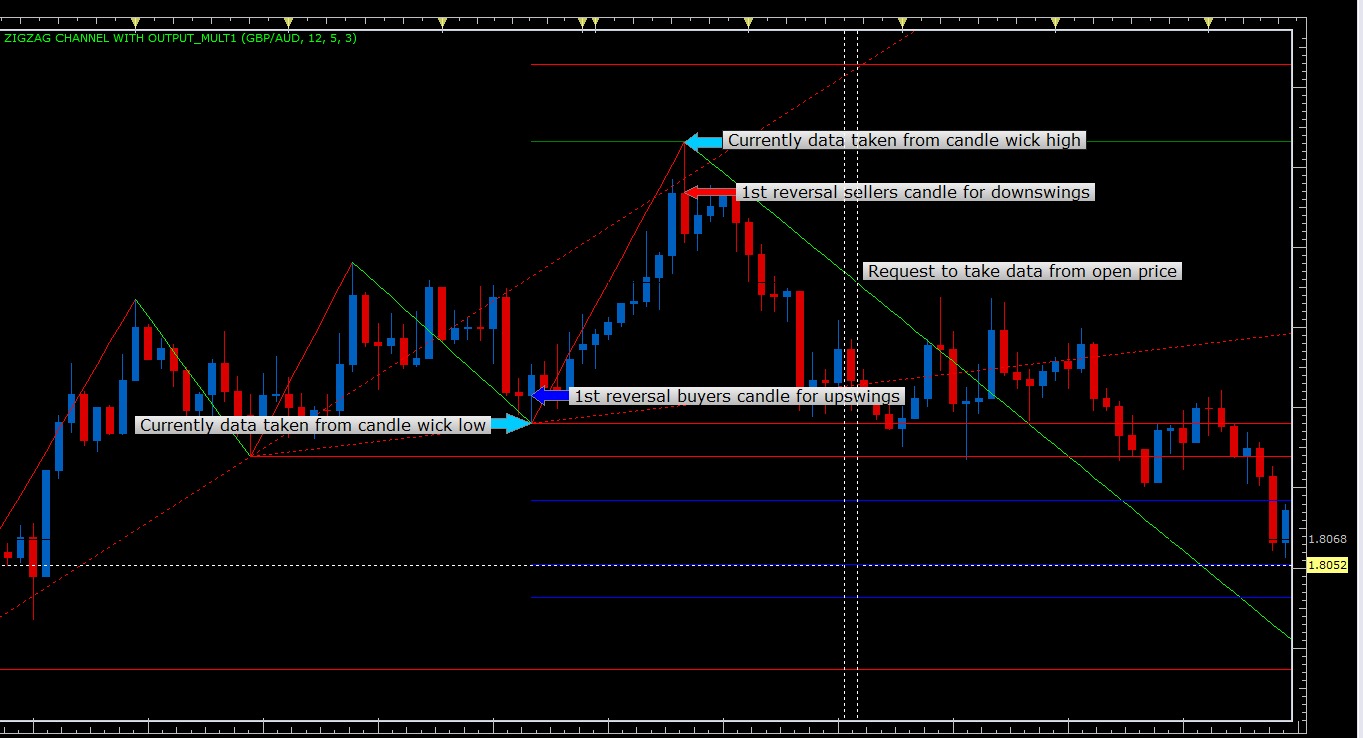
Hi Apprentice, Instead of the data to be taken from the candle wick high or candle wick low to plot the zigzag, can you take data from the open price of the 1st reversal sellers candle for downswings and for upswings take data from the open price of the 1st reversal buyers candle for upswings Hope this clarifies the request Thanks in advance Minifire
Re: ZigZag Channel
Apprentice · Mon Nov 30, 2020 10:09 am
Your request is added to the development list. Development reference 2375.
Re: ZigZag Channel
minifire18 · Fri Dec 11, 2020 1:06 am
Any update with this request?
Re: ZigZag Channel
Apprentice · Mon Dec 28, 2020 3:27 pm
I’m not sure that I do understand it correctly, but this version already doing so: download/file.php?id=27772
Re: ZigZag Channel
Apprentice · Sun Jan 03, 2021 5:38 am
ZigZag Channel with Output_Mult.lua
Try this version.
Re: ZigZag Channel
minifire18 · Mon Jan 04, 2021 7:43 am
thanks works perfectly minifire
Re: ZigZag Channel
minifire18 · Sun Jan 10, 2021 3:55 am
Hi Apprentice Is it possible to only allow to print the new version of indicator only when the original zigzag high /low data has created a swing within a swing than print the new version? thanks in advance Minifire
Re: ZigZag Channel
Apprentice · Mon Jan 11, 2021 5:12 am
Can you show the example?
Re: ZigZag Channel
minifire18 · Mon Jan 11, 2021 9:23 am
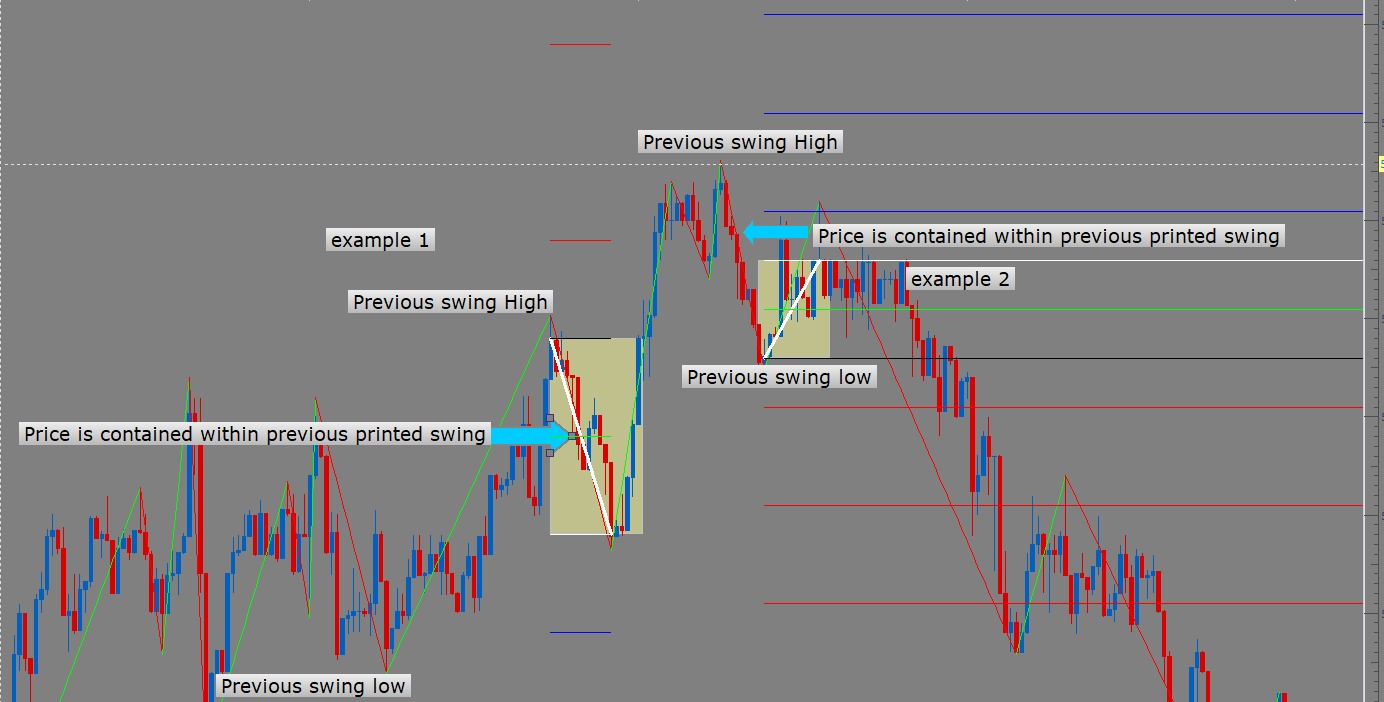
Hi Apprentice, The request for the task is IF the High Low data zigzag creates a higher low (example 1) then the new version to print from previous high to the higher low IF the High Low data zigzag creates a lower high (example 2)then the new version to print from previous low to the lower high they are the only two conditions for the new version to print the fib extension levels hope this helps to understand the request Minifire
Re: ZigZag Channel
Apprentice · Tue Jan 12, 2021 5:12 am
Your request is added to the development list. Development reference 72.
Re: ZigZag Channel
Apprentice · Wed Jun 02, 2021 9:48 am
Try this version. https://fxcodebase.com/code/viewtopic.php?f=17&t=71253