fxcodebase-backup
GHLA EMA Strategy
Source: https://fxcodebase.com/code/viewtopic.php?f=31&t=62341
Forum: 31 · Topic 62341 · 24 post(s)
GHLA EMA Strategy
Alexander.Gettinger · Mon Jun 22, 2015 3:43 pm
The strategy based on Renko charts (http://www.fxcodebase.com/code/viewtopi … 48&p=94660).
The Strategy uses 2 indicators, a) A moving Average as a trend filter. b) Gann HiLow Activator (http://www.fxcodebase.com/code/viewtopic.php?f=17&t=227) in a stair based format, as a trigger for the trades.
This Strategy will always be in the market and perform 2 types of trades, a) With Trent (Number of lots is set by the user) b) Contra Trend (Number of lots is set by the user)
With Trend
- price is above the MA and crosses upward the GHLA, then close all short positions and go long [Amount1] lots.
-price is below the MA and crosses downward the GHLA, then close all long positions and go short [Amount1] lots.
Contra Trend -If price is above the MA and crosses downwards the GHLA then close all long positions and go short X lots, if the price continues downwards and crosses the MA go long [Amount2] lots.
-If price is below the MA and crosses upwards the GHLA then close all sort positions and go long X lots, if the price continues upwards and crosses the MA go long [Amount2] lots.
Download:
For this strategy must be installed New Renko Chart (http://www.fxcodebase.com/code/viewtopi … 48&p=94660).
The Strategy was revised and updated on December 18, 2018.
Re: GHLA EMA Strategy
mulligan · Tue Jun 23, 2015 5:09 am
First, thanks for creating a strategy for Renko. I loaded the strategy and received the following message when it was apparently going to signal. GHLA_EMA_Strategy.lua:205:attempt to perform arithmetic on up value “Amount 1” [a nil value].
Re: GHLA EMA Strategy
fxcyberman · Fri Jun 26, 2015 10:43 pm
The first trade (GER30) is entered normally with default parameters, but the second trade is not entered with the following error, “ Open order failed The Quantity must be a positive integer number.”. Why ? and Would you please help me to fix it ?
Re: GHLA EMA Strategy
fxcyberman · Fri Jun 26, 2015 10:50 pm
In addition to the above problem, I also can’t find the parameter for X lot in the interface of strategy. Where can I setup the value for X lots ?
Re: GHLA EMA Strategy
Apprentice · Tue Jun 30, 2015 3:29 am
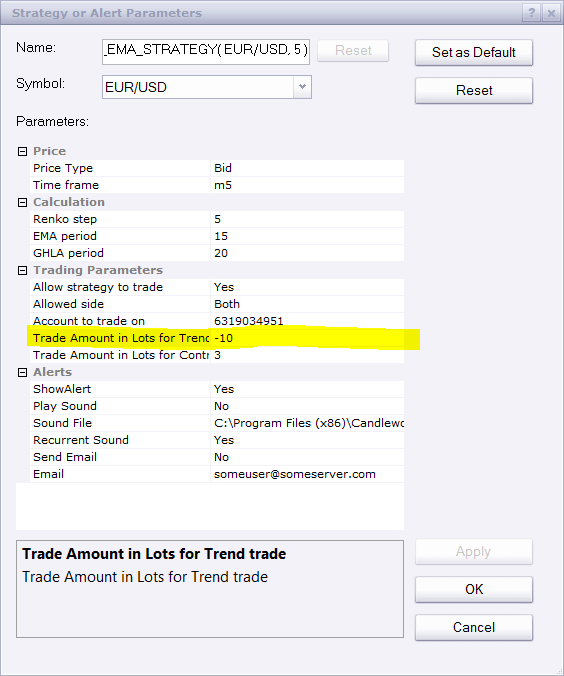
Negative lot position simply is not supported.
Re: GHLA EMA Strategy
fxcyberman · Tue Jun 30, 2015 3:54 am
hi, I have double checked with my setting for strategy. which is a positive number (10). I used the default setting only.
Re: GHLA EMA Strategy
fxcyberman · Thu Jul 02, 2015 5:55 am
Is it possible to add mandatory close and trading time control please ? Thanks
Re: GHLA EMA Strategy
jaricarr · Thu May 19, 2016 9:05 pm
Hi Apprentice,
Is it possible to please add the option to choose different types of moving averages ?
That way the strategy parameters can be match with the indicator settings ?
Many thanks, Jari
Re: GHLA EMA Strategy
Apprentice · Fri May 20, 2016 3:04 am
Try it now.
Re: GHLA EMA Strategy
jaricarr · Tue Jun 07, 2016 10:02 pm
Hi Apprentice,
The strategy does not have the option of selecting different MA method for the GHLA line, like the indicator does.
Thanks, JariCarr
Re: GHLA EMA Strategy
Apprentice · Tue Jun 14, 2016 2:59 am
Strategy uses an internal logic. Mention indicator is not used in calculation of.
Re: GHLA EMA Strategy
jaricarr · Thu Jun 16, 2016 7:37 pm
HI Apprentive,
Thank you for replying.
Can you add Limit and stop loss parameters to this strategy please.
Many thanks, JariCarr
Re: GHLA EMA Strategy
Apprentice · Sun Jun 19, 2016 4:14 am
Your request is added to the development list, Under Bugzilla Id Number 3550
Bugzilla is internal forum. If someone is interested to do this task please contact me.
Re: GHLA EMA Strategy
jaricarr · Thu Jun 30, 2016 6:09 pm
Any one please add Limit and stop loss parameters
Thanks JariCarr
Re: GHLA EMA Strategy
Apprentice · Sun Jul 03, 2016 8:45 am
Try it now.
Re: GHLA EMA Strategy
jaricarr · Tue Jul 05, 2016 12:07 am
Hi,
Thanks for adding the parameters.
Its producing this error msg…
C:/Program Files (x86)/Candleworks/FXTS2/Strategies/Custom/RENKO GHLA EMA Strategy2.lua:276: attempt to index upvalue ‘Source’ (a nil value)
Thanks JariCarr
Re: GHLA EMA Strategy
Apprentice · Tue Jul 05, 2016 2:45 pm
Fixed. Will not work within strategy backtester.
Re: GHLA EMA Strategy
jaricarr · Tue Jul 05, 2016 9:00 pm
Hi Apprentice,
This is happening when attempting to use the strategy in live trading.
Please see screenshot attached.
Thanks, JC
Re: GHLA EMA Strategy
Apprentice · Wed Jul 06, 2016 2:32 am
Refresh your browser/ Redownload. This bug has been fixed.
Re: GHLA EMA Strategy
jaricarr · Thu Jul 07, 2016 9:23 pm
Hi, Looks like what is causing this error is when the strategy is set to “Live”. thanks
Re: GHLA EMA Strategy
jaricarr · Tue Jul 12, 2016 7:50 pm
Hi Apprentice,
After you added the limit and stop parameters, the strategy hasn’t made any trades.
Allow strategy to trade is set to “yes” of course.
Thanks, JC
Re: GHLA EMA Strategy
Apprentice · Wed Jul 13, 2016 6:03 am
Can you test it now. I do not have demo account. If this does not work will install one.
Re: GHLA EMA Strategy
jaricarr · Wed Jul 20, 2016 3:53 pm
Hi,
The strategy hasnt made any trades yet.
Thanks JC
Re: GHLA EMA Strategy
Apprentice · Sat Dec 17, 2016 7:46 am
Strategy was revised and updated.