How to Backtest and Optimize Parameters using SDK 2.0?
Source: https://fxcodebase.com/code/viewtopic.php?f=31&t=3862
How to Backtest and Optimize Parameters using SDK 2.0?
Nikolay.Gekht · Thu Apr 07, 2011 12:11 pm
We recently released Indicore SDK 2.0. Now you can use it to backtest and optimize the strategy parameters with new, ultra fast and precise market simulator, using 1-minute price archives for the whole Jan 2010-Mar 2011 period.
Please read how to use the Indicore SDK 2.0 here:
http://fxcodebase.com/wiki/index.php/Op … by_Step%29
Please also read articles here for more information about SDK, prices, backtesting and parameter optimization:
http://fxcodebase.com/wiki/index.php/Ca … ndicoreSDK
Re: How to Backtest and Optimize Parameters using SDK 2.0?
alepan72 · Wed Apr 20, 2011 11:07 am
Good work, as always!!!
The new SDK is simple and mutch better than older one.
I have all historical archives from
http://fxcodebase.com/wiki/index.php/Co … ce_Archive
and I wonder if it’s possible to have the price archive for 2009. I observed that between two years (2009 and 2010) there is big difference in the way that price go on.
So, if we can backtesting both years we draw useful conclusions on the strategy that we use.
Thanx in advance and best regards for your services!!!
Re: How to Backtest and Optimize Parameters using SDK 2.0?
mfoste1 · Fri Apr 22, 2011 1:31 pm
i think something might be wrong with indicoresdk download….i try to open strategy debugger to backtest and it keep saying “no one strategy can be found”
could someone please tell me what is wrong or what im doing incorrectly?
thanks
Re: How to Backtest and Optimize Parameters using SDK 2.0?
sunshine · Sat Apr 23, 2011 2:06 am
alepan72 wrote:
Good work, as always!!!
The new SDK is simple and mutch better than older one.
I have all historical archives from
http://fxcodebase.com/wiki/index.php/Co … ce_Archive
and I wonder if it’s possible to have the price archive for 2009. I observed that between two years (2009 and 2010) there is big difference in the way that price go on.
So, if we can backtesting both years we draw useful conclusions on the strategy that we use.
Thanx in advance and best regards for your services!!!
Hi alepan72,
Thanks for your feedback.
I’ve asked fxcodebase developers to upload the historical data for 2009. I’ll post link here once the data will be available.
Re: How to Backtest and Optimize Parameters using SDK 2.0?
sunshine · Sat Apr 23, 2011 2:15 am
mfoste1 wrote:
i think something might be wrong with indicoresdk download….i try to open strategy debugger to backtest and it keep saying “no one strategy can be found”
could someone please tell me what is wrong or what im doing incorrectly?
thanks
Hi mfoste1,
You should copy the strategy you are going to optimize to the strategies folder. This folder is located in the folder where the Indicore SDK 2.0 is installed. By default the path is:
C:\Gehtsoft\IndicoreSDK\strategies
Just place your strategy to this folder and the error won’t appear.
Re: How to Backtest and Optimize Parameters using SDK 2.0?
mfoste1 · Sat Apr 23, 2011 9:33 am
sunshine wrote:
mfoste1 wrote:
i think something might be wrong with indicoresdk download….i try to open strategy debugger to backtest and it keep saying “no one strategy can be found”
could someone please tell me what is wrong or what im doing incorrectly?
thanks
Hi mfoste1,
You should copy the strategy you are going to optimize to the strategies folder. This folder is located in the folder where the Indicore SDK 2.0 is installed. By default the path is:
C:\Gehtsoft\IndicoreSDK\strategies
Just place your strategy to this folder and the error won’t appear.
yea i tried this and its still giving me that same message
Re: How to Backtest and Optimize Parameters using SDK 2.0?
oceanus1 · Mon Apr 25, 2011 3:23 pm
I have come across data from forextester.com that is in a *.txt format and appears to be complete in 1m duration and from 2001 through 2011. Is there any way that this data can be converted to work in SDK?
Here is the first part of the data
,,,,,,,
EURUSD,20010102,230100,0.9507,0.9507,0.9507,0.9507,4
EURUSD,20010102,230200,0.9506,0.9506,0.9505,0.9505,4
EURUSD,20010102,230300,0.9505,0.9507,0.9505,0.9506,4
EURUSD,20010102,230400,0.9506,0.9506,0.9506,0.9506,4
EURUSD,20010102,230500,0.9506,0.9506,0.9506,0.9506,4
EURUSD,20010102,230600,0.9506,0.9506,0.9506,0.9506,4
EURUSD,20010102,230700,0.9505,0.9507,0.9505,0.9507,4
EURUSD,20010102,230800,0.9507,0.9507,0.9507,0.9507,4
EURUSD,20010102,230900,0.9507,0.9507,0.9507,0.9507,4
EURUSD,20010102,231000,0.9507,0.9507,0.9507,0.9507,4
EURUSD,20010102,231100,0.9507,0.9507,0.9506,0.9507,4
EURUSD,20010102,231200,0.9507,0.9507,0.9507,0.9507,4
EURUSD,20010102,231300,0.9507,0.9507,0.9507,0.9507,4
EURUSD,20010102,231400,0.9507,0.9507,0.9507,0.9507,4
EURUSD,20010102,231500,0.9507,0.9507,0.9507,0.9507,4
Thanks for the help in advance
---
## Re: How to Backtest and Optimize Parameters using SDK 2.0?
**Nikolay.Gekht** · Mon Apr 25, 2011 3:58 pm
Yes. The SDK format is pretty similar ([http://fxcodebase.com/wiki/index.php/Pr ... ile_Format](https://fxcodebase.com/wiki/index.php/Price_Data#Data_File_Format)), so any language for the text processing can be used.
The only point is that SDK requires both, bid and ask data, but you can easily get them by adding some fixed spread.
If you need help in converting this data, please write us.
---
## Re: How to Backtest and Optimize Parameters using SDK 2.0?
**Nikolay.Gekht** · Mon Apr 25, 2011 4:04 pm
> **alepan72 wrote:**
> and I wonder if it's possible to have the price archive for 2009. I observed that between two years (2009 and 2010) there is big difference in the way that price go on.
> So, if we can backtesting both years we draw useful conclusions on the strategy that we use.
> Thanx in advance and best regards for your services!!!
2009 will be available soon. We are preparing the data.
---
## Re: How to Backtest and Optimize Parameters using SDK 2.0?
**vstrelnikov** · Mon Apr 25, 2011 6:04 pm
2009 archive uploaded at [http://fxcodebase.com/wiki/index.php/Co ... ce_Archive](https://fxcodebase.com/wiki/index.php/CodeBase_Price_Archive)
---
## Re: How to Backtest and Optimize Parameters using SDK 2.0?
**alepan72** · Tue Apr 26, 2011 3:07 am
Simple the best!!!
Thank you very much
---
## Re: How to Backtest and Optimize Parameters using SDK 2.0?
**alepan72** · Tue Apr 26, 2011 3:30 am
Hello again,
what means the numbers of "K" and "L" colunnes?
e.g.
DAT 02.01.2009 00:26:00 138.699 138.709 138.676 138.677 138.736 138.736 1.387 138.716**56 56**
---
## Re: How to Backtest and Optimize Parameters using SDK 2.0?
**sunshine** · Tue Apr 26, 2011 9:33 am
Hi,
The values mean Bid Volume and Ask Volume respectively.
---
## Re: How to Backtest and Optimize Parameters using SDK 2.0?
**Nikolay.Gekht** · Tue Apr 26, 2011 9:48 am
BTW, please note that for FXCM's data bid and ask volume has exactly the same value, because only tick volume is populated. Some other data MAY have bid and ask volume published separately.
---
## Re: How to Backtest and Optimize Parameters using SDK 2.0?
**Nikolay.Gekht** · Tue Apr 26, 2011 9:50 am
> **mfoste1 wrote:**
>
>
> > **sunshine wrote:**
> >
> >
> > > **mfoste1 wrote:**
> > > i think something might be wrong with indicoresdk download....i try to open strategy debugger to backtest and it keep saying "no one strategy can be found"
> > > could someone please tell me what is wrong or what im doing incorrectly?
> > > thanks
> >
> >
> > You should copy the strategy you are going to optimize to the **strategies** folder. This folder is located in the folder where the Indicore SDK 2.0 is installed. By default the path is:
> > C:\Gehtsoft\IndicoreSDK\strategies
> > Just place your strategy to this folder and the error won't appear.
>
>
> yea i tried this and its still giving me that same message
Please download the fresh Indicore SDK 2.0 (beta update 2) ([http://fxcodebase.com/bin/sdk2beta/IndicoreSDK.exe](https://fxcodebase.com/bin/sdk2beta/IndicoreSDK.exe)). I added the command "file->install custom strategy" which copies the chosen strategy file into the proper location.
Please read how to use this command here:
[http://fxcodebase.com/wiki/index.php/Op ... a_Strategy](https://fxcodebase.com/wiki/index.php/Optimizing_Strategy_Parameters_using_SDK_2.0_%28Step_by_Step_Instruction%29#Using_Lua_Strategy_Debugger_to_Install_a_Strategy)
---
## Re: How to Backtest and Optimize Parameters using SDK 2.0?
**alepan72** · Fri Apr 29, 2011 6:15 am
Hi all,
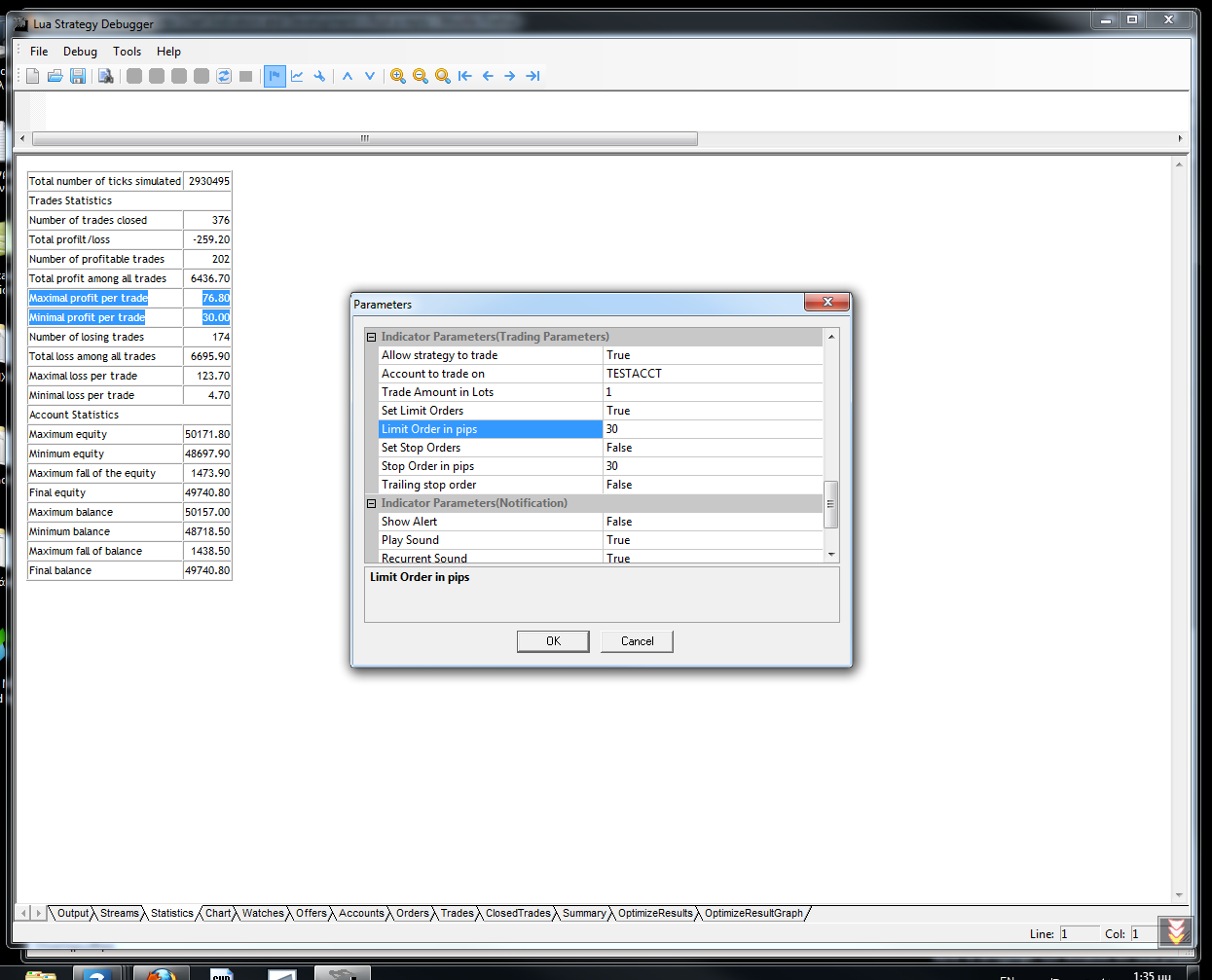
As you can see below (I tested MA_crossover on EURUSD 5m chart) I have check the limit profit to 30 pips. But in statistic area gave me the follow results
Maximal profit per trade 76.80
Minimal profit per trade 30.00
Where is th prob?
---
## Re: How to Backtest and Optimize Parameters using SDK 2.0?
**Nikolay.Gekht** · Fri Apr 29, 2011 12:57 pm
Possible gap in the data. As on the real server, the orders are executed by the current price, and if price moved for 40 pips over the limit level - it is possible, for example if position is kept over weekend.
---
## Re: How to Backtest and Optimize Parameters using SDK 2.0?
**hockeydea** · Sun May 01, 2011 11:18 pm
Hello ...
I have a diference between data shown in SDK and Marketscope related to my custom indicator. My indicator shows dots on a posible buy or sell based on candlestick. The image below shows the diferences, green circles are ok and red circles are not.
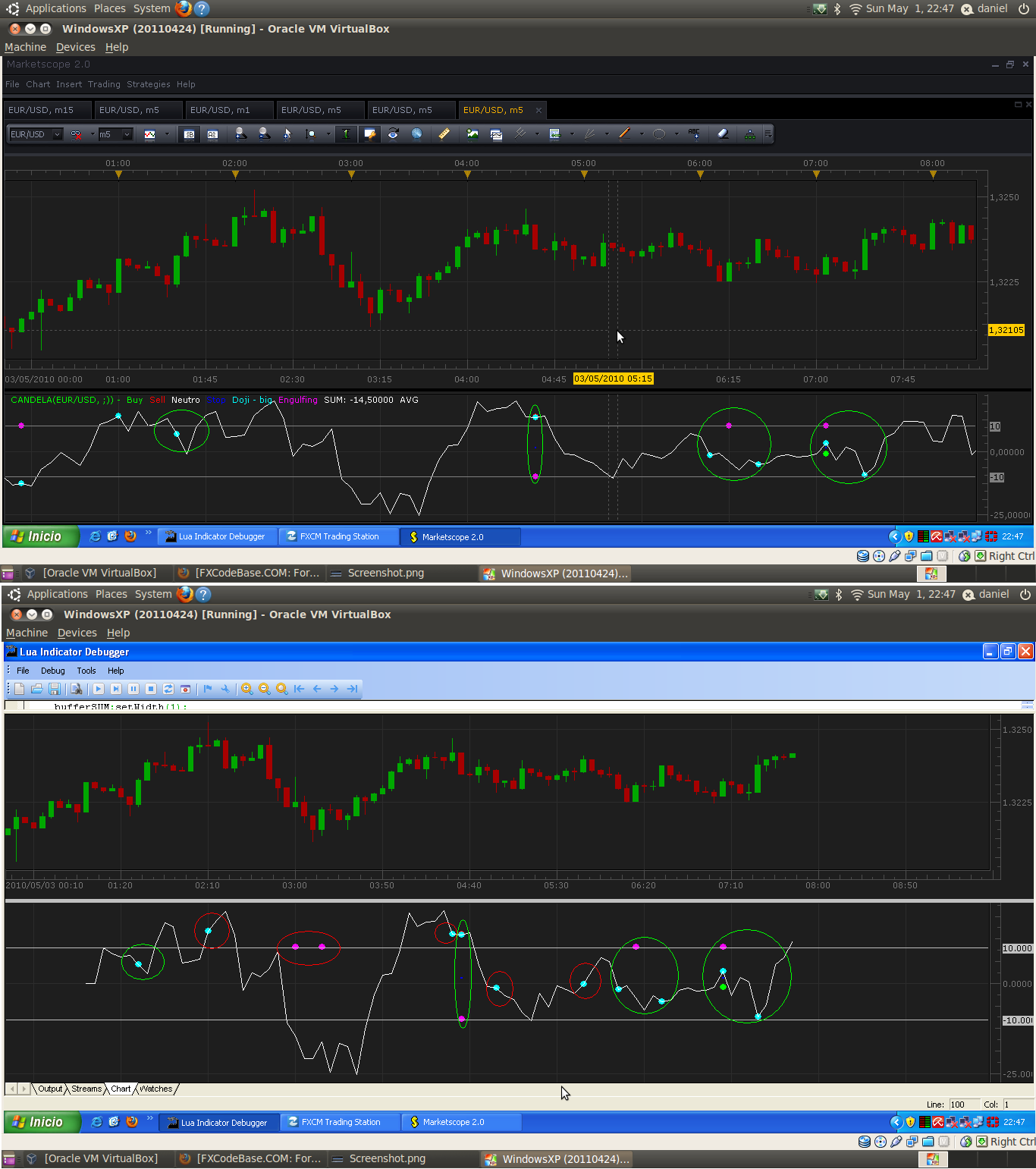
It is anything in new core of indicoreV2.0 that explains this behavior?
Thanks in advance for the help
PD: Apologize for my english
---
## Re: How to Backtest and Optimize Parameters using SDK 2.0?
**Nikolay.Gekht** · Mon May 02, 2011 9:47 am
It's hard to say without looking at the code, but, the most probable cause is the different behavior of the indicator applied on historical data and on live market:
Please read the following articles in fxcodebase.wiki for details:
[http://fxcodebase.com/wiki/index.php/Cl ... t_Live_Bar](https://fxcodebase.com/wiki/index.php/Closed_Bar_against_Live_Bar)
[http://fxcodebase.com/wiki/index.php/In ... arket_Data](https://fxcodebase.com/wiki/index.php/Indicators_on_Live_Market_Data)
[http://fxcodebase.com/wiki/index.php/De ... Parameters](https://fxcodebase.com/wiki/index.php/Debugging_Indicator#Indicator_Parameters) (look for predeliver mode discussion).
the SDK 1.0/Marketscope with indicore 1.0 do not simulate live market. SDK 2.0 and further release of Marketscope - does, so it is much simpler to spot such problems.
---
## Re: How to Backtest and Optimize Parameters using SDK 2.0?
**hockeydea** · Mon May 02, 2011 11:03 am
Thank you Nikolay, links you posted helped a lot, i will update the indicator when candle closes
---
## Re: How to Backtest and Optimize Parameters using SDK 2.0?
**mcarr005** · Wed May 23, 2012 12:34 pm
Please update CodeBase Price Archive FXCM 1-Min Data
---
## Re: How to Backtest and Optimize Parameters using SDK 2.0?
**guangho** · Tue Jan 01, 2013 5:00 am
Happy New Year。。。
I'm very sorry, because I can not open a new post questions, so only here to ask questions.
I think through reference to existing positions opening to limit the next opening when the opening price. My strategy for the preparation of a problem, I would like to ask how to write.
local trades = core.host:findTable("trades");
local haveTrades = (trades:find('AccountID', Account) ~= nil)
if (haveTrades) then
local enum = trades:enumerator();
while true do
local row = enum:next();
if row == nil then break end
local OrderPL=row.PL;
if row.AccountID == Account and row.OfferID == Offer then
local MaxB=0;
local MinS=100000000;
if row.BS == 'B' then
MaxB=math.max(MaxB,row.Open);
elseif row.BS == 'S' then
MinS=math.min(MinS,row.Open);
end
My goal is to refer to the existing largest and smallest positions opening price opening price and assigned to " MaxB " and " MinS ". Ask how to modify?
Thanks a million!
---
## Re: How to Backtest and Optimize Parameters using SDK 2.0?
**Apprentice** · Tue Jan 01, 2013 6:32 am
If I understand you.
You want to store minimum and maximum price at the opening,
for all active positions.
---
## Re: How to Backtest and Optimize Parameters using SDK 2.0?
**guangho** · Tue Jan 01, 2013 11:54 am
> **Apprentice wrote:**
> If I understand you.
> You want to store minimum and maximum price at the opening,
> for all active positions.
HI Apprentice:
I just want to have the highest bid opening price and sell the lowest opening price assigned to " MaxB " and " MinS ", and then use the two numerical limit after the opening price not higher (or lower ) the standard.
Excuse me, how should I write this command? Thank you.
---
## Re: How to Backtest and Optimize Parameters using SDK 2.0?
**guangho** · Tue Jan 01, 2013 1:20 pm
> **Apprentice wrote:**
> If I understand you.
> You want to store minimum and maximum price at the opening,
> for all active positions.
Yes, just as what you said. That should be how to write this command? Please help me. Thank you!