fxcodebase-backup
Stage trailing stop
Source: https://fxcodebase.com/code/viewtopic.php?f=31&t=4109
Forum: 31 · Topic 4109 · 50 post(s)
Stage trailing stop
Alexander.Gettinger · Wed May 04, 2011 2:56 am
Strategy move stop order correspondence to user level. Supported maximum 5 levels. If level=0 stop is not used. Algorithm: if profit of order reaches [Level1] strategy supports stop at level [Stop1], if profit reaches [Level2] strategy supports stop at level [Stop2] etc.
Download:
The Strategy was revised and updated on December 10, 2018.
Re: Stage trailing stop
oritzbaba · Tue May 10, 2011 10:54 am
Please is there any more trailing stop management tool like this one on this site, someone more familiar with TS2 custom indicator please help out. Will the Stage Trailing Stop work on automated trading?
Thanks.
Re: Stage trailing stop
sunshine · Thu May 12, 2011 4:01 am
oritzbaba wrote: Please is there any more trailing stop management tool like this one on this site, someone more familiar with TS2 custom indicator please help out.
Hi,
Please check the following strategies:
- Moving-average based stop order The strategy moves stop level of the chosen position exactly on the chosen Moving Average Value. viewtopic.php?f=31&t=2339&p=4997#p4997
- Trailing by time This strategy moves stop on [StepTrailing] points each [TimeInterval] minutes in order direction (up for BUY and down for SELL). viewtopic.php?f=31&t=2804&p=6393&hilit=trailing+stop#p63933
- Shadow trailing stop The strategy sets stop value for the chosen trade using several next candles. viewtopic.php?f=31&t=2793&p=6363&hilit=trailing+stop#p6363
- SAR trailing stop The strategy sets stop value for the chosen trade using SAR indicator. viewtopic.php?f=31&t=2449#p5318
- ATR trailing stop The strategy sets stop value for the chosen trade using ATR oscillator. viewtopic.php?f=31&t=2795&p=6365&hilit=trailing+stop#p6365
- Fractal trailing stop The strategy sets stop value for the chosen trade using fractals. viewtopic.php?f=31&t=2791&p=8622&hilit=trailing+stop#p6361
oritzbaba wrote: Will the Stage Trailing Stop work on automated trading?
Yes. For this it’s necessary to include the code of Stage Trailing Stop to the code of your strategy.
Re: Stage trailing stop
oritzbaba · Sun May 15, 2011 6:56 pm
Thank you so much Sunshine for your assistance. But pardon me, I will be asking a lot of questions for a better understanding. First, I want to use this stage trailing stop with the FX Sniper Ergodic CCI strategy, how this will work out I don’t know yet but it looks good on paper, any idea on this from you is highly welcome. You mentioned using a code linking it to the strategy, how do I do this? And where can I find the code?
Questions: 1) Do I have to add it to every currency pair I want to trade for it to be effective? Since it is a strategy, can I assume it will accompany each trade automatically as long as it’s attached to that currency pair? 2) Will both strategies be active on TradingStation server? 3) Do I still need to set a stop loss while entering a trade? On TS can I set fixed stop loss and take profit target? 4) If level1 is 10 and stop1 is 0, does this mean stop1 is equal to breakeven? Can it be used in any way for breakeven point? 5) The Choose Trade parameter on the stage trailing stop is blank, what do I put there as there is nothing on the selection dropdown button? 6) How do I use it to lock in profit? Example; if stop1 is 50, I assume it is 50 pips away from the entry price, when I have a profit level3 of 70 pips and I want the stop3 to lock in 40 pips above the entry price on a long position, how do I do this?
Please Sunshine help out and thank you in advance for your time and energy but above all, your kindness.
Thanks.
Re: Stage trailing stop
uff2163 · Mon May 16, 2011 9:27 am
Hi guys: It seems hard to find the orders automatically. Most of stop strategy requires you enter the trade by yourself.. such as: ————————————— strategy.parameters:addGroup(“Trade”); strategy.parameters:addString(“Trade”, “Choose Trade”, “”, “”); strategy.parameters:setFlag(“Trade”, core.FLAG_TRADE); —————————————– if row.AccountID == Account and (instance.parameters.Symbol==”- All -“ or row.Instrument==instance.parameters.Symbol) then —————————————— if (haveTrades) then local enum = trades:enumerator(); while true do local row = enum:next(); if row == nil then break end
if row.AccountID == Account and row.OfferID == Offer then – Close position if we have corresponding closing conditions. if row.BS == ‘B’ then CurrentOrder=”B”; MaxB=math.max(MaxB,row.Open); elseif row.BS == ‘S’ then CurrentOrder=”S”; MinS=math.min(MinS,row.Open); end
end end
May CurrentOrder is useful .
Re: Stage trailing stop
uff2163 · Wed May 18, 2011 6:46 am
Hi Guys: I found a puzzle from my profit lock strategy. I try to develop this strategy to look after all my orders, but it can not work. It seems hard to manage all the orders from TS2.
function Init()
    strategy:name("Profit lock");
    strategy:description("Profit lock");
    strategy.parameters:addGroup("Profit lock Parameters");
    strategy.parameters:addInteger("PriceLevel33", "Profit lock in pips", "", 30, 1, 10000);
    strategy.parameters:addInteger("Stop5", "Lock Profit in pips", "", 2);
    strategy.parameters:addString("SIDE55", "Use Profit lock", "", "false");
    strategy.parameters:addStringAlternative("SIDE55", "true", "", "true");
    strategy.parameters:addStringAlternative("SIDE55", "false", "", "false");

    strategy.parameters:addString("SIDE25", "Close strategy without orders", "", "false");
    strategy.parameters:addStringAlternative("SIDE25", "true", "", "true");
    strategy.parameters:addStringAlternative("SIDE25", "false", "", "false");
end
function Prepare(onlyName)
     local Source = nil;
     Level33 = instance.parameters.Level33;
     SIDE55= instance.parameters.SIDE55;
     SIDE25= instance.parameters.SIDE25;
end

function ExtUpdate(id, source, period)

if SIDE55=="true" then

    if (Source:first() > (period - 1)) then
        return
    end

    local pipSize = instance.bid:pipSize()

    local trades = core.host:findTable("trades");
    local haveTrades = (trades:find('AccountID', Account) ~= nil)

    local MaxB=0;
    local MinS=100000000;

    if (haveTrades) then
        local enum = trades:enumerator();
        while true do
            local row = enum:next();
            if row == nil then break end

            if row.AccountID == Account and row.OfferID == Offer then
                    -- Close position if we have corresponding closing conditions.
                if row.BS == 'B' then
                 CurrentOrder="B";
                 MaxB=math.max(MaxB,row.Open);
                elseif row.BS == 'S' then
                 CurrentOrder="S";
                 MinS=math.min(MinS,row.Open);
                end

            end
        end

        if CurrentOrder=="B" then

         if instance.ask[NOW]-MaxB>=instance.parameters.PriceLevel33*PipSize then


        stopValue=instance.bid[NOW]-instance.parameters.Stop5*instance.bid:pipSize();


         end
        end

        if CurrentOrder=="S" then
         if MinS-instance.bid[NOW]>=instance.parameters.PriceLevel33*PipSize then


        stopValue=instance.ask[NOW]+instance.parameters.Stop5*instance.bid:pipSize();


         end
        end


-----------------------------------------------------------------------
    local enum, row, valuemap;

    local count = 0;
    enum = core.host:findTable("trades"):enumerator();
    row = enum:next();
    while count == 0 and row ~= nil do
        if row.AccountID == Account and
           row.OfferID == Offer and
           row.BS == BuySell then
           count = count + 1;
        end
        row = enum:next();
    end

    if count > 0 then
        valuemap = core.valuemap();


        valuemap.OrderType = "CM";
        valuemap.OfferID = Offer;
        valuemap.AcctID = Account;
        valuemap.NetQtyFlag = "Y";
        valuemap.Rate = stopValue;
    end

-------------------------------------------------------------------------------

   else

if SIDE25 == "true" then
        if CurrentOrder==nil then
          core.host:execute("stop");
        end
        end

end
end
end

dofile(core.app_path() .. "\\strategies\\standard\\include\\helper.lua");
Re: Stage trailing stop
Laurus12 · Fri May 27, 2011 12:08 pm
Hello Alexander,
If this is the strategy I believe it is I would like to say thank you very much for making it. I have been longing for this for a long time.
I am not sure if I understand the setup. I get the message “Trade disappear”.
As a starter I would like to just use one level, so I am wondering if you could give an example on how to set it up. As an example I would like to use 25 pips in stop loss and when price reaches 20 pips in profit I would like the stop to jump to 1 pips on the profit side. Meaning 1 pips more than break even. If you could help me with this I would appreciate it a lot.
Tank you. Laurus
Re: Stage trailing stop
STEIGO · Fri Oct 28, 2011 6:00 pm
Alexander
Could this strategy be modified as follows: If profit reaches level1 set SL stop 1 if profit reaches level2 set SL to “fixed trailing stop” with a starting price of current price-stop 2 If profit reaches level3 set SL stop 3 if profit reaches level4 set SL to “fixed trailing stop” with a starting price of current price-stop 4 etc This modification, might allow a normal trailing (fixed pip) SL strategy to deal with expected Support/Resistance levels
Thanks in advance for your replies
Re: Stage trailing stop
vaguthun · Sun Oct 30, 2011 3:24 am
I like this Trailing stop.. I wonder if you could add another feature.
For example: I traded 2 Mini lots when Level1 is reached take Profit of 1 lot and at level2 take profit of second lot etc..
What do u think guys???
Re: Stage trailing stop
vaguthun · Sun Oct 30, 2011 3:30 am
I wonder if you could update it this way..
For Example: I traded 2 mini lots
And when the level1 is reached take profit of 1 lot. and move TS to level1 And when Level2 is reached take the second profit or move TS.. etc
Thanks
Re: Stage trailing stop
STEIGO · Sun Oct 30, 2011 6:22 pm
Vaguthun Why not just open 2 positions (mini lots) and set appropriate (TP) Limit orders on one while using this strategy to move your SL on the other. Hope I understood your post, and this helps STEIGO
Re: Stage trailing stop
STEIGO · Mon Oct 31, 2011 4:24 am
Vaguthun If I understand your question - You could achieve this resutly by opening 2 (half size orders), and setting a take profit Limit order at level 1, for the first order; and using this strategy without modification on the second order to move SL or TP as required. Hope this helps STEIGO
Re: Stage trailing stop
fabfxcm · Fri Jan 27, 2012 3:35 am
Dear programmers, unfortunately automated strategies allow only for dinamic stop. It’s possible to set up a strategy that places a fixed trailing stop in which you can set the value on each open position???
Re: Stage trailing stop
Apprentice · Sun Jan 29, 2012 1:45 pm
You can have both, fix stop levels, and stop or algorithm that is independent from strategy build in stop.
Re: Stage trailing stop
macogi37 · Tue Jan 31, 2012 4:45 am
Hello Alexander, excellent work, but it would be better if it worked automatically as soon as it enters an order on cross specified, without having to manually enter the order number.
Example … strategy Macd EURUSD and strategy Stage Trailing Stop … just start an order on Macd strategy, automatically the strategy Stage Trailing Stop begins to operate on cross specified.. You can make this change? Thanks
Re: Stage trailing stop
SJB944 · Sun Feb 12, 2012 10:38 pm
Is there away to apply this stage trailing stop to an Entry Order, so that it will apply to the trade if the entry order is executed?
Thanks SJB
Re: Stage trailing stop
Apprentice · Mon Feb 13, 2012 5:55 am
It is possible.
Re: Stage trailing stop
SJB944 · Mon Feb 13, 2012 6:22 pm
Good. How?
Re: Stage trailing stop
SJB944 · Mon Feb 13, 2012 9:13 pm
Also. If I set level 1 to 100pips and then Stop 1 to 100pips, and all the other levels and stops to 0, then when my position reaches 100pips profit the stop is moved to Break Even; however, when another 100 pips profit is reached it moves the stop up another 100pips.
Am I missing something? I just want the the stop to remain at the level 1 Stop point (break even).
SJB.
Re: Stage trailing stop
Apprentice · Wed Feb 15, 2012 6:58 am
I or Alex will prepare several solutions.
Re: Stage trailing stop
oggalan · Wed Feb 15, 2012 2:42 pm
I have been looking for a Trailing Stop Strategy, I found this.
I tried it today in an EURUSD, I set level one to 10 pips, and Stop 1 to 9 becuase I wanted that When My trade was 10 pips in profits the Stop loss was moved to Break Even + 1 pip.
But the strategy keep moving the SL, when I was 13 pips the strategy moved the Stop Loss to 4 pips, How can avoid this, I just wanted to protect 1 pips after that, I was going to move it monually.
I attached an image how I set the parameters.
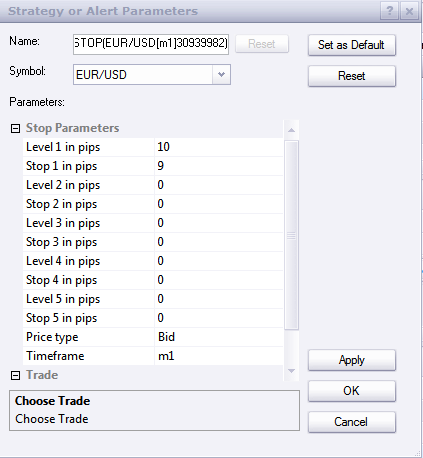
SL parameters
Thanks in advance for your answer.
Re: Stage trailing stop
Apprentice · Thu Feb 16, 2012 2:48 am
I’ll prepare something today (Completely new strategy).
Re: Stage trailing stop
SJB944 · Thu Feb 16, 2012 7:45 pm
Excellent. Look forward to seeing the results.
Re: Stage trailing stop
oritzbaba · Fri Feb 17, 2012 5:15 pm
Good looking forward to seeing it. But I hope it will work for limit buy stop or sell stop orders.
Thanks
Re: Stage trailing stop
spinemaligna · Sat Feb 18, 2012 1:26 am
Hi all,
In my opinion one of the biggest drawbacks with this platform is the inability to scale out positions. Since there seems to be work done on a new strategy is it possible that some form of scaling out could be incorporated? It is very awkward at times to have to open multiple positions in order to achieve this when on MT4 there at least a couple of EAs that do the job.
Ross
Re: Stage trailing stop
Copper · Tue Feb 28, 2012 10:23 pm
Hi,
I have a question as to why I keep getting an error message. that says number needs to be a positive number. I have level 1 set at 29 and stop level to 2 and level 2 at 38 and stop level 2 at 20. Any thoughts are appreciated. Thanks
Re: Stage trailing stop
bptcan · Wed Apr 04, 2012 8:09 pm
I’m a newbie at this and I’m looking for a trailing stop strategy. I wondered if this will work for what I’m looking for.
First off I want a strategy where I can set my stop and when the pair I’m trading reaches a certain level the stop will jump to that level. For example : If I buy at 1.31500 and I set my stop at 1.31230 when the pair reaches 1.31730 I want the stop to jump to 1.31729. Will this strategy do this and if so how do I set it up?
An even more awesome thing would be after the stop jumps to 1.31729 it would change to a dynamic trailing stop.
Is this capable of doing this or can someone point me in the right direction? It doesn’t seem like it should be all that complicated, but I have no experience with this so I could be wrong.
Thanks
Re: Stage trailing stop
Apprentice · Fri Apr 06, 2012 4:35 am
Unfortunately this strategy does not support input of the absolute, but rather, the relative position of stop orders in relation to the entry position.
Re: Stage trailing stop
bptcan · Fri Apr 06, 2012 8:45 am
Thank you for the reply. Do you know of any strategies that would accomplish what I’m looking for?
Re: Stage trailing stop
Apprentice · Mon Apr 16, 2012 3:38 am
Updated.
Re: Stage trailing stop
jaynlola · Wed Apr 18, 2012 11:34 am
Can someone please tell me how to input the Stage Trailing Stop strategy into my own strategy? I’m fairly new and am unfimiliar with coding. Do I need SDK or anything like that?
Thanks, Jason.
Re: Stage trailing stop
Apprentice · Thu Apr 19, 2012 1:31 am
SDK is not needed. It can help you. Adding other indicators is not easy task for beginners. There is no simple way, you must first be familiar with the Lua programming language, SDK and TS specific functions.
Re: Stage trailing stop
Laurus12 · Wed May 30, 2012 2:20 am
Is it possible to set the Stage Trailing Stop strategy to move Stop to the positive profit side?
Since all numbers with “Stop” in the strategy is positive numbers I guess this means that whatever positive number entered means still being on the loss side.
Ideally I would like to have the Stop moving to + 0,4 pips “break even” when profit reaches like 10 or 20 pips, and to + 25 pips in profit when profit reaches like 50 pips. Could this be done with this strategy?
Thank you. Laurus
Re: Stage trailing stop
Apprentice · Wed May 30, 2012 2:44 am
Your request is added to the development list.
Re: Stage trailing stop
Laurus12 · Wed May 30, 2012 3:04 am
Thank you Apprentice. I appreciate it.
Laurus
Re: Stage trailing stop
Laurus12 · Sat Aug 25, 2012 7:46 am
Hello,
I am just wondering if you could please tell me what the progress is with the “Stage Trailing Stop” with “Stop on the positive profit side” in the development list?
Thanks. Laurus
Re: Stage trailing stop
jaynlola · Fri Nov 09, 2012 5:53 pm
Hey, I’m from USA. My idea coincides with yours regarding the stop being automatically changed to the profit side. My idea was: open trade; 100pips limit, 50pips stop - level 1 10pips; stop 1 +5pips; level 2 20pips; stop 2 +10pips; and so on. That would be a great way to minimize risk and increase profits.
This profit enhancing tool should definitely be prioritized as I’ve done manual calculations with it, and while trading good 4H - 1D timeframes; following daily trend, it proved to be extremely profitable!!
Re: Stage trailing stop
guangho · Tue Dec 04, 2012 1:46 pm
This strategy requires a position to set, ask to be amended to breed as object?
Because I have a lot of positions in the setting of this strategy was in trouble.
THANK YOU!
Re: Stage trailing stop
guangho · Sun Dec 09, 2012 11:51 am
Apprentice wrote: SDK is not needed. It can help you. Adding other indicators is not easy task for beginners. There is no simple way, you must first be familiar with the Lua programming language, SDK and TS specific functions.
HI Apprentice,This strategy has quickly set up a trade method? I open a lot of small, a setting very confused.
Thank you.
Re: Stage trailing stop
guangho · Fri Dec 14, 2012 5:11 am
HI Apprentice
This strategy can increase the function of movable stops? Thank you.
Re: Stage trailing stop
spinemaligna · Mon Mar 02, 2015 12:43 pm
Three years on and still waiting.
I noticed a member asked for a strategy to be built the other day and the next day it was there.
Could I request a strategy that will allow me to scale out and move stops as profit levels are reached. i.e. When profit reaches x pips move stop to y. 5 stages of that. Also when profit reaches x pips have the option close a percentage of the position. Also have the ability to wait for SAR to overtake stop level then trail stop with SAR.
For example. I open a position with four lots. At profit =+10 pips close two lots and move stop to breakeven -5. At profit =+15 pips close 1 lot and move stop to breakeven and wait for SAR to overtake breakeven level then stop tracks SAR value.
I think that makes sense. Of course all levels are user inputted.
Thanks,
Ross
Re: Stage trailing stop
Apprentice · Mon Mar 02, 2015 6:12 pm
Your request is added to the development list.
Re: Stage trailing stop
krash11554 · Sat Mar 14, 2015 5:11 pm
hi everyone i read through this thread and saw many post about different stop loss strategies and i wasn’t sure if any of the systems people posted were what i want.
i split all of my positions into two separate orders. so i have two TP’s. for example one of the TP is 40 pips and next one is 80. is there a system on here that would move the stop loss of the 80 pip order to break even once the first limit order is taken out on the 40 pip move?? I’m in high school still and trade demo but plan on opening a live account soon. this system would really help me.
i trade on marketscope 2.0. idk if that would make a difference or not. can anyone direct me to a system that does that?? thanks in advance.
Re: Stage trailing stop
spinemaligna · Wed Dec 09, 2015 7:03 am
Another eight months on. Any progress to report? I can achieve this on Metatrader so it shouldn’t be too difficult. Ross
Re: Stage trailing stop
traderwarrior77 · Fri Sep 23, 2016 11:38 pm
Hi, I have 2 questions 1) I am looking for a trailing stop where when price reach target 1, the stop will automatically move to break even and when it reaches the second target, it will move the stop to target 1 level and ect. Does this strategy does that?
2) when the stop breaks even, can I turn the feature off and I can trail it manually?
thank you for your time
Re: Stage trailing stop
traderwarrior77 · Mon Sep 26, 2016 5:01 pm
hi, I downloaded the stage trailing stop to my demo and real acct on fxcm trading station. How do I go by setting up the trailing stop? such as after 15 pips or target 1 is reached, move stop to break even. When price reach target 2 move stop 15 pip or where 1:1 was ect. do you have a video or instructions on how to use this? thanks
Re: Stage trailing stop
traderwarrior77 · Tue Sep 27, 2016 1:44 pm
hi, i downloaded your software on my fxcm platform on both demo and real account. when I placed my order. how do i set it up for my stop to move to break even when it reaches first target and to move 15 pips when it reaches second target?
thanks
Re: Stage trailing stop
traderwarrior77 · Fri Sep 30, 2016 10:32 pm
hello again,
I have downloaded the software to my demo acct and tried it . I set up my trades by splitting all of my positions into two separate orders. so i have two TP’s. for example one of the TP is 15 pips and next one is 30. However, when I tried and it reached target 1 or 15 pips the stop did not move. Is there a system on here that would move the stop loss of the 15 pip order to break even once the first limit order is taken out on the 30 pip move ? what am I doing wrong. I would appreciate a reply. thank you
Re: Stage trailing stop
Alexander.Gettinger · Wed Oct 05, 2016 11:56 am
Should the stops of several orders to move dependently of each other?
Re: Stage trailing stop
guangho · Fri Dec 09, 2016 3:21 pm
Alexander.Gettinger wrote: Strategy move stop order correspondence to user level. Supported maximum 5 levels. If level=0 stop is not used. Algorithm: if profit of order reaches [Level1] strategy supports stop at level [Stop1], if profit reaches [Level2] strategy supports stop at level [Stop2] etc.
Download:
StageStop.lua
Excuse me,Alexander.Gettinger: Can you help me how to do it? thank you for your help me.