fxcodebase-backup
Ichimoku Scanner
Source: https://fxcodebase.com/code/viewtopic.php?f=38&t=68827
Forum: 38 · Topic 68827 · 47 post(s)
Ichimoku Scanner
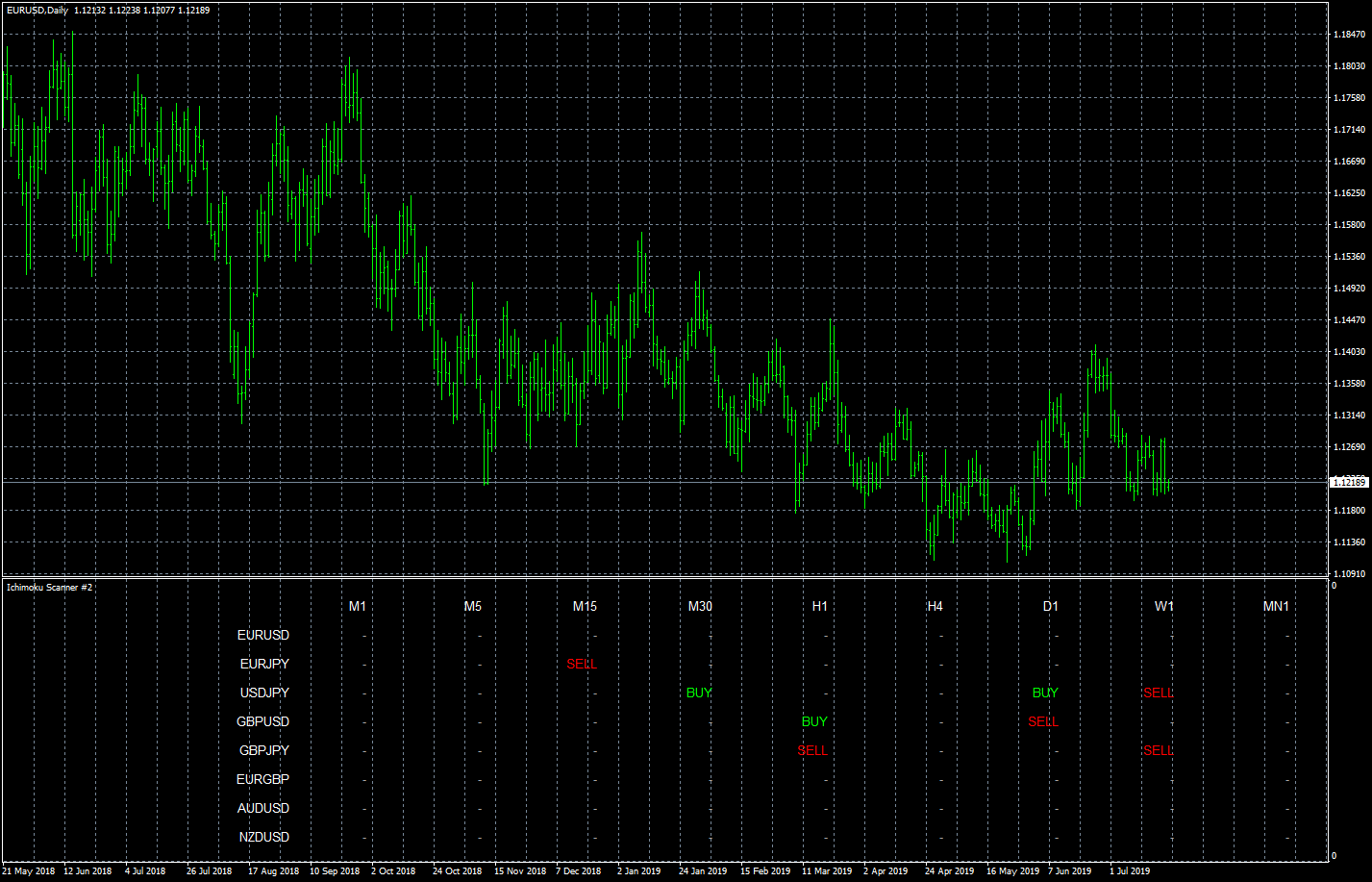
Apprentice · Wed Aug 21, 2019 3:04 pm
The attachment eurusd-d1-forex-capital-markets.png is no longer available
Based on request. viewtopic.php?f=27&t=68818
Re: Ichimoku Scanner
trillionairemac · Fri Oct 11, 2019 7:19 am
Could you make an Ichimoku EA?
Re: Ichimoku Scanner
Apprentice · Fri Oct 11, 2019 10:10 am
Sure. We will need EA rules.
Re: Ichimoku Scanner
trillionairemac · Wed Oct 23, 2019 6:31 pm
EA RULES:
BUY- 1: Price to Break and close above the Ichimoku Cloud 2:The Conversion Line needs to break above the Base Line 3: Buy after the crossover at the opening of the next candle. 4: Place protective stop loss below the Candle that broke out above the cloud 5: Take Profit when the Conversion Line crosses below the Base Line.
SELL- 1: Price to Break and close below the Ichimoku Cloud 2: The Conversion line needs to break below the baseline
- Sell after the crossover (in step 2) at the opening of the next candle.
- Place Protective SL above the candle that broke below the cloud. 5: Take profit when the conversion line crosses above the baseline.
Re: Ichimoku Scanner
Apprentice · Wed Oct 23, 2019 6:36 pm
Your request is added to the development list. Development reference 233.
Re: Ichimoku Scanner
Apprentice · Thu Oct 24, 2019 5:04 am
What is conversion and base lines? Usually, Ichimoku lines are named Tenkan/Kijun/Chikou.
Re: Ichimoku Scanner
trillionairemac · Mon Oct 28, 2019 12:15 pm
Apprentice wrote: What is conversion and base lines? Usually, Ichimoku lines are named Tenkan/Kijun/Chikou.
BUY- 1: Price closes above SENKOU SPAN B 2: TENKAN breaks above KIJUN 3: CHIKOU breaks above SENKOU SPAN B 4: Place protective stop loss below the Candle that broke out above the cloud 5: Take Profit when the TEKAN crosses below the KIJUN.
SELL- 1: Price closes below SENKOU SPAN A 2: TENKAN breaks below KIJUN
- CHIKOU breaks below SENKOU SPAN B
- Place Protective SL above the candle that broke below the cloud. 5: Take profit when the TEKAN crosses above theKIJUN.
Re: Ichimoku Scanner
Apprentice · Tue Oct 29, 2019 6:25 am
Your request is added to the development list. Development reference 255.
Re: Ichimoku Scanner
Apprentice · Thu Oct 31, 2019 6:32 am
Try this version. viewtopic.php?f=38&t=69074
Re: Ichimoku Scanner
zero999 · Mon Mar 16, 2020 1:03 pm
Apprentice wrote: Try this version. viewtopic.php?f=38&t=69074
Hi Can you change the alarms of this indicator? When the alarms are written in the alarms text of the currency pair and timeframe where the cross occurs Do not clear the signal after the signal time has expired. Its color will be gray Clicking on the signal opens the currency pair chart in that time frame
Re: Ichimoku Scanner
Apprentice · Mon Mar 16, 2020 1:54 pm
Your request is added to the development list. Development reference 881.
Re: Ichimoku Scanner
Apprentice · Tue Mar 17, 2020 12:38 pm
You want an alert on crosses only? I don’t understand the request. Alert does have a symbol, timeframe in the text.
Re: Ichimoku Scanner
zero999 · Tue Mar 17, 2020 5:27 pm
Apprentice wrote: You want an alert on crosses only? I don’t understand the request. Alert does have a symbol, timeframe in the text.
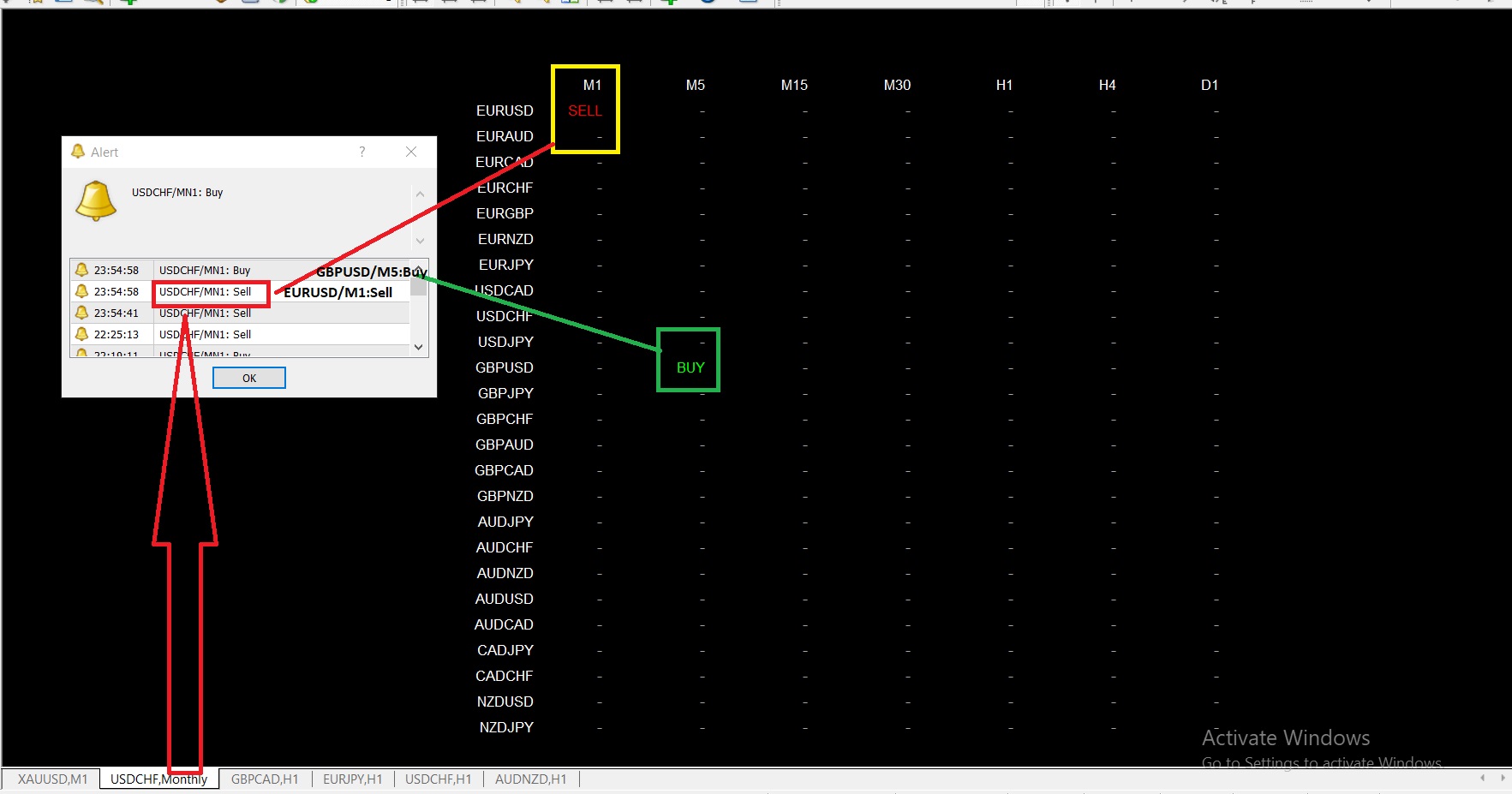
Consider this example Time 1 minute in the euro-dollar cross-in occurred, but the text was not written alarms euro-dollar
Re: Ichimoku Scanner
Apprentice · Thu Mar 19, 2020 6:33 am
Try this version.
Re: Ichimoku Scanner
zero999 · Thu Mar 19, 2020 8:32 am
Apprentice wrote:
The attachment Ichimoku Scanner.mq4 is no longer available
Try this version.
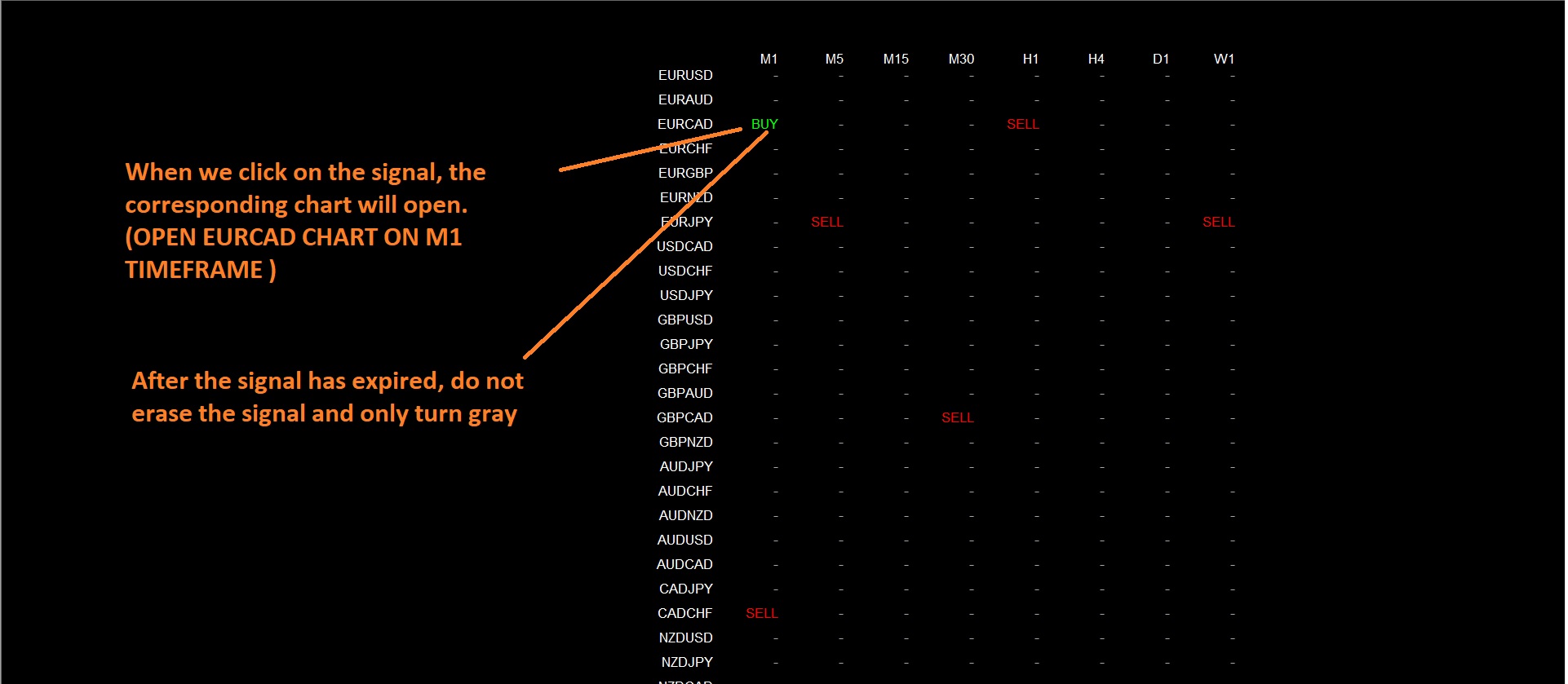
Thanks for the alarm You can also do the following changes? When we click on the signal, the corresponding chart will open After the signal has expired, do not erase the signal and only turn gray
Re: Ichimoku Scanner
Apprentice · Thu Mar 19, 2020 9:20 am
Your request is added to the development list. Development reference 905.
Re: Ichimoku Scanner
Apprentice · Mon Mar 23, 2020 6:07 am
Try this version.
Re: Ichimoku Scanner
zero999 · Mon Mar 23, 2020 9:53 am
Apprentice wrote:
The attachment Ichimoku Scanner.mq4 is no longer available
Try this version.
Thanks for correcting the indicator In fact, I want to open a new chart every time I click on the button After the timeout, the signal is cleared from the chart In fact, I want it to look like a scanner
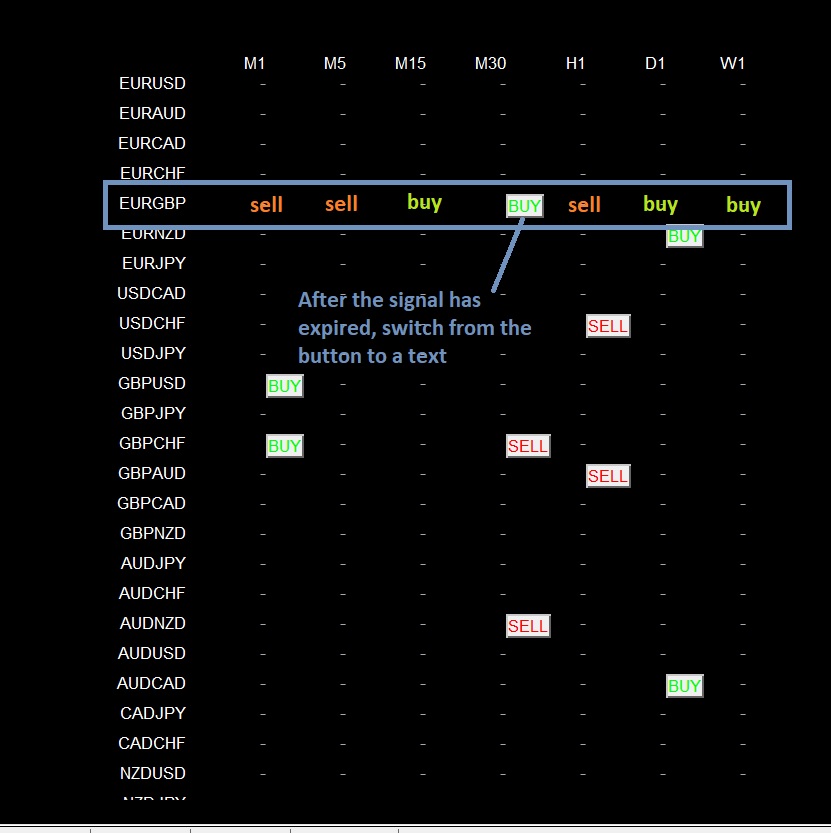
Thank you for your attention
Re: Ichimoku Scanner
Apprentice · Tue Mar 24, 2020 9:07 am
Your request is added to the development list. Development reference 935.
Re: Ichimoku Scanner
Apprentice · Thu Mar 26, 2020 7:16 am
Something like this?
Re: Ichimoku Scanner
zero999 · Thu Mar 26, 2020 10:17 am
Apprentice wrote:
The attachment Ichimoku Scanner.mq4 is no longer available
Something like this?
Look at this picture carefully
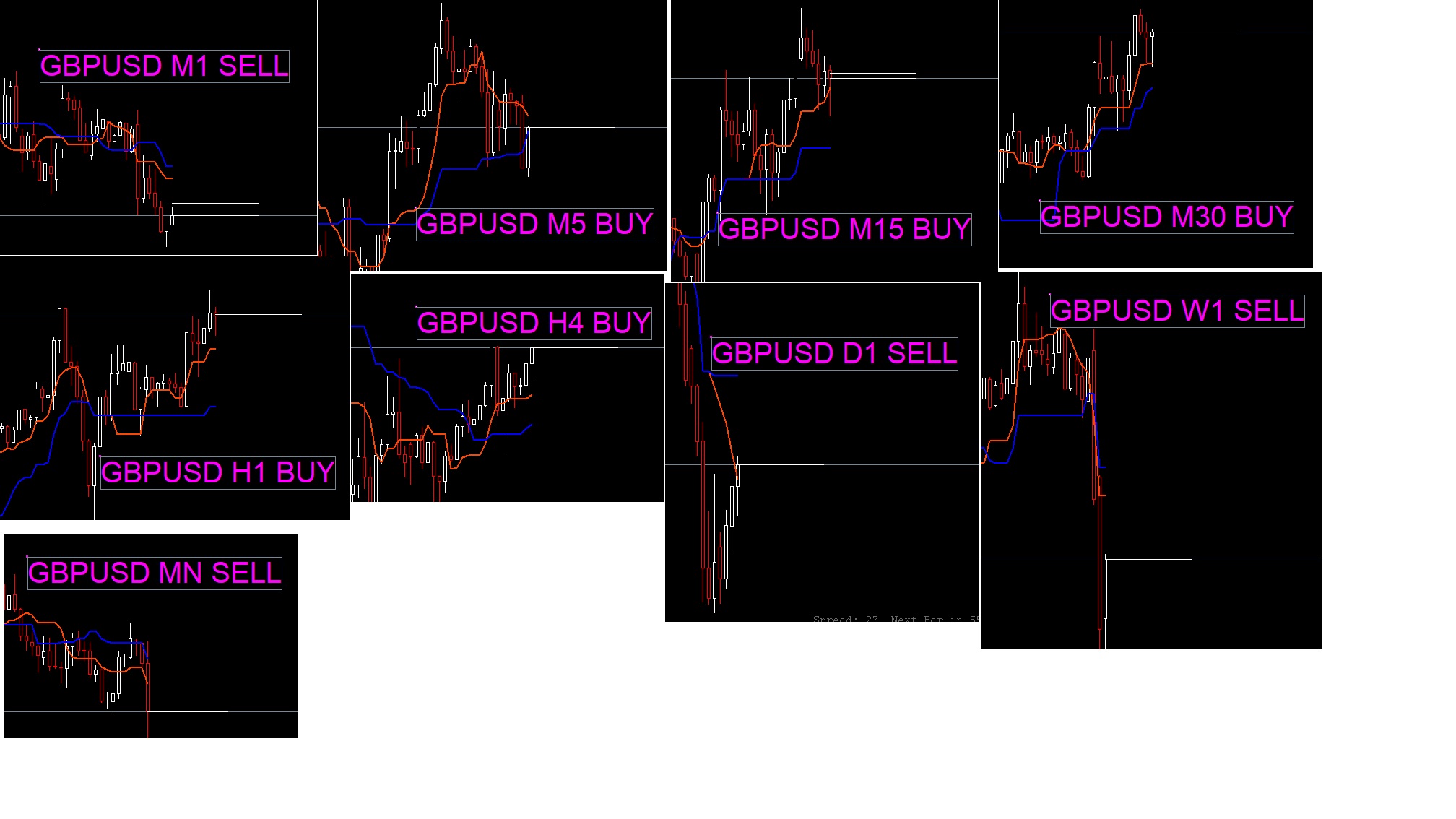
The indicator should check all the time frames of a currency pair when executed In the line corresponding to it, write the last cross it finds When a new cross occurs, give alarms and switch buttons When the signal has expired switch from button mode to remain as text The final image of the scanner should look like a GBPUSD row
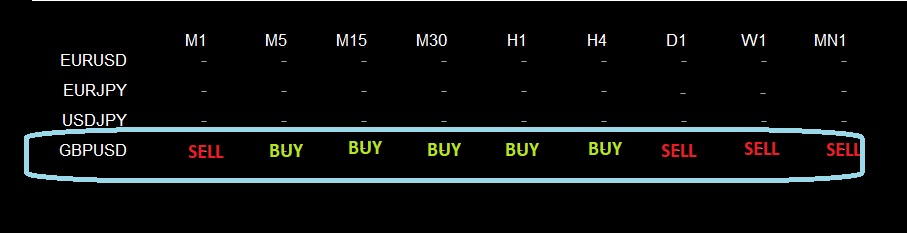
I’m sorry if I can’t explain clearly
Re: Ichimoku Scanner
Apprentice · Fri Mar 27, 2020 6:48 am
Your request is added to the development list. Development reference 955.
Re: Ichimoku Scanner
Apprentice · Mon Mar 30, 2020 7:32 am
Try this version.
Re: Ichimoku Scanner
zero999 · Mon Mar 30, 2020 4:24 pm
Thanks a lot My latest request to complete this scanner is to add the kumo cloud. To make my point better, I draw a schematic view in the Excel file Do exactly the same thing to draw the KUMO cloud direction (alarms. Button. Scan the latest KUMO) thanks again

Re: Ichimoku Scanner
Apprentice · Tue Mar 31, 2020 5:17 am
Your request is added to the development list. Development reference 972.
Re: Ichimoku Scanner
zero999 · Wed Apr 01, 2020 9:32 am
Please correct these bugs
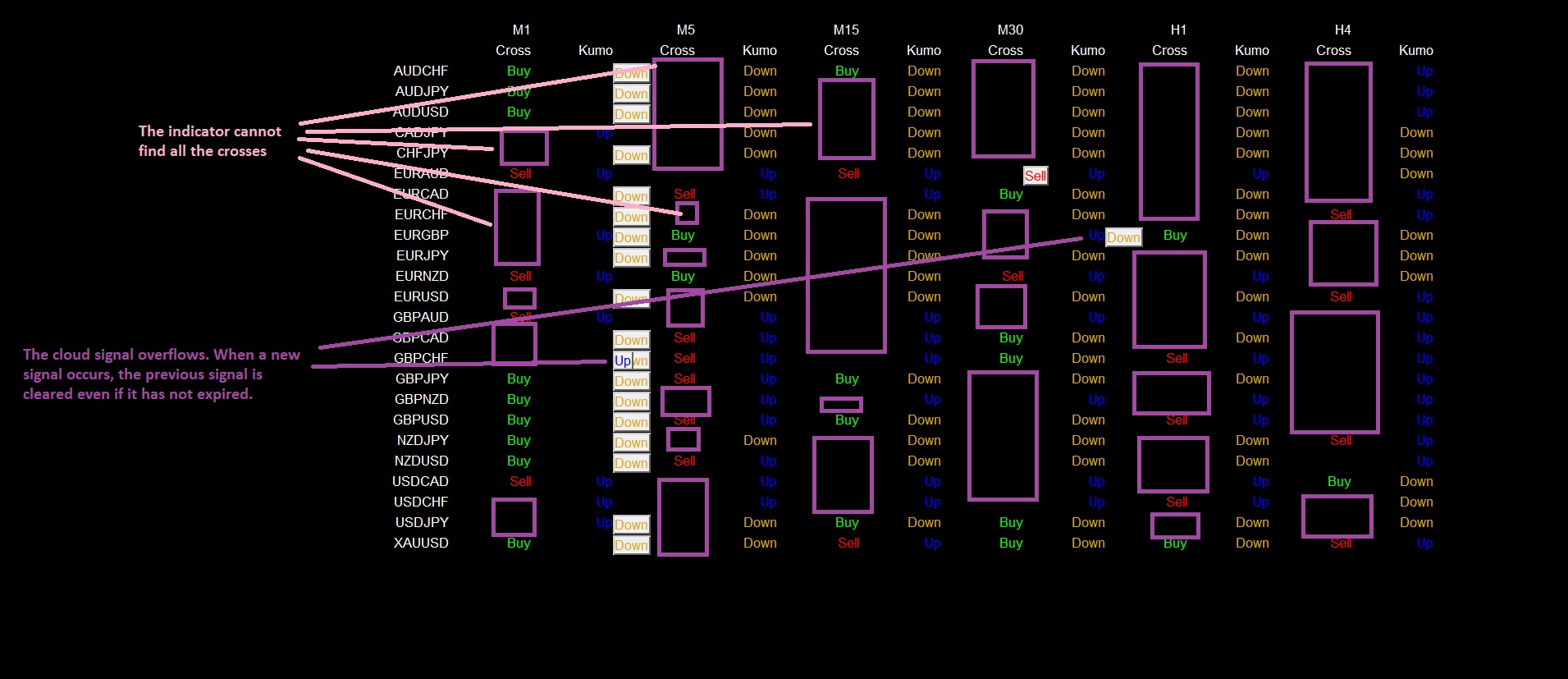
Re: Ichimoku Scanner
Apprentice · Thu Apr 02, 2020 5:09 am
Your request is added to the development list. Development reference 991.
Re: Ichimoku Scanner
Apprentice · Fri Apr 03, 2020 6:00 am
Try this version.
Re: Ichimoku Scanner
zero999 · Tue Apr 07, 2020 4:35 pm
Apprentice wrote:
Ichimoku Scanner.mq4
Try this version.
Thankful It’s very good Is it possible to add more features later?
Re: Ichimoku Scanner
Apprentice · Wed Apr 08, 2020 4:16 am
Sure.
Re: Ichimoku Scanner
zero999 · Thu May 21, 2020 10:28 am
Hello Can you write a scanner like this for offline charts? An offline chart created with the RENKO indicator
Re: Ichimoku Scanner
Apprentice · Fri May 22, 2020 6:42 am
Your request is added to the development list. Development reference 1330.
Re: Ichimoku Scanner
Jjoetong · Wed May 27, 2020 1:51 pm
Hi there,
Could you help me create an EA with the following parameters ?
Buy :
- Enter when candlestick crosses above Kijun-Sen, Exit when candlestick closes below kijun-sen.
- Enter when candlestick breaks above Kumo Cloud, Exit when candlestick closes below kumo cloud.
- Auto Trailing Stop Loss at 300 points.
Sell :
- Enter when candlestick crosses below Kijun-Sen, Exit when candlestick closes above kijun-sen.
- Enter when candlestick breaks below Kumo Cloud, Exit when candlestick exits above kumo cloud.
- Auto Trailing Stop Loss at 300 points.
Other Settings :
- Allow lot size setting.
- Allow alerts and pop up notifications.
- Allow buy and sell positions opened at the same time.
Thanks
Re: Ichimoku Scanner
Apprentice · Wed May 27, 2020 4:03 pm
Your request is added to the development list. Development reference 1381.
Re: Ichimoku Scanner
Apprentice · Thu Jun 11, 2020 6:01 am
Try this version. viewtopic.php?f=38&t=70001
Re: Ichimoku Scanner
zero999 · Thu Jun 25, 2020 11:44 am
Apprentice wrote:
Ichimoku Scanner.mq4
Try this version.
Hello Apprentice I need to add a few items to this scanner.
Item One: ROAD CROSS When the Tenkan and Kijun exactly overlap (The value of both is exactly the same.) Road Cross occurs Whenever Road Cross occurs, write the word RC in yellow in the Cross section.
Item Two: Advanced alarm I need a separate alarm for each part of the scanner 1 Cross alarm (Alarm text: symbole name / Time frame: sell or buy) 2 kumo switches (Alarm text: symbole name / Time frame: Kumo UP or Kumo DOWN) 3 Road cross (Alarm text: symbole name / Time frame: Road Cross)
Re: Ichimoku Scanner
Apprentice · Thu Jun 25, 2020 1:34 pm
Your request is added to the development list. Development reference 1559.
Re: Ichimoku Scanner
Apprentice · Fri Jun 26, 2020 3:54 am
Try this version.
Re: Ichimoku Scanner
zero999 · Fri Jun 26, 2020 1:48 pm
Apprentice wrote:
Ichimoku Scanner v1.5.mq4
Try this version.
Thanks a lot You and your team work great
Can you get a scanner for a non-default ichimoku indicator? This indicator uses the processing file and I do not have access to its mql4 file
Re: Ichimoku Scanner
Apprentice · Sun Jun 28, 2020 4:33 am
If you do not have code, can you provide non-default Ichimoku description or rules?
Re: Ichimoku Scanner
zero999 · Sun Jun 28, 2020 12:00 pm
Apprentice wrote: If you do not have code, can you provide non-default Ichimoku description or rules?
This indicator uses some filters that select specific crosses I don’t know the rules for filters I will send you the indicator in a personal message
Re: Ichimoku Scanner
Apprentice · Fri Jul 03, 2020 7:38 am
Task 1330
Re: Ichimoku Scanner
zero999 · Sat Jul 04, 2020 12:01 pm
Apprentice wrote: Task 1330
The attachment Renko Ichimoku Scanner.mq4 is no longer available
Hello dear Mario In Renko charts, time is practically eliminated and the chart is formed based on price. The scanner is shown to be incorrect. And it doesn’t match the Renko chart
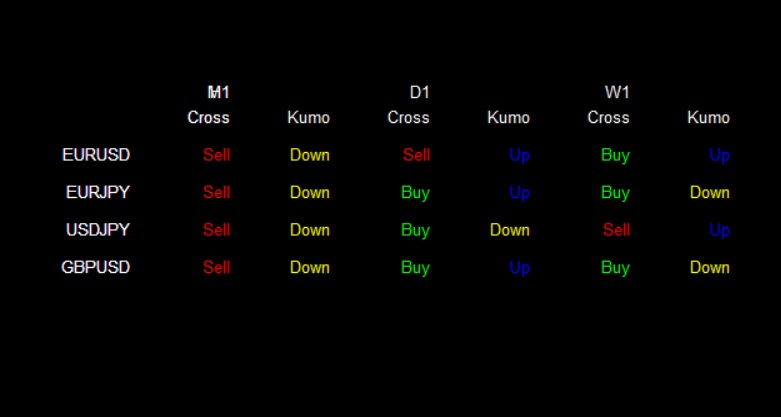
I use this indicator for the Renko chart
In fact, in this scanner, instead of a time frame, we have to use price steps
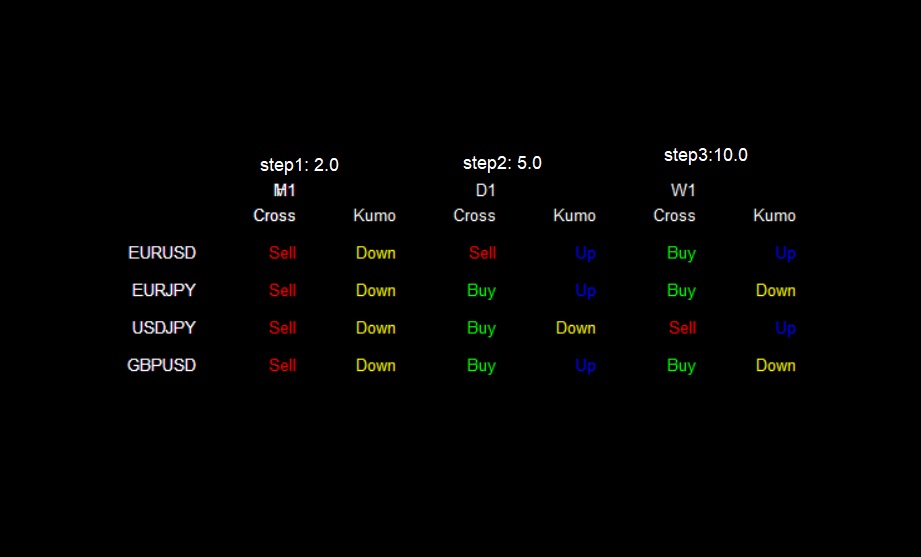
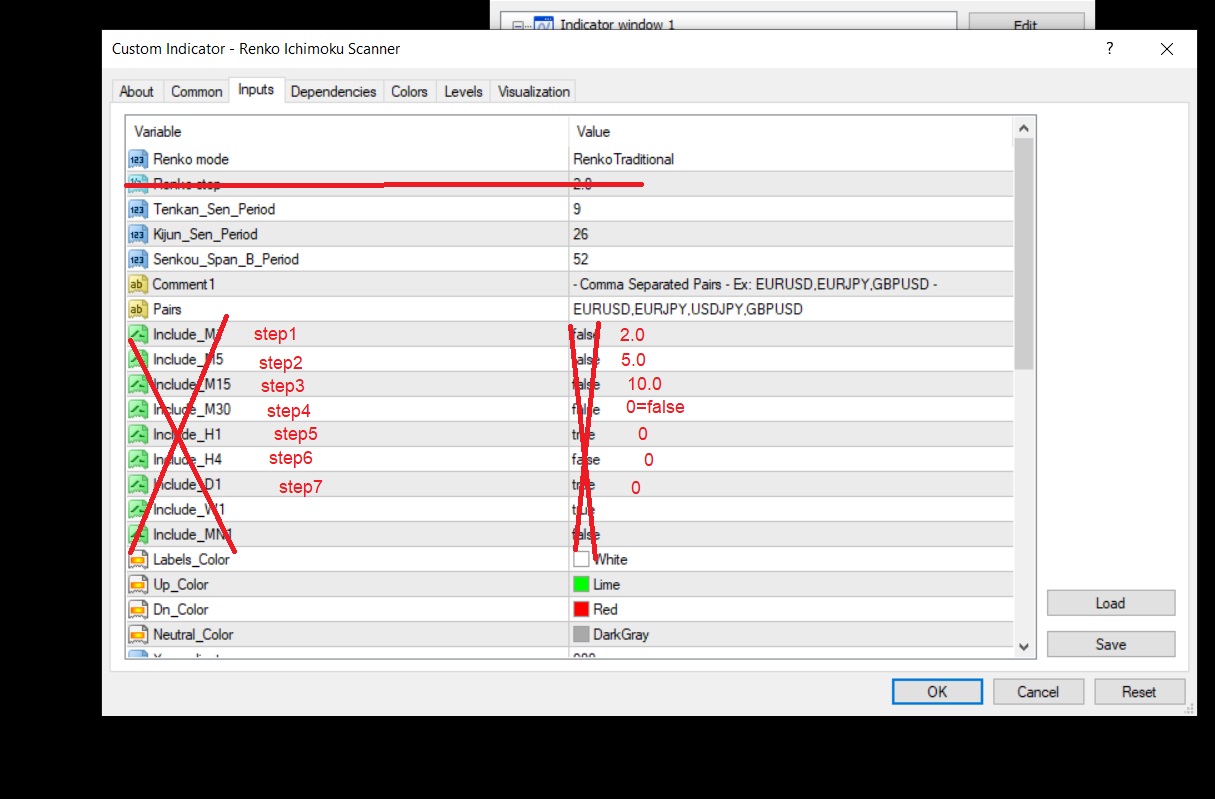
Re: Ichimoku Scanner
Frank8093 · Thu Apr 15, 2021 8:37 am
Hi Team how are you can you check this program. i think the program has problem in commands.
1- in Down or Up section in ICHIMOKU SCANNER :
IICHIMOKU Command : Period + 1 : means next candle Period : current candle
but according to the commands it means period +1 current candle and Period means next candle.
please revise it.
UpCondition(const string symbol, ENUM_TIMEFRAMES timeframe) :ACondition(symbol, timeframe) { }
virtual bool IsPass(const int period, const datetime date) { double TENKANSEN_0 = iIchimoku(_symbol, _timeframe, Tenkan_Sen_Period, Kijun_Sen_Period, Senkou_Span_B_Period, 1, period); double KIJUNSEN_0 = iIchimoku(_symbol, _timeframe, Tenkan_Sen_Period, Kijun_Sen_Period, Senkou_Span_B_Period, 2, period); double TENKANSEN_1 = iIchimoku(_symbol, _timeframe, Tenkan_Sen_Period, Kijun_Sen_Period, Senkou_Span_B_Period, 1, period + 1); double KIJUNSEN_1 = iIchimoku(_symbol, _timeframe, Tenkan_Sen_Period, Kijun_Sen_Period, Senkou_Span_B_Period, 2, period + 1);
return TENKANSEN_0 > KIJUNSEN_0 && TENKANSEN_1 <= KIJUNSEN_1;
DownCondition(const string symbol, ENUM_TIMEFRAMES timeframe) :ACondition(symbol, timeframe) { }
virtual bool IsPass(const int period, const datetime date) { double TENKANSEN_0 = iIchimoku(_symbol, _timeframe, Tenkan_Sen_Period, Kijun_Sen_Period, Senkou_Span_B_Period, 1, period); double KIJUNSEN_0 = iIchimoku(_symbol, _timeframe, Tenkan_Sen_Period, Kijun_Sen_Period, Senkou_Span_B_Period, 2, period); double TENKANSEN_1 = iIchimoku(_symbol, _timeframe, Tenkan_Sen_Period, Kijun_Sen_Period, Senkou_Span_B_Period, 1, period + 1); double KIJUNSEN_1 = iIchimoku(_symbol, _timeframe, Tenkan_Sen_Period, Kijun_Sen_Period, Senkou_Span_B_Period, 2, period + 1);
return TENKANSEN_0 < KIJUNSEN_0 && TENKANSEN_1 >= KIJUNSEN_1;
2- in Road Cross Condition : we want when in the specified time frame in iichimoku command occured. the alert has been showed. but when the timeframe in iichimoku specified the alert show all timeframe of symbols that the road cross occured.
3- please revise the alert show. because the alert show multi again alert for expired signal. for example the sell signal in eurusd occured now the alert show it now and also after 1 hour or before next signal show again sell on eurusd.
4- i want when in two time or 3 or 4 timeframe together occured RC (Road Cross). Tenkan and Kijun are same (overlap) in 2 or 3 or 4 timeframe. Tenkan = Kijun (M5) , Tenkan = Kijun (M15) , Tenkan = Kijun (M30) , Tenkan = Kijun (H1) Message alert show same as below : Symbol , Timeframe : M5 , M15 , M30 , H1 – Road Cross in Tenkan & Kijun
thanks
Re: Ichimoku Scanner
ben3131 · Mon Apr 17, 2023 11:07 am
Hello Apprentice,
Could you convert your indicator (page 2) of this forum in MT5 ? :
“Re: Ichimoku Scanner Postby Apprentice » Thu Mar 26, 2020 2:16 pm
Ichimoku Scanner.mq4 (26.41 KiB) Downloaded 350 times”
Thanks in advance, Ben
Re: Ichimoku Scanner
Apprentice · Wed Apr 19, 2023 5:34 am
We have added your request to the development list. Development reference 337.
Re: Ichimoku Scanner
Apprentice · Sun Apr 23, 2023 2:34 pm